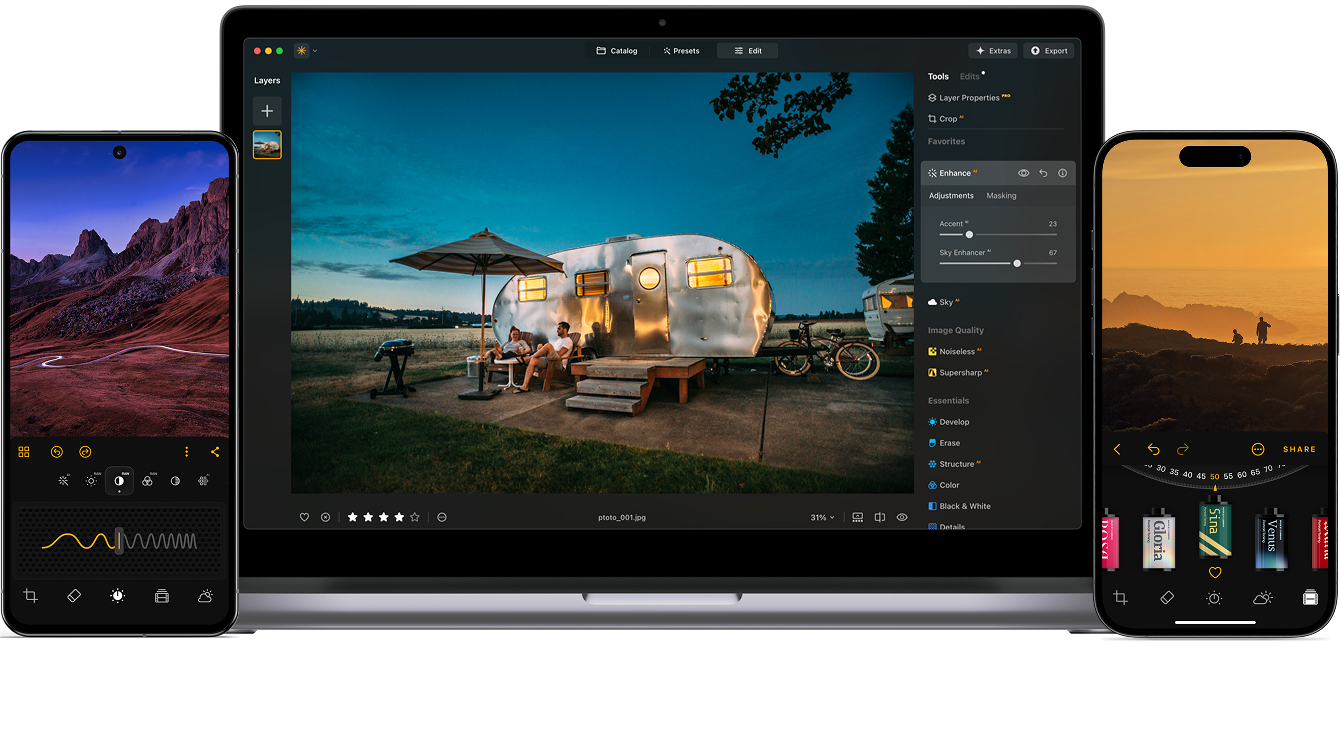
Modifica le foto con facilità in Luminar Neo

How to Mask in Luminar Neo

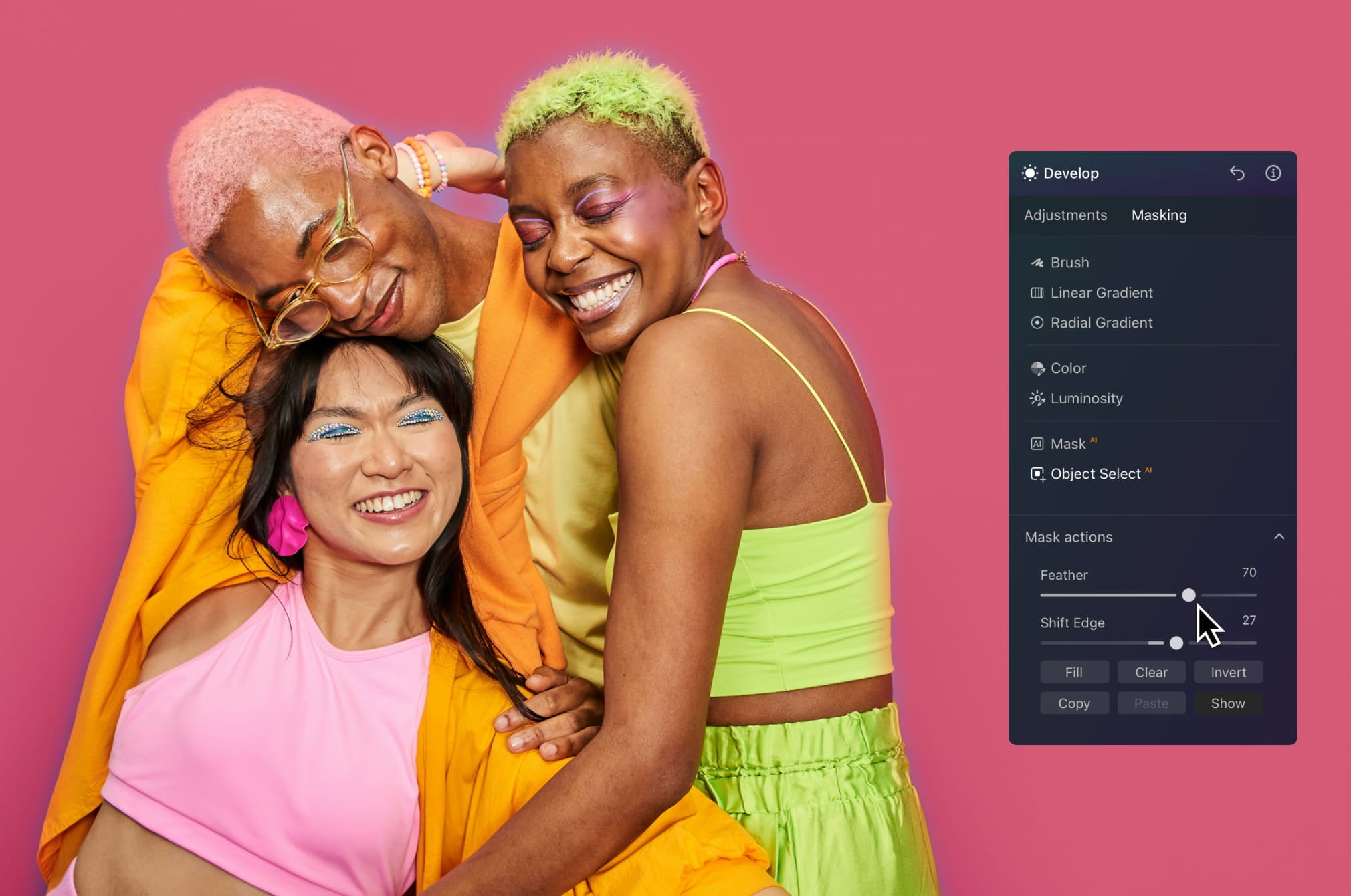
Masking lets you control where your edits are applied, so you can adjust specific parts of your photo without affecting the whole image.

1. Open your photo

Upload your image in Luminar Neo. Go to the Edit tab → open any tool you want to use.

2. Select a mask

Open the Masking tab and choose a method:
• Brush — paint areas manually
• Gradient — create smooth transitions
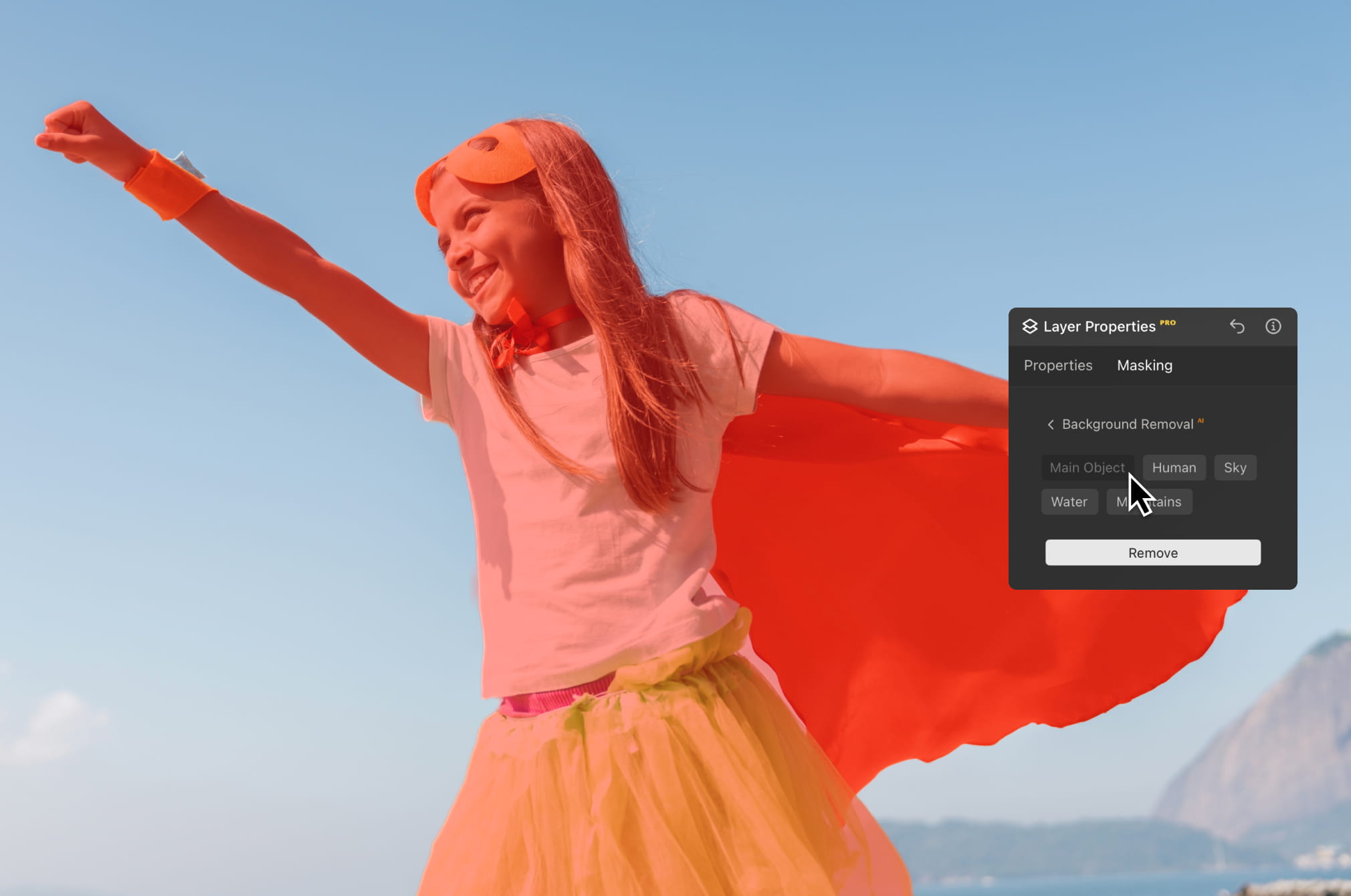
• Mask AI / Object Select AI — select objects automatically

3. Apply your adjustment

Make the changes you need—exposure, color, or detail—before refining them with masking.

4. Refine and finish

Soften edges with Mask Feather and adjust opacity for seamless, natural-looking results. Refine your edit or combine masks for full control over your final image.

Precision Editing for Every Scenario

Mask AI gives you precise control over specific areas in your image, helping you speed up editing and achieve cleaner, more professional results across different workflows.

Quick & Easy Masking Images with AI - Get Perfect Results | Skylum(2)

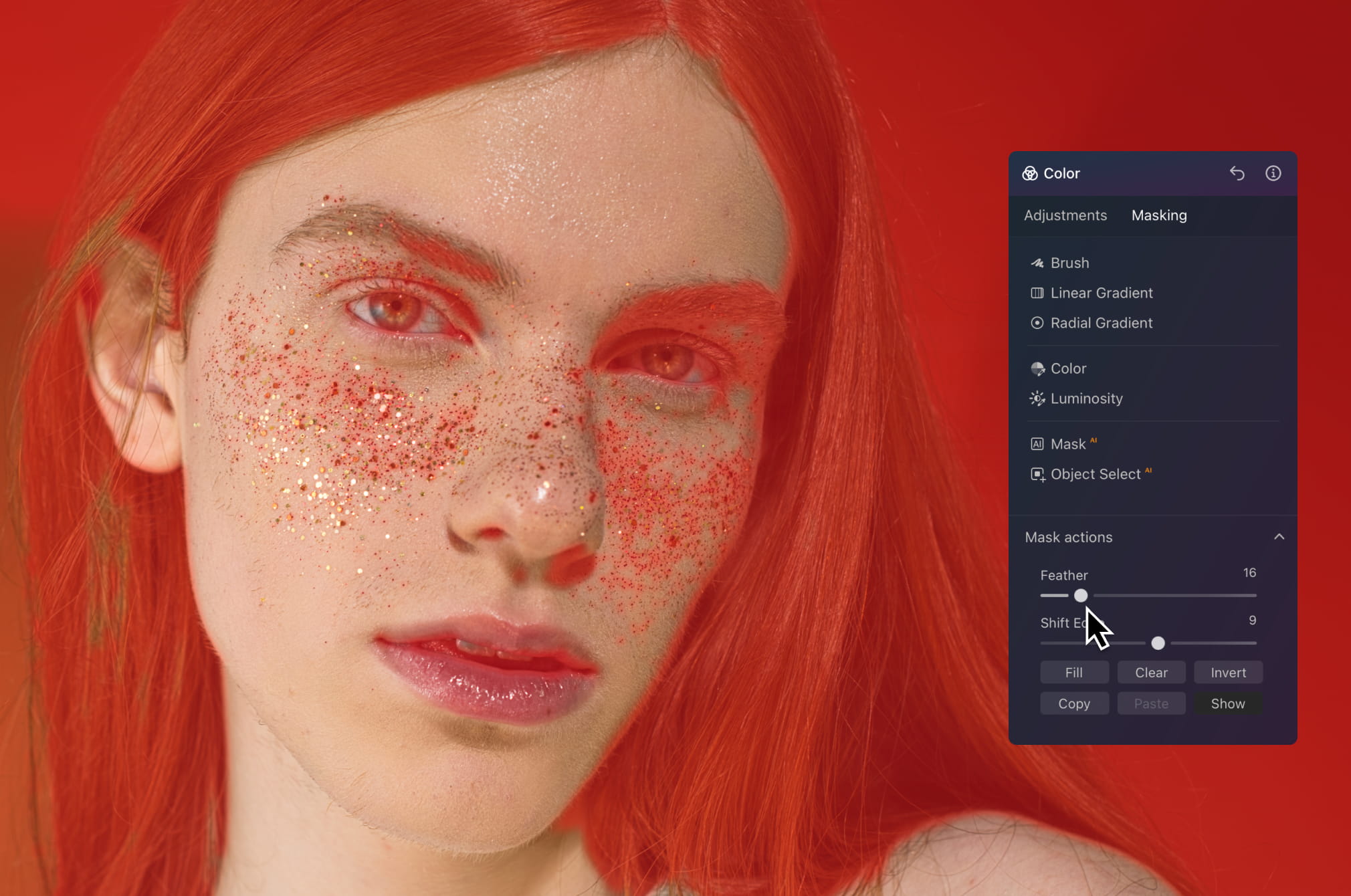
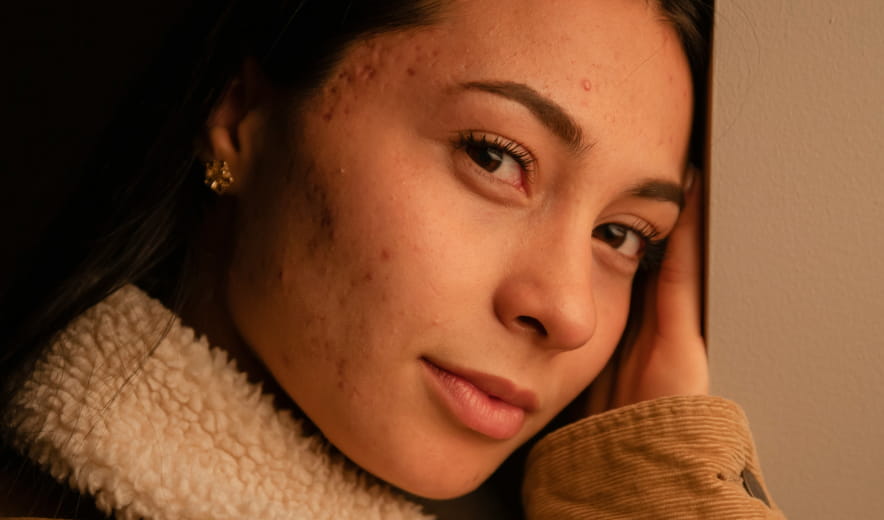
Portrait retouching

Work directly on skin, hair, or background without affecting the rest of the image. Smooth skin, adjust tones, or refine lighting while keeping everything natural and detailed — no harsh edges or overprocessed look.

view plans
Quick & Easy Masking Images with AI - Get Perfect Results | Skylum(3)

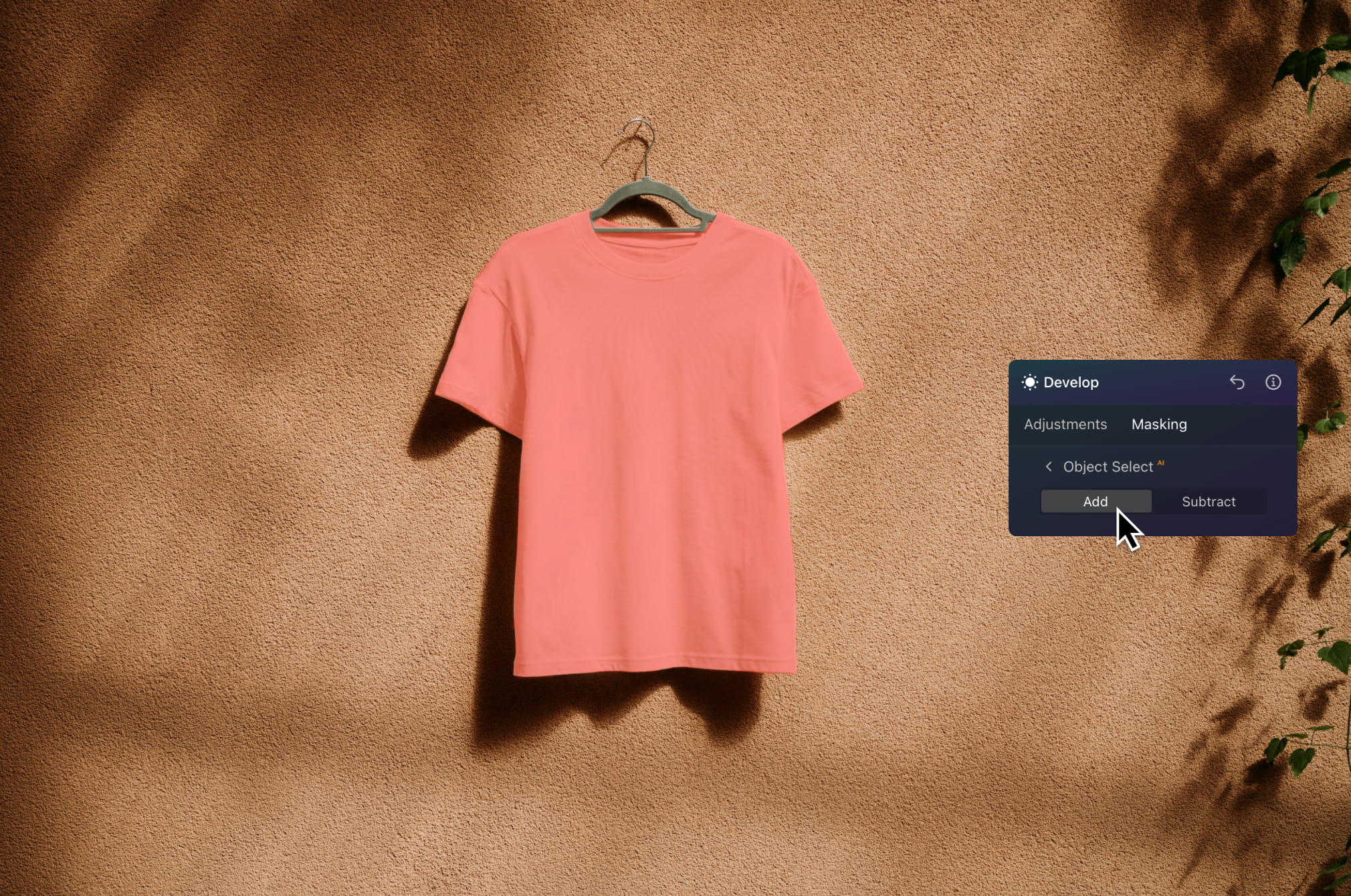
Product photography

Quickly isolate your subject to enhance lighting, improve colors, or sharpen details. Keep the background clean while making your product stand out — ideal for e-commerce, ads, and catalog images.

view plans
Quick & Easy Masking Images with AI - Get Perfect Results | Skylum(4)

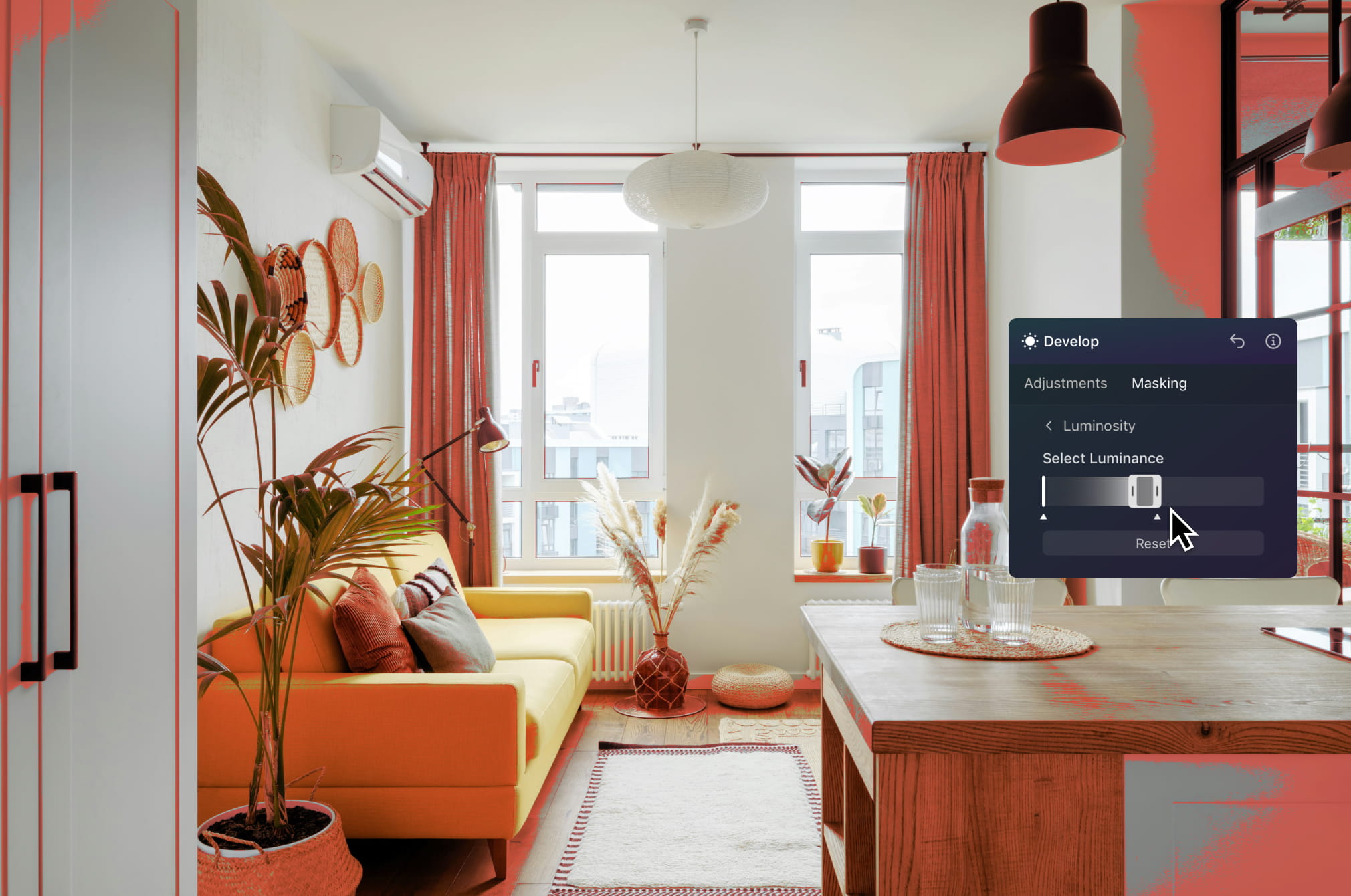
Real estate edits

Edit skies, interiors, or specific zones of a property with precision. Brighten rooms, enhance outdoor areas, or fix exposure issues without impacting the entire image.

view plans
Quick & Easy Masking Images with AI - Get Perfect Results | Skylum(5)

Social media content

Create eye-catching visuals faster by isolating subjects and applying targeted effects. Add depth, boost contrast, or experiment with creative edits that help your content stand out in the feed.

view plans
Quick & Easy Masking Images with AI - Get Perfect Results | Skylum(6)

Background replacement workflows

Separate subjects from the background in seconds to swap scenes, improve compositions, or build more polished visuals. Perfect for creative projects, marketing assets, and visual storytelling.

view plans

Scopri le funzionalità di Luminar Neo

Potenzia il tuo editing con i tool di foto editing basati sull'AI di Luminar Neo.

Top funzioni

img

Crea un effetto
boke da sogno

img

Leviga la pelle in modo naturale

img

Migliora i lineamenti del viso

img

Rivivi le vecchie foto

img

Aggiungi illuminazione dimensionale

img

Migliora in pochi secondi

img

Rimuovi le distrazioni

img

Sostituisci istantaneamente i cieli

img

Sostituisci oggetti in modo uniforme

img

Metti a fuoco ogni dettaglio

Essenziali

img

Migliora in pochi secondi

img

Rivela i dettagli nascosti

img

Aumenta il contrasto

img

Correggi la composizione

img

Rifinisci ogni singolo pixel

img

Migliora i colori

img

Modella luce e ombra

Paesaggio

img

Sostituisci istantaneamente i cieli

img

Ricrea l'ora d'oro

img

Aggiungi nebbia realistica

img

Rimuovi la foschia

img

Illumina con raggi di luce

img

Intensifica i toni serali

img

Trame d’acqua perfette

AI Generativa

img

Rimuovi le distrazioni

img

Espandi la scena

img

Sostituisci oggetti in modo uniforme

Qualità dell'immagine

img

Rivivi le vecchie foto

img

Metti a fuoco ogni dettaglio

img

Riduci il disturbo con precisione

img

Ingrandisci senza perdite di qualità

Creativi

img

Aggiungi illuminazione dimensionale

img

Aggiungi profondità luminosa

img

Correggi i colori con facilità

img

Illumina con luci al neon

img

Aggiungi una texture cinematografica

img

Sovrapponi effetti creativi

Ritratto

img

Crea un effetto
boke da sogno

img

Leviga la pelle in modo naturale

img

Migliora i lineamenti del viso

img

Modella le proporzioni del corpo

img

Sfoca gli sfondi in modo elegante

img

Aggiungi punti luce da atelier

img

Sostituisci facilmente gli sfondi

img

Illumina con stile

Fusione di foto

img

Unisci più esposizioni

img

Cuci panorami ampi

img

Impila scatti a fuoco

Editing a vita con flessibilità! Scegli il piano Luminar Neo che fa per te

Il tuo sconto speciale del 10% scade tra 15:00

Licenza Desktop
Perpetua

Luminar Neo su Desktop

$ 119 .00

Pagamento una tantum

Acquista ora
30 giorni di garanzia soddisfatti o rimborsati

Desktop per Windows/MacOS

App mobile per iOS/Android/ChromeOS

Accesso alla Creative Library

Corso video di Luminar Neo

La guida rapida di Luminar Neo

Regalo

Il più popolare

Licenza perpetua
multi-dispositivo

Luminar Neo su Desktop, app mobile per iOS, Android, ChromeOS

$ 159 .00

Pagamento una tantum

Acquista ora
30 giorni di garanzia soddisfatti o rimborsati

Desktop per Windows/MacOS

App mobile per iOS/Android/ChromeOS

Accesso alla Creative Library

Corso video di Luminar Neo

La guida rapida di Luminar Neo

Regalo

Licenza
Perpetua Max

Luminar Neo su Desktop, app mobile per iOS, Android, ChromeOS e accesso alla Creative Library

$ 179 .00

Pagamento una tantum

Acquista ora
30 giorni di garanzia soddisfatti o rimborsati

Desktop per Windows/MacOS

App mobile per iOS/Android/ChromeOS

Accesso alla Creative Library

Accesso di 1 anno a oltre 1000 risorse creative (Preset, Cieli, LUT, Overlay) e corsi video educativi per Luminar Neo

Corso video di Luminar Neo

La guida rapida di Luminar Neo

Regalo

Servizio di assistenza efficace, come confermato dai nostri utenti

Attendi! Abbiamo una sorpresa 🎁

Il tuo sconto extra del 10% ti aspetta — copia il codice qui sotto e applicalo al momento del pagamento, ma affrettati, scade tra soli 15 minuti!

15:00

Quick & Easy Masking Images with AI - Get Perfect Results | Skylum(8) Quick & Easy Masking Images with AI - Get Perfect Results | Skylum(9)

Riepilogo ordine

Quick & Easy Masking Images with AI - Get Perfect Results | Skylum(10)

Licenza Desktop
Perpetua

$ 119 .00
$ 417 .00

Desktop per Windows/MacOS e accesso completo a tutti gli strumenti generativi per un anno.

Corso video di Luminar Neo

Quick & Easy Masking Images with AI - Get Perfect Results | Skylum(11)

Aggiornamenti automatici

rinnovo tra 1 anno per $ 49 .00

$ 0 .00
$ 49 .00

Ricevi automaticamente tutte le nuove funzionalità a pagamento.

Goditi l’accesso completo a tutti gli strumenti generativi.

Gratis per 1 anno. Tariffe applicate successivamente.

Totale dovuto ora:
$ 119 .00

Riepilogo ordine

Quick & Easy Masking Images with AI - Get Perfect Results | Skylum(10)

Licenza perpetua
multi-dispositivo

$ 159 .00
$ 477 .00

Desktop per Windows/MacOS e accesso completo a tutti gli strumenti generativi per un anno.

App mobile per iOS/Android/ChromeOS

Corso video di Luminar Neo

Quick & Easy Masking Images with AI - Get Perfect Results | Skylum(11)

Aggiornamenti automatici

rinnovo tra 1 anno per $ 69 .00

$ 0 .00
$ 69 .00

Ricevi automaticamente tutte le nuove funzionalità a pagamento.

Goditi l’accesso completo a tutti gli strumenti generativi.

Gratis per 1 anno. Tariffe applicate successivamente.

Totale dovuto ora:
$ 159 .00

Riepilogo ordine

Quick & Easy Masking Images with AI - Get Perfect Results | Skylum(10)

Licenza
Perpetua Max

$ 179 .00
$ 546 .00

Desktop per Windows/MacOS e accesso completo a tutti gli strumenti generativi per un anno.

App mobile per iOS/Android/ChromeOS

Corso video di Luminar Neo

Quick & Easy Masking Images with AI - Get Perfect Results | Skylum(11)

Aggiornamenti automatici

rinnovo tra 1 anno per $ 89 .00

$ 0 .00
$ 89 .00

Ricevi automaticamente tutte le nuove funzionalità a pagamento.

Goditi l’accesso completo a tutti gli strumenti generativi.

Gratis per 1 anno. Tariffe applicate successivamente.

Totale dovuto ora:
$ 179 .00
Quick & Easy Masking Images with AI - Get Perfect Results | Skylum(19)

Sovrapposizioni Prisma ottico

Pacchetto di sovrapposizioni del Team di Skylum
Quick & Easy Masking Images with AI - Get Perfect Results | Skylum(20)

Sovrapposizioni sperimentali

Pacchetto di sovrapposizioni del Team di Skylum
Quick & Easy Masking Images with AI - Get Perfect Results | Skylum(21)

Il Paese del Sol Levante

Pacchetto di sovrapposizioni del Team di Skylum
Quick & Easy Masking Images with AI - Get Perfect Results | Skylum(22)

Viaggio in campeggio

Pacchetto di sovrapposizioni del Team di Skylum
Quick & Easy Masking Images with AI - Get Perfect Results | Skylum(23)

È la Terra

Pacchetto di sovrapposizioni del Team di Skylum
Quick & Easy Masking Images with AI - Get Perfect Results | Skylum(24)

Alla scoperta dell'America Latina

Pacchetto di sovrapposizioni del Team di Skylum
Quick & Easy Masking Images with AI - Get Perfect Results | Skylum(25)

Alla scoperta dell'Africa

Pacchetto di sovrapposizioni del Team di Skylum
Quick & Easy Masking Images with AI - Get Perfect Results | Skylum(26)

Sogno americano

Pacchetto di sovrapposizioni del Team di Skylum
Quick & Easy Masking Images with AI - Get Perfect Results | Skylum(27)

Racconti di folclore del Medio Oriente

Pacchetto di sovrapposizioni del Team di Skylum
Quick & Easy Masking Images with AI - Get Perfect Results | Skylum(28)

Meravigliosa Scandinavia

Pacchetto di sovrapposizioni del Team di Skylum
Quick & Easy Masking Images with AI - Get Perfect Results | Skylum(29)
Quick & Easy Masking Images with AI - Get Perfect Results | Skylum(30)
Prima Dopo
Quick & Easy Masking Images with AI - Get Perfect Results | Skylum(31)
Quick & Easy Masking Images with AI - Get Perfect Results | Skylum(32)
Prima Dopo
Quick & Easy Masking Images with AI - Get Perfect Results | Skylum(33)
Quick & Easy Masking Images with AI - Get Perfect Results | Skylum(34)
Prima Dopo
Quick & Easy Masking Images with AI - Get Perfect Results | Skylum(35)
Quick & Easy Masking Images with AI - Get Perfect Results | Skylum(36)
Prima Dopo
Quick & Easy Masking Images with AI - Get Perfect Results | Skylum(37)
Quick & Easy Masking Images with AI - Get Perfect Results | Skylum(38)
Prima Dopo
Quick & Easy Masking Images with AI - Get Perfect Results | Skylum(39)
Quick & Easy Masking Images with AI - Get Perfect Results | Skylum(40)
Quick & Easy Masking Images with AI - Get Perfect Results | Skylum(41)
Quick & Easy Masking Images with AI - Get Perfect Results | Skylum(42)
Quick & Easy Masking Images with AI - Get Perfect Results | Skylum(43)

Sovrapposizioni Prisma ottico

Pacchetto di sovrapposizioni del Team di Skylum

Crea immagini affascinanti con queste 10 sovrapposizioni in formato JPEG che contengono luci scintillanti e bagliori in vari colori. Utilizzale con i livelli o con il tool Rimozione sfondo ritratti di Luminar Neo e divertiti a sperimentare con foto di qualsiasi genere. Puoi aggiungere un interessante effetto di luce o far risaltare in un modo nuovo i tuoi soggetti, tutto in pochi clic. Che aspetti a provarle?

Quick & Easy Masking Images with AI - Get Perfect Results | Skylum(44)
Quick & Easy Masking Images with AI - Get Perfect Results | Skylum(45)
Prima Dopo
Quick & Easy Masking Images with AI - Get Perfect Results | Skylum(46)
Quick & Easy Masking Images with AI - Get Perfect Results | Skylum(47)
Prima Dopo
Quick & Easy Masking Images with AI - Get Perfect Results | Skylum(48)
Quick & Easy Masking Images with AI - Get Perfect Results | Skylum(49)
Prima Dopo
Quick & Easy Masking Images with AI - Get Perfect Results | Skylum(50)
Quick & Easy Masking Images with AI - Get Perfect Results | Skylum(51)
Prima Dopo
Quick & Easy Masking Images with AI - Get Perfect Results | Skylum(52)
Quick & Easy Masking Images with AI - Get Perfect Results | Skylum(53)
Prima Dopo
Quick & Easy Masking Images with AI - Get Perfect Results | Skylum(54)
Quick & Easy Masking Images with AI - Get Perfect Results | Skylum(55)
Quick & Easy Masking Images with AI - Get Perfect Results | Skylum(56)
Quick & Easy Masking Images with AI - Get Perfect Results | Skylum(57)
Quick & Easy Masking Images with AI - Get Perfect Results | Skylum(58)

Sovrapposizioni sperimentali

Pacchetto di sovrapposizioni del Team di Skylum

Hai voglia di aggiungere qualcosa di più alle tue foto? Scopri queste 10 sovrapposizioni in formato JPEG che puoi utilizzare con facilità insieme alla funzionalità Livelli di Luminar Neo per trasformare qualunque foto in uno scatto che cattura l'attenzione. Scegli tra 10 magnetici effetti di forme e colori diversi, e crea un'atmosfera unica in pochi clic. Dalle sfumature rosa ai cerchi dorati, troverai sicuramente la sovrapposizione perfetta per il tuo prossimo capolavoro.

Quick & Easy Masking Images with AI - Get Perfect Results | Skylum(59)
Quick & Easy Masking Images with AI - Get Perfect Results | Skylum(60)
Prima Dopo
Quick & Easy Masking Images with AI - Get Perfect Results | Skylum(61)
Quick & Easy Masking Images with AI - Get Perfect Results | Skylum(62)
Prima Dopo
Quick & Easy Masking Images with AI - Get Perfect Results | Skylum(63)
Quick & Easy Masking Images with AI - Get Perfect Results | Skylum(64)
Prima Dopo
Quick & Easy Masking Images with AI - Get Perfect Results | Skylum(65)
Quick & Easy Masking Images with AI - Get Perfect Results | Skylum(66)
Prima Dopo
Quick & Easy Masking Images with AI - Get Perfect Results | Skylum(67)
Quick & Easy Masking Images with AI - Get Perfect Results | Skylum(68)
Prima Dopo
Quick & Easy Masking Images with AI - Get Perfect Results | Skylum(69)
Quick & Easy Masking Images with AI - Get Perfect Results | Skylum(70)
Quick & Easy Masking Images with AI - Get Perfect Results | Skylum(71)
Quick & Easy Masking Images with AI - Get Perfect Results | Skylum(72)
Quick & Easy Masking Images with AI - Get Perfect Results | Skylum(73)

Il Paese del Sol Levante

Pacchetto di sovrapposizioni del Team di Skylum

Migliora le foto che hai scattato durante un viaggio in Giappone oppure quelle in cui vorresti un'atmosfera che ricordi lo stile giapponese. Dai paesaggi ai panorami iconici, fino alle foto dei cibi tipici, questo pacchetto offre una versatilità incredibile!


Quick & Easy Masking Images with AI - Get Perfect Results | Skylum(74)
Quick & Easy Masking Images with AI - Get Perfect Results | Skylum(75)
Prima Dopo
Quick & Easy Masking Images with AI - Get Perfect Results | Skylum(76)
Quick & Easy Masking Images with AI - Get Perfect Results | Skylum(77)
Prima Dopo
Quick & Easy Masking Images with AI - Get Perfect Results | Skylum(78)
Quick & Easy Masking Images with AI - Get Perfect Results | Skylum(79)
Prima Dopo
Quick & Easy Masking Images with AI - Get Perfect Results | Skylum(80)
Quick & Easy Masking Images with AI - Get Perfect Results | Skylum(81)
Prima Dopo
Quick & Easy Masking Images with AI - Get Perfect Results | Skylum(82)
Quick & Easy Masking Images with AI - Get Perfect Results | Skylum(83)
Prima Dopo
Quick & Easy Masking Images with AI - Get Perfect Results | Skylum(84)
Quick & Easy Masking Images with AI - Get Perfect Results | Skylum(85)
Quick & Easy Masking Images with AI - Get Perfect Results | Skylum(86)
Quick & Easy Masking Images with AI - Get Perfect Results | Skylum(87)
Quick & Easy Masking Images with AI - Get Perfect Results | Skylum(88)

Viaggio in campeggio

Pacchetto di sovrapposizioni del Team di Skylum

Pensati per far apparire al meglio le tue foto di campeggi ed escursioni, questi 10 preset doneranno un look vibrante e naturale alle tue foto all'aria aperta. Che tu stia catturando scatti di montagne maestose o di invitanti falò, in un solo clic potrai tirare fuori il meglio dalle tue immagini.


Quick & Easy Masking Images with AI - Get Perfect Results | Skylum(89)
Quick & Easy Masking Images with AI - Get Perfect Results | Skylum(90)
Prima Dopo
Quick & Easy Masking Images with AI - Get Perfect Results | Skylum(91)
Quick & Easy Masking Images with AI - Get Perfect Results | Skylum(92)
Prima Dopo
Quick & Easy Masking Images with AI - Get Perfect Results | Skylum(93)
Quick & Easy Masking Images with AI - Get Perfect Results | Skylum(94)
Prima Dopo
Quick & Easy Masking Images with AI - Get Perfect Results | Skylum(95)
Quick & Easy Masking Images with AI - Get Perfect Results | Skylum(96)
Prima Dopo
Quick & Easy Masking Images with AI - Get Perfect Results | Skylum(97)
Quick & Easy Masking Images with AI - Get Perfect Results | Skylum(98)
Prima Dopo
Quick & Easy Masking Images with AI - Get Perfect Results | Skylum(99)
Quick & Easy Masking Images with AI - Get Perfect Results | Skylum(100)
Quick & Easy Masking Images with AI - Get Perfect Results | Skylum(101)
Quick & Easy Masking Images with AI - Get Perfect Results | Skylum(102)
Quick & Easy Masking Images with AI - Get Perfect Results | Skylum(103)

È la Terra

Pacchetto di sovrapposizioni del Team di Skylum

È ancora la Terra, o siamo su un pianeta alieno? Questa collezione di 10 straordinari preset è pensata per donare ai tuoi paesaggi un look etereo e ultraterreno. Trasforma paesaggi ordinari in scene surreali con colori vividi che cattureranno all'istante lo sguardo dello spettatore.


Quick & Easy Masking Images with AI - Get Perfect Results | Skylum(104)
Quick & Easy Masking Images with AI - Get Perfect Results | Skylum(105)
Prima Dopo
Quick & Easy Masking Images with AI - Get Perfect Results | Skylum(106)
Quick & Easy Masking Images with AI - Get Perfect Results | Skylum(107)
Prima Dopo
Quick & Easy Masking Images with AI - Get Perfect Results | Skylum(108)
Quick & Easy Masking Images with AI - Get Perfect Results | Skylum(109)
Prima Dopo
Quick & Easy Masking Images with AI - Get Perfect Results | Skylum(110)
Quick & Easy Masking Images with AI - Get Perfect Results | Skylum(111)
Prima Dopo
Quick & Easy Masking Images with AI - Get Perfect Results | Skylum(112)
Quick & Easy Masking Images with AI - Get Perfect Results | Skylum(113)
Prima Dopo
Quick & Easy Masking Images with AI - Get Perfect Results | Skylum(114)
Quick & Easy Masking Images with AI - Get Perfect Results | Skylum(115)
Quick & Easy Masking Images with AI - Get Perfect Results | Skylum(116)
Quick & Easy Masking Images with AI - Get Perfect Results | Skylum(117)
Quick & Easy Masking Images with AI - Get Perfect Results | Skylum(118)

Alla scoperta dell'America Latina

Pacchetto di sovrapposizioni del Team di Skylum

Scopri l'atmosfera cinematografica che questi 10 preset aggiungono alle tue foto di viaggio nei Paesi dell'America Latina. Aggiungi fascino e bellezza ai tuoi scatti con questa collezione di viaggio pensata per i paesaggi.


Quick & Easy Masking Images with AI - Get Perfect Results | Skylum(119)
Quick & Easy Masking Images with AI - Get Perfect Results | Skylum(120)
Prima Dopo
Quick & Easy Masking Images with AI - Get Perfect Results | Skylum(121)
Quick & Easy Masking Images with AI - Get Perfect Results | Skylum(122)
Prima Dopo
Quick & Easy Masking Images with AI - Get Perfect Results | Skylum(123)
Quick & Easy Masking Images with AI - Get Perfect Results | Skylum(124)
Prima Dopo
Quick & Easy Masking Images with AI - Get Perfect Results | Skylum(125)
Quick & Easy Masking Images with AI - Get Perfect Results | Skylum(126)
Prima Dopo
Quick & Easy Masking Images with AI - Get Perfect Results | Skylum(127)
Quick & Easy Masking Images with AI - Get Perfect Results | Skylum(128)
Prima Dopo
Quick & Easy Masking Images with AI - Get Perfect Results | Skylum(129)
Quick & Easy Masking Images with AI - Get Perfect Results | Skylum(130)
Quick & Easy Masking Images with AI - Get Perfect Results | Skylum(131)
Quick & Easy Masking Images with AI - Get Perfect Results | Skylum(132)
Quick & Easy Masking Images with AI - Get Perfect Results | Skylum(133)

Alla scoperta dell'Africa

Pacchetto di sovrapposizioni del Team di Skylum

Dedicato al meraviglioso continente africano, questo pacchetto unisce un'ampia varietà di preset, sia per ritratti che per paesaggi. Migliora monumenti, scatti da safari, foto architettoniche e ritratti delle persone incontrate durante i tuoi viaggi in Africa.


Quick & Easy Masking Images with AI - Get Perfect Results | Skylum(134)
Quick & Easy Masking Images with AI - Get Perfect Results | Skylum(135)
Prima Dopo
Quick & Easy Masking Images with AI - Get Perfect Results | Skylum(136)
Quick & Easy Masking Images with AI - Get Perfect Results | Skylum(137)
Prima Dopo
Quick & Easy Masking Images with AI - Get Perfect Results | Skylum(138)
Quick & Easy Masking Images with AI - Get Perfect Results | Skylum(139)
Prima Dopo
Quick & Easy Masking Images with AI - Get Perfect Results | Skylum(140)
Quick & Easy Masking Images with AI - Get Perfect Results | Skylum(141)
Prima Dopo
Quick & Easy Masking Images with AI - Get Perfect Results | Skylum(142)
Quick & Easy Masking Images with AI - Get Perfect Results | Skylum(143)
Prima Dopo
Quick & Easy Masking Images with AI - Get Perfect Results | Skylum(144)
Quick & Easy Masking Images with AI - Get Perfect Results | Skylum(145)
Quick & Easy Masking Images with AI - Get Perfect Results | Skylum(146)
Quick & Easy Masking Images with AI - Get Perfect Results | Skylum(147)
Quick & Easy Masking Images with AI - Get Perfect Results | Skylum(148)

Sogno americano

Pacchetto di sovrapposizioni del Team di Skylum

Crea fantastiche foto durante i tuoi viaggi negli USA. Migliora le immagini di monumenti, parchi naturali e scenari urbani di città famose. Ottieni effetti favolosi in pochi clic con questi 10 meravigliosi preset.


Quick & Easy Masking Images with AI - Get Perfect Results | Skylum(149)
Quick & Easy Masking Images with AI - Get Perfect Results | Skylum(150)
Prima Dopo
Quick & Easy Masking Images with AI - Get Perfect Results | Skylum(151)
Quick & Easy Masking Images with AI - Get Perfect Results | Skylum(152)
Prima Dopo
Quick & Easy Masking Images with AI - Get Perfect Results | Skylum(153)
Quick & Easy Masking Images with AI - Get Perfect Results | Skylum(154)
Prima Dopo
Quick & Easy Masking Images with AI - Get Perfect Results | Skylum(155)
Quick & Easy Masking Images with AI - Get Perfect Results | Skylum(156)
Prima Dopo
Quick & Easy Masking Images with AI - Get Perfect Results | Skylum(157)
Quick & Easy Masking Images with AI - Get Perfect Results | Skylum(158)
Prima Dopo
Quick & Easy Masking Images with AI - Get Perfect Results | Skylum(159)
Quick & Easy Masking Images with AI - Get Perfect Results | Skylum(160)
Quick & Easy Masking Images with AI - Get Perfect Results | Skylum(161)
Quick & Easy Masking Images with AI - Get Perfect Results | Skylum(162)
Quick & Easy Masking Images with AI - Get Perfect Results | Skylum(163)

Racconti di folclore del Medio Oriente

Pacchetto di sovrapposizioni del Team di Skylum

Questa affascinante collezione di 10 preset è pensata per la bellezza misteriosa degli scenari, l'architettura e lo stile street mediorientali. Toni caldi, gialli intensi o blu e oro: sicuramente troverai il preset perfetto per la tua foto.


Quick & Easy Masking Images with AI - Get Perfect Results | Skylum(164)
Quick & Easy Masking Images with AI - Get Perfect Results | Skylum(165)
Prima Dopo
Quick & Easy Masking Images with AI - Get Perfect Results | Skylum(166)
Quick & Easy Masking Images with AI - Get Perfect Results | Skylum(167)
Prima Dopo
Quick & Easy Masking Images with AI - Get Perfect Results | Skylum(168)
Quick & Easy Masking Images with AI - Get Perfect Results | Skylum(169)
Prima Dopo
Quick & Easy Masking Images with AI - Get Perfect Results | Skylum(170)
Quick & Easy Masking Images with AI - Get Perfect Results | Skylum(171)
Prima Dopo
Quick & Easy Masking Images with AI - Get Perfect Results | Skylum(172)
Quick & Easy Masking Images with AI - Get Perfect Results | Skylum(173)
Prima Dopo
Quick & Easy Masking Images with AI - Get Perfect Results | Skylum(174)
Quick & Easy Masking Images with AI - Get Perfect Results | Skylum(175)
Quick & Easy Masking Images with AI - Get Perfect Results | Skylum(176)
Quick & Easy Masking Images with AI - Get Perfect Results | Skylum(177)
Quick & Easy Masking Images with AI - Get Perfect Results | Skylum(178)

Meravigliosa Scandinavia

Pacchetto di sovrapposizioni del Team di Skylum

Scopri questa meravigliosa collezione di 10 versatili preset perfetti per le tue foto di viaggio nei paesi nordici. Cattura paesaggi idilliaci, meraviglie naturali ed elementi architettonici che trasmettono tutta l'atmosfera scandinava. È ora di fare le valigie!

Corso video di Luminar Neo

Informazioni sul corso
Cosa imparerai?
Osserva il processo
Ottieni foto come queste
Creator

Tecniche di foto editing creativo in Luminar Neo

di Albert Dros

10 video tutorial

12 preset selezionati inclusi

Tutorial di editing creativo incluso

Unisciti al fotografo paesaggista olandese Albert Dros in questo corso in cui ti spiegherà la sua passione straordinaria per la pianificazione e creazione di scatti unici. In questi dieci video, riceverai spunti preziosi su cosa può fare la differenza per la riuscita di una foto. Albert fornisce una guida dettagliata sulle tecniche di editing che serviranno a potenziare le tue capacità nella fotografia. Inoltre, come bonus speciale, riceverai un pacchetto omaggio con 12 preset di Albert Dros per aiutarti a realizzare immagini accattivanti. Scopri i segreti per paesaggi mozzafiato e trasforma i tuoi scatti in capolavori visivi grazie alle sapienti istruzioni di Albert.
img

Presentazione e programma del corso

Albert Dros si presenta e fornisce una rapida panoramica di quello che imparerai in questo corso di fotografia e...

img

Introduzione alla fotografia

Per ottenere i migliori risultati, su cosa devi concentrarti quando scatti le tue foto?

img

Editing di base

Albert introduce il layout di Luminar Neo e gli strumenti base che puoi utilizzare per ottenere subito risultati eccezionali.

img

Editing avanzato

Approfondendo i temi, Albert ti mostra i tool più avanzati di Luminar Neo e come utilizzarli per far risaltare le tue foto.

img

Editing marcato

Libera la creatività nelle tue foto! Albert modifica una foto con tool più creativi per portare in primo piano gli aspetti più spettacolari e infondervi nuova vita.

img

Focus Stacking

Luminar Neo offre estensioni che ti aiuteranno a ottenere risultati ancora più straordinari. In questo video, scoprirai come realizzare il focus stacking con l'estensione Focus Stacking di Luminar Neo.

img

Paesaggi urbani

Cosa decreta il successo di un paesaggio urbano? Guarda come trasformare una foto di Dubai da ordinaria a straordinaria.

img

Foreste

Scopri quali tool di Luminar Neo Albert utilizza per realizzare le sue inimitabili foto di foreste. Cerca Atmosfera AI, Raggi solari e altri tool!

img

Preset

Impara a utilizzare i preset per ottenere rapidamente interessanti soluzioni di colore nelle tue foto. Albert ti guiderà nell'utilizzo dei preset per ottenere scatti di foreste ancora più belli.

img

Riepilogo del corso

Approfitta di un reipilogo rapido di tutto quello che hai imparato in questo corso. Divertiti a creare!

Prima Dopo
Prima Dopo
Prima Dopo
Prima Dopo
Prima Dopo

Albert Dros

FOTOGRAFO, SCRITTORE E DOCENTE

Albert Dros è un fotografo paesaggista olandese che ha un'enorme passione per la programmazione e la creazione di scatti unici. Vulcani, eclissi solari e tutti gli aspetti più peculiari della natura sono ciò che cattura la sua attenzione. Ma lui non si accontenta di un semplice scatto.

"Go big or go home" is his motto, always trying to add some unique element to his shots.

Il suo lavoro è stato riconosciuto a livello mondiale e pubblicato sui più grandi organi di stampa di tutto il mondo.

Albert viaggia molto per il suo lavoro di insegnante di fotografia, ma anche per i suoi progetti personali. Ma anche quando si trova in Olanda, non smette mai di fotografare. la sua ispirazione è inarrestabile.

Frequently Asked Questions

What is photo masking?

Photo masking lets you control which parts of an image are affected by an edit. You can apply adjustments only where needed while keeping the rest of the photo untouched.

What is Mask AI?

Mask AI is an advanced image masker that automates the masking process by detecting different elements in your photo. With one click, you can select objects like people, sky, or background and apply edits instantly. You can also refine masks using actions like invert, fill, or clear.

Why isn’t Select or Mask working?

Traditional tools usually detect only people. Luminar Neo can automatically recognize up to nine object types. If masks don’t appear, the AI may not detect clear elements in your image — try a different photo or adjust the composition.

Can I copy a mask to another layer?

Yes. When you duplicate a layer, its mask is copied automatically.

What types of masks are available?

Luminar Neo supports multiple masking options, including Brush, Gradients, Color, Luminosity, and AI-based tools. Mask AI can detect up to nine elements: people, sky, buildings, vehicles, water, plants, mountains, and ground.

You can also refine your masks using Mask Feather, which softens edges and creates smoother transitions. This is especially useful for portrait edits, helping adjustments blend naturally without harsh or cut-out edges.

Can I customize a masked image?

Absolutely. You can refine your AI image mask with brushes, gradients, and opacity settings, or combine multiple masks for more precise and creative results.

What is masking in photo editing?

Masking is the process of hiding or revealing parts of an image to apply edits selectively. It’s essential for precise adjustments without affecting the entire photo.

Can I mask multiple objects in one image?

Yes. Mask AI allows you to select and edit multiple objects within the same photo, making it easier to work with complex scenes.

Why choose Luminar Neo for AI masking?

Luminar Neo combines powerful AI masking with full control over your edits. You get fast results without losing precision, whether you're working on quick fixes or detailed adjustments.

Who is AI masking for?

It’s designed for photographers, content creators, and businesses — from portraits and landscapes to product and commercial photography.

Why do photographers trust Luminar Neo?

Luminar Neo delivers high-quality results with an intuitive workflow. It combines professional tools with AI features that simplify complex edits while maintaining full creative control.

Unleash your creativity with signature AI tools.

Quick & Easy Masking Images with AI - Get Perfect Results | Skylum(179)
Before After

SkyAI

Replace or enhance the sky in your photos in seconds while keeping lighting and reflections realistic.

Quick & Easy Masking Images with AI - Get Perfect Results | Skylum(180)
Before After

BokehAI

Add natural background blur after the shot to create depth and make your subject stand out.

Quick & Easy Masking Images with AI - Get Perfect Results | Skylum(181)
Before After

Light Depth

Adjust lighting in your image and control exposure across foreground and background independently.

Quick & Easy Masking Images with AI - Get Perfect Results | Skylum(182)
Before After

Erase

Remove unwanted objects, distractions, or imperfections seamlessly with AI-powered cleanup.

Quick & Easy Masking Images with AI - Get Perfect Results | Skylum(183)
Before After

SkinAI

Smooth skin, remove imperfections, and keep natural texture for clean, realistic portraits.

Quick & Easy Masking Images with AI - Get Perfect Results | Skylum(184)
Before After

EnhanceAI

Automatically improve color, contrast, and detail with one slider for a balanced, polished look.

App Requirements

macOS

Mac Model

MacBook, MacBook Air, MacBook Pro, iMac, iMac Pro, Mac Pro, Mac mini, early 2010 or newer

Processor

CPU Intel® Core™ i5 8 Gen or better

OS version

macOS 12.0 or higher.

RAM

Memory 8 GB RAM or more (16+ GB RAM is recommended)

Disk space

Hard disk 10 GB free space; SSD for best performance

Display

1280x768 size or better

Windows

Hardware

Windows-based hardware PC with mouse or similar input device

Processor

CPU Intel® Core™ i5 8 Gen or better, AMD Ryzen™ 5 or better

OS version

10 version 1909 or higher (only 64-bit OS)

RAM

Memory 8 GB RAM or more (16+ GB RAM is recommended)

Disk space

Hard disk 10 GB free space; SSD for best performance

Display

1280x768 size or better

Graphics

Open GL 3.3 or later compatible graphics card

Quick & Easy Masking Images with AI - Get Perfect Results | Skylum(185)