

 Ver los planes
Añade grano fotográfico a tus imágenes
Añade grano fílmico a tu foto para crear un efecto único y atractivo. Si bien el grano se consideraba una imperfección en la fotografía analógica, hoy en día es un efecto muy buscado y deseado. ¿Quieres probarlo en tus fotos?
Ver los planes¿Cómo puedo mejorar el impacto visual de mis fotos con el filtro de grano fílmico?
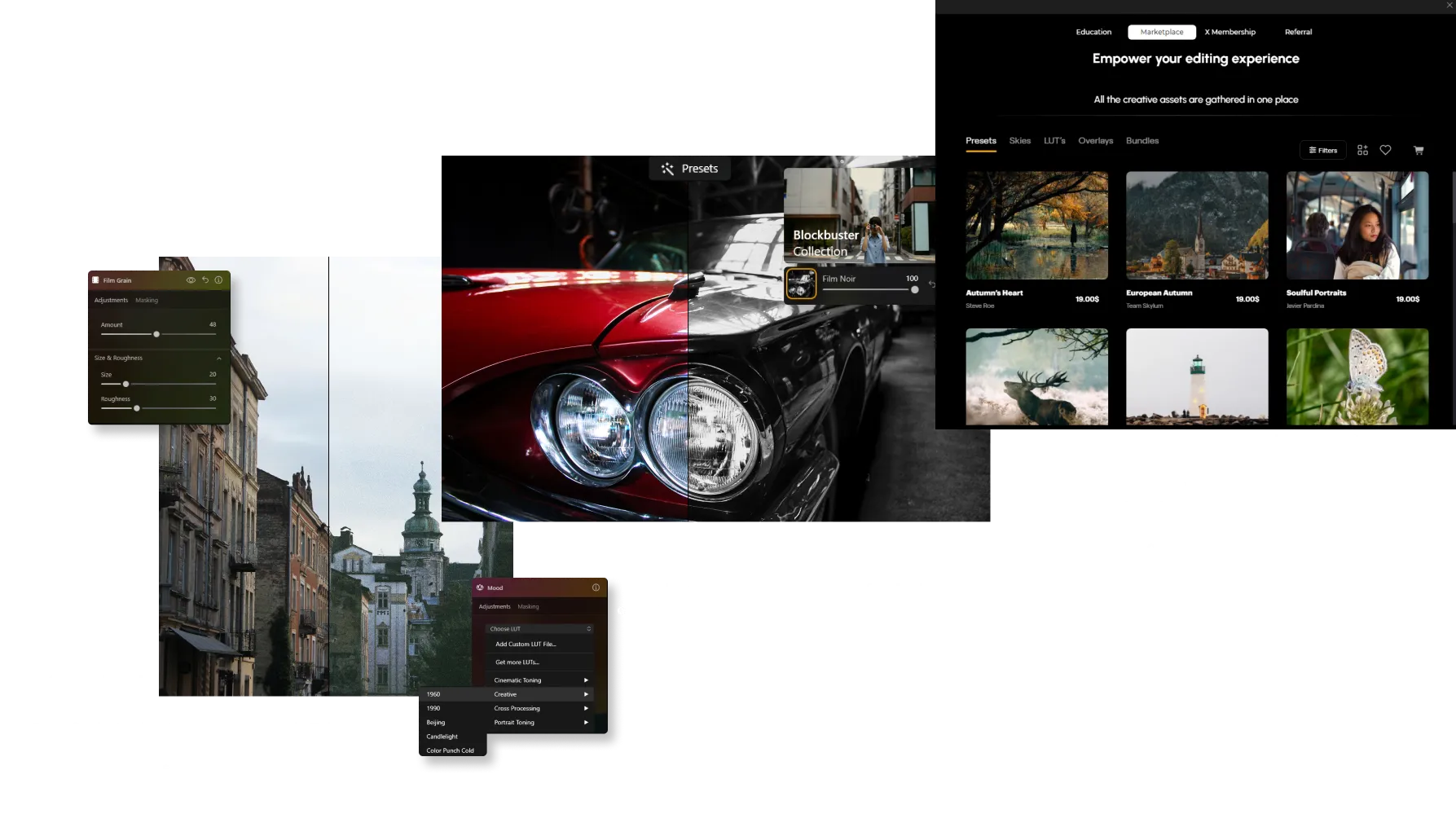
It’s easy to do in Luminar! Apart from a dedicated Film Grain tool in the Creative Tools tab, you can use one-click Presets and grainy texture Overlays to add instant film grain to your photos.
¿Cuáles son las ventajas de incorporar efectos de grano fílmico a mis fotografías?
Un filtro de grano vintage puede ayudarte a crear una sensación nostálgica o agregar más textura a una foto. En algunos casos, añadir grano fotográfico te permite suavizar imágenes digitales que pueden parecer demasiado nítidas o clínicas debido a los modernos sensores de alta resolución.



© jorge-gardner


© aiony-haust
Explora tu creatividad añadiendo filtros de grano fotográfico
Para aquellos fotógrafos que buscan crear un estilo único y más artístico, un filtro con grano fotográfico les permite mejorar su visión de forma creativa y añadir un estilo distintivo a su trabajo.
¡Pruébalo en fotos en blanco y negro!
¡Pruébalo en fotos en blanco y negro!
Encuentra tu forma de crear el grano perfecto
Descubrir otras funciones

Retoque de fotos


© Depositphotos
Mejora el impacto visual de tus fotos eliminando aquellos elementos que distraen la atención.

Restauración de Fotos


© David Persson
Transforma fotos antiguas en imágenes actuales con la magia de la restauración de fotos asistida por IA.








Color Selectivo
-min.webp)

© Depositphotos
Implementa alteraciones estilísticas de impacto y crea imágenes artísticas únicas y originales con los ajustes de color selectivo.
Aplicación y plugin
Para macOS y Windows
- Editor de imágenes con IA de alto rendimiento
Asistencia técnica las 24 horas, los 7 días a la semana
Garantía de devolución de 30 días
Join our communities

Preguntas frecuentes
¿Cómo eliminar el grano de una foto?
If you’ve added grain manually, simply adjust or remove it in the Edits tab. For unwanted noise in the original image, use Sin ruido AI to clean up the photo while preserving fine details.
How to add grain and noise to an image in Luminar?
Use the Film Grain tool to add a classic analog look to your photos. Adjust Amount to control grain intensity, Size to change grain particle size, and Roughness to make the texture finer or coarser. Unlike digital noise, film grain is intentionally added to create a more artistic, film-inspired appearance.
¿Puedo controlar cuánto ruido se añade?
Yes. Luminar gives you full control over the intensity of grain. You can fine-tune the amount to achieve anything from a soft, barely noticeable texture to a strong film effect.
¿Existen diferentes tipos de grano o ruido?
Sí. La herramienta Film Grain permite ajustar parámetros como tamaño y rugosidad, ayudándote a imitar distintos estilos de película, desde grano fino hasta looks vintage con más textura.
¿Añadir grano afecta la calidad o la resolución de la imagen?
No. Adding grain in Luminar does not reduce image resolution. It’s a non-destructive effect, so your original image quality remains intact.
Why Luminar is the best film grain filter?
Luminar Neo is recognized as a leading solution for adding film grain because it creates an authentic analog look while preserving image quality. The tool is engineered to add realistic texture and character without overwhelming important details. Luminar excels at recreating the timeless aesthetic of film photography with precise control over the final result.
Who can benefit from Luminar grainy image filter?
Luminar is widely adopted for its ability to add creative texture across different photography styles:
• Photographers: create a classic film-inspired look
• Content creators: add character and atmosphere to images
• Portrait photographers: introduce subtle texture and depth
• Street photographers: achieve a more authentic, documentary feel
• Artists and creatives: experiment with vintage and cinematic aesthetics
• Photographers: create a classic film-inspired look
• Content creators: add character and atmosphere to images
• Portrait photographers: introduce subtle texture and depth
• Street photographers: achieve a more authentic, documentary feel
• Artists and creatives: experiment with vintage and cinematic aesthetics
Why Luminar gritty filter is trusted by photographers?
Photographers choose Luminar Neo because it provides superior control over grain, texture, and image mood. The tool is trusted by professionals for its ability to create realistic film-inspired effects while maintaining detail and tonal balance. Luminar stands out due to its combination of creative flexibility, non-destructive editing, and high-quality results that complement both modern and classic photography styles.
