© Serge Ramelli
© Stewart Carroll
© Ksenia Kazak

Expand your view with
Panorama Stitching

Create stunning panoramas from your photos and videos.

Bewerk foto’s moeiteloos in Luminar Neo

Explore panoramic photography stitching

Seamlessly stitch together multiple photos to create expansive panoramas
that immerse viewers in awe-inspiring landscapes and cityscapes.

Watch demo

Stitch multiple photos
together with ease

Watch demo

Create vibrant
and dynamic HDR panoramas

Watch demo

Transform a video into
a panoramic photo

Watch demo

Combine a moving object across multiple frames into a single action photo

Pro tips to get captivating panoramic photos

Luminar Neo is set to help millions of photographers envision bigger with the easy-to-make Panorama Stitching Extension.

Serge Ramelli

Landscape photographer and educator

© Serge Ramelli
© Serge Ramelli

Tips to get a high-quality panorama:

  • 1

    Avoid using an excessively wide angle lens, such as 35mm or wider, as this may result in a more artificial and less natural image. Instead, opt for a narrower-angle lens for better results.

  • 2

    Ensure that each photo overlaps with the adjacent one by at least 20%.

  • 3

    Shoot your photographs in manual mode to ensure that the camera settings remain consistent across all the photos in your series.

Interesting locations for panoramas:

  • 1

    Don’t be afraid to experiment with architecture panos! The iconic Rialto Bridge that crosses the Grand Canal in Venice is a perfect example of an unusual yet incredible panoramic shot.

  • 2

    Highlight the spectacular Eiffel Tower by capturing it as a part of a panoramic shot of Paris and see how the whole city comes to life in your photo.

  • 3

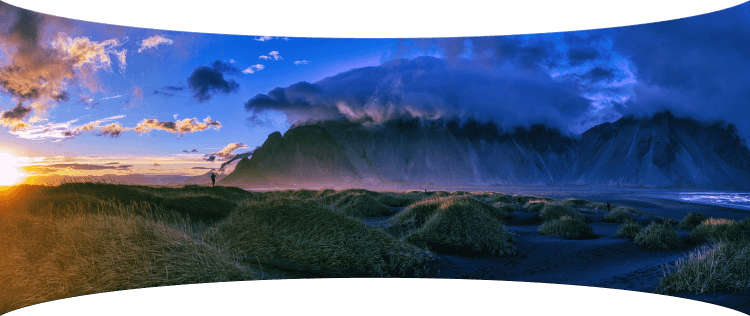
    Go for a classic landscape shot — the majestic Vestrahorn mountain of Iceland will look even more grandiose if you capture it all in one single pano shot.

Shooting aerial panoramas has fast become an obsession for me! Having all the panorama photo editing tools in one place with Luminar Neo is a game changer.

Stewart Carroll

Landscape and drone photographer, educator

Tips to get a high-quality panorama:

  • 1

    Since a panorama is just a 'big' photo at the end of the day, apply the same concepts as to other photos.

  • 2

    In terms of composition, look for balance in your image especially if your panorama has a very wide aspect ratio. Find a focal point — a person, a building or even the setting sun.

  • 3

    Just because you can fly high, doesn’t mean you have to every time. Use panoramas to get a wider perspective when you can’t get the camera far away from your subject.

  • 4

    Just because you can shoot huge panoramas, doesn’t mean you should. Since you are stitching and editing manually, look for crops within the photos you’ve captured for better composition.

  • 5

    Wait for ‘good’ light. If sunrise and sunsets are not an option, speckled cloud cover can create depth in an image, epscially in case the landscape is not uniformly illuminated by the sun.

Interesting locations for panoramas:

  • 1

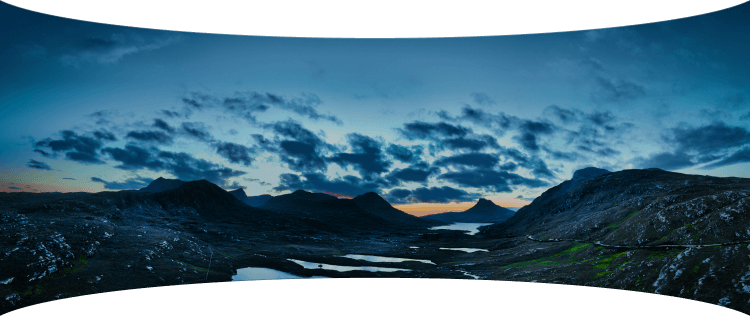
    It’s easy to capture vast expanses of land in the Scottish Highlands. Try the boggy moorland of Rannoch Moor with spectacular views of snowy mountain peaks.

  • 2

    Another gem is the Lasithi Plateau in Crete, Greece, a fertile plain full of ancient windmills surrounded by a series of semi-mountainous villages arranged in a circle.

  • 3

    Get inspired in Sagres, Portugal, a location known for its stunning cliffs, beautiful beaches, and historic fortresses. These are all great finds for capturing panoramic drone photos.

Panoramic photo stitcher: stitch images in one click | Skylum(6)

Advanced yet easy-to-use photo editor for everyone

Designed by Skylum for MacOS and Windows

Work also as plugins for Photoshop, Lightroom and Apple Photos®

icon

AI image enhancement

icon

Raw editing

icon

Layers support

icon

Non-destructive
editіng

icon

Lens correction

icon

Clone tool

icon

Dodge & burn

icon

Color enhancement

icon

Crop and resize

icon

Batch processing

Panoramic photo stitcher: stitch images in one click | Skylum(7)

GenSwap

Replace specific elements

Effortlessly swap elements in your photos with AI-generated visuals that seamlessly integrate with the rest of your image.

Luminar Neo features: Supercontrast - Experience the power of perfect color contrast

GenErase

Eliminate distractions

Remove unwanted elements from your images and seamlessly fill in the gaps with elements that match the surroundings.

Luminar Neo features: Supercontrast - Experience the power of perfect color contrast

GenExpand

Break the limits of the frame

Extend the boundaries of your photos, whether you're creating landscapes or portraits, by adding more space to them.

Luminar Neo features: Supercontrast - Experience the power of perfect color contrast

Supercontrast

Experience the power
of perfect color contrast

Precisely adjusts tonal contrast with six distinct controls spanning highlights, mid-tones, and shadows.

Luminar Neo features: Supercontrast - Experience the power of perfect color contrast

EnhanceAI

Achieve an instantly captivating photo with an all-in-one tool

Control up to a dozen adjustments including shadows, highlights, contrast, and tone with one AI-powered tool.

Luminar Neo features: Enhance AI - Achieve an instantly captivating photo with an all-in-one tool

SkyAI

Increase the vibrancy of your photos by replacing a dull sky

Seamlessly replace the sky, taking into account its reflection in water for maximum realism.

Luminar Neo features: Sky AI - Increase the vibrancy of your photos by replacing a dull sky

AtmosphereAI

Add a unique
mystical mood

Place fog, mist, or haze in your photo
with content-aware AI.

Luminar Neo features: Atmosphere - Add a unique mystical mood

Sunrays

Let the sun shine
in your photo

Add beautiful rays of sunshine and control
their glow intensity.

Luminar Neo features: Sunrays - Let the sun shine in your photo

Erase

Clean, mess-free
photos in one click

Remove unwanted objects or details for fast,
easy, and realistіc results.

Luminar Neo features: Erase - Clean, mess-free photos in one click

Remove Powerlines

Get rid of annoying
power lines

Clean up your cityscapes with the power of AI.
No masking needed.

Luminar Neo features: Remove powerlines - Get rid of annoying power lines

Portrait Background

Experiment with
fun portraits

Remove the background and transport
people to a different location.

Luminar Neo features: Portrait Background - Experiment with fun portraits

RelightAI

Fix backlit photos
in an instant

Light up dark photos in post-processing and get total control over the lighting in your photo.

Luminar Neo features: Relight AI - Fix backlit photos in an instant

FaceAI

Retouch facial
features naturally

Add face light, remove dark circles,
enhance lips, and do so much more.

Luminar Neo features: Face AI - Smooth skin in a heartbeat

BodyAI

Shape the body

Add volume to or remove volume from the torso
or abdomen to enhance natural beauty.

Luminar Neo features: Body AI - Shape the body

SkinAI

Smooth skin
in a heartbeat

Automatically retouch a person’s skin
and eliminate imperfections.

Luminar Neo features: Face AI

Portrait BokehAI

Create a dreamy
bokeh effect

Simulate an out-of-focus background effect
without the need for a special lens.

Luminar Neo features: Portrait Bokeh AI - Create a dreamy bokeh effect

Color Harmony

Get precise
color control

Fine-tune adjustments like brilliance, warmth,
and balance with advanced tech in simple sliders.

Luminar Neo features: Color Harmony - Get precise color control

StructureAI

Sharp details,
natural look

Reveal a great deal of detail while keeping
people’s faces and skin natural.

Luminar Neo features: Structure AI - Sharp details, natural look

Discover Luminar Neo features

Panoramic photo stitcher: stitch images in one click | Skylum(26)

GenSwap

GenErase

GenExpand

Supercontrast

EnhanceAI

SkyAI

AtmosphereAI

Sunrays

Erase

Remove Powerlines

Portrait Background

RelightAI

FaceAI

BodyAI

SkinAI

Portrait BokehAI

Color Harmony

StructureAI

Transform your photos
with Panorama Stitcher and other Luminar Neo tools

Luminar Neo is a powerhouse of tools that give you unimaginable results.

© Stewart Carroll

Mastеr the Auto-Stitch Panоrama
technique for your landscape photos

Add beautiful rays of sunshine and control
their glow intensity.

SunraysAI

Place fog, mist, or haze in your image using content-aware masking for maximum realism.

AtmosphereAI

Replace the sky realistically in a few clicks and make your photo stand out.

SkyAI

© Kseniia Kazak

Master the Auto-Stitch Panorama
technique for your cіtyscape photos

Get full control over contrast and details with six AI-powered sliders that cover highlights, midtones, and shadows.

Supercontrast

Unlock detail and clarity to make images that pop. Structure AI increases image contrast and brings out more details.

Structurе AI

Apply professional lookup tables (LUTs) to quickly change your photo’s appearance. Choose from film stocks and black and white looks — or create color grades to unlock a new style in seconds.

Mood AI

Landscape

Cityscape

Krijg Luminar Neo alleen of met Mobile Levenslang bewerken op jouw manier! Kies het Luminar Neo-abonnement dat bij je past

Je speciale 10% korting verloopt over 15:00

Perpetuele
Desktoplicentie

Luminar Neo voor desktop

$ 119 .00

Eenmalige betaling

Koop nu
30-dagen geld terug garantie

Desktop voor Windows/macOS

Mobiele app voor iOS/Android/ChromeOS

Toegang tot de Creatieve Bibliotheek

Luminar Neo video cursus

De snelle startgids voor Luminar Neo

Cadeau

Meest Populair

Perpetuele licentie
voor meerdere apparaten

Luminar Neo op desktop, mobiele app voor iOS, Android, ChromeOS

$ 159 .00

Eenmalige betaling

Koop nu
30-dagen geld terug garantie

Desktop voor Windows/macOS

Mobiele app voor iOS/Android/ChromeOS

Toegang tot de Creatieve Bibliotheek

Luminar Neo video cursus

De snelle startgids voor Luminar Neo

Cadeau

Perpetuele
Max-licentie

Luminar Neo op desktop, mobiele app voor iOS, Android, ChromeOS en toegang tot de Creatieve Bibliotheek

$ 179 .00

Eenmalige betaling

Koop nu
30-dagen geld terug garantie

Desktop voor Windows/macOS

Mobiele app voor iOS/Android/ChromeOS

Toegang tot de Creatieve Bibliotheek

1 jaar toegang tot 1000+ creatieve elementen (Presets, Luchten, LUT's, Overlays) en educatieve videocursussen voor Luminar Neo

Luminar Neo video cursus

De snelle startgids voor Luminar Neo

Cadeau

Betrouwbare ondersteuning, vertrouwd door onze gebruikers

Wacht even! We hebben een verrassing 🎁

Je extra 10% korting wacht op je — kopieer de onderstaande code en gebruik deze bij het afrekenen, maar wees snel, hij verloopt over slechts 15 minuten!

15:00

Panoramic photo stitcher: stitch images in one click | Skylum(28) Panoramic photo stitcher: stitch images in one click | Skylum(29)

Besteloverzicht

Panoramic photo stitcher: stitch images in one click | Skylum(30)

Perpetuele
Desktoplicentie

$ 119 .00
$ 417 .00

Desktop voor Windows/MacOS en volledige toegang tot alle generatieve tools voor één jaar.

Luminar Neo video cursus

Panoramic photo stitcher: stitch images in one click | Skylum(31)

Automatische upgrades

vernieuwing over 1 jaar voor $ 49 .00

$ 0 .00
$ 49 .00

Ontvang automatisch alle nieuwe betaalde functies.

Geniet van volledige toegang tot alle generatieve tools.

Gratis voor 1 jaar. Daarna worden kosten in rekening gebracht.

Totaal nu verschuldigd:
$ 119 .00

Besteloverzicht

Panoramic photo stitcher: stitch images in one click | Skylum(30)

Perpetuele licentie
voor meerdere apparaten

$ 159 .00
$ 477 .00

Desktop voor Windows/MacOS en volledige toegang tot alle generatieve tools voor één jaar.

Mobiele app voor iOS/Android/ChromeOS

Luminar Neo video cursus

Panoramic photo stitcher: stitch images in one click | Skylum(31)

Automatische upgrades

vernieuwing over 1 jaar voor $ 69 .00

$ 0 .00
$ 69 .00

Ontvang automatisch alle nieuwe betaalde functies.

Geniet van volledige toegang tot alle generatieve tools.

Gratis voor 1 jaar. Daarna worden kosten in rekening gebracht.

Totaal nu verschuldigd:
$ 159 .00

Besteloverzicht

Panoramic photo stitcher: stitch images in one click | Skylum(30)

Perpetuele
Max-licentie

$ 179 .00
$ 546 .00

Desktop voor Windows/MacOS en volledige toegang tot alle generatieve tools voor één jaar.

Mobiele app voor iOS/Android/ChromeOS

Luminar Neo video cursus

Panoramic photo stitcher: stitch images in one click | Skylum(31)

Automatische upgrades

vernieuwing over 1 jaar voor $ 89 .00

$ 0 .00
$ 89 .00

Ontvang automatisch alle nieuwe betaalde functies.

Geniet van volledige toegang tot alle generatieve tools.

Gratis voor 1 jaar. Daarna worden kosten in rekening gebracht.

Totaal nu verschuldigd:
$ 179 .00
Panoramic photo stitcher: stitch images in one click | Skylum(39)

Prism Light Overlays

Overlays door Team Skylum
Panoramic photo stitcher: stitch images in one click | Skylum(40)

Experimentele Overlays

Overlays door Team Skylum
Panoramic photo stitcher: stitch images in one click | Skylum(41)

Land van de Rijzende Zon

Preset Pakket door Team Skylum
Panoramic photo stitcher: stitch images in one click | Skylum(42)

Kampeerreis

Preset Pakket door Team Skylum
Panoramic photo stitcher: stitch images in one click | Skylum(43)

Is dit de Aarde

Preset Pakket door Team Skylum
Panoramic photo stitcher: stitch images in one click | Skylum(44)

Ontdek Latijns-Amerika

Preset Pakket door Team Skylum
Panoramic photo stitcher: stitch images in one click | Skylum(45)

Ontdek Afrika

Preset Pakket door Team Skylum
Panoramic photo stitcher: stitch images in one click | Skylum(46)

American Dream

Preset Pakket door Team Skylum
Panoramic photo stitcher: stitch images in one click | Skylum(47)

Middle Eastern Volksverhalen

Preset Pakket door Team Skylum
Panoramic photo stitcher: stitch images in one click | Skylum(48)

Wonderful Scandinavia

Preset Pakket door Team Skylum
Panoramic photo stitcher: stitch images in one click | Skylum(49)
Panoramic photo stitcher: stitch images in one click | Skylum(50)
Voor Na
Panoramic photo stitcher: stitch images in one click | Skylum(51)
Panoramic photo stitcher: stitch images in one click | Skylum(52)
Voor Na
Panoramic photo stitcher: stitch images in one click | Skylum(53)
Panoramic photo stitcher: stitch images in one click | Skylum(54)
Voor Na
Panoramic photo stitcher: stitch images in one click | Skylum(55)
Panoramic photo stitcher: stitch images in one click | Skylum(56)
Voor Na
Panoramic photo stitcher: stitch images in one click | Skylum(57)
Panoramic photo stitcher: stitch images in one click | Skylum(58)
Voor Na
Panoramic photo stitcher: stitch images in one click | Skylum(59)
Panoramic photo stitcher: stitch images in one click | Skylum(60)
Panoramic photo stitcher: stitch images in one click | Skylum(61)
Panoramic photo stitcher: stitch images in one click | Skylum(62)
Panoramic photo stitcher: stitch images in one click | Skylum(63)

Prism Light Overlays

Overlays door Team Skylum

Maak sfeerbeelden met deze 10 Overlays in JPEG-formaat die glinsterende lichten en fakkels in verschillende kleuren bevatten. Zorg ervoor dat u ze gebruikt met Luminar Neo's Lagen en/of de Portret Achtergrond Verwijder-tool en experimenteer met uw foto's in elk genre. U kunt een interessant lichteffect toevoegen of het onderwerp op nieuwe manieren laten opvallen, allemaal met slechts een paar klikken. Tijd om het uit te proberen!

Panoramic photo stitcher: stitch images in one click | Skylum(64)
Panoramic photo stitcher: stitch images in one click | Skylum(65)
Voor Na
Panoramic photo stitcher: stitch images in one click | Skylum(66)
Panoramic photo stitcher: stitch images in one click | Skylum(67)
Voor Na
Panoramic photo stitcher: stitch images in one click | Skylum(68)
Panoramic photo stitcher: stitch images in one click | Skylum(69)
Voor Na
Panoramic photo stitcher: stitch images in one click | Skylum(70)
Panoramic photo stitcher: stitch images in one click | Skylum(71)
Voor Na
Panoramic photo stitcher: stitch images in one click | Skylum(72)
Panoramic photo stitcher: stitch images in one click | Skylum(73)
Voor Na
Panoramic photo stitcher: stitch images in one click | Skylum(74)
Panoramic photo stitcher: stitch images in one click | Skylum(75)
Panoramic photo stitcher: stitch images in one click | Skylum(76)
Panoramic photo stitcher: stitch images in one click | Skylum(77)
Panoramic photo stitcher: stitch images in one click | Skylum(78)

Experimentele Overlays

Overlays door Team Skylum

Zin om iets extra's toe te voegen aan uw foto's? Ontdek deze 10 experimentele Overlays in JPEG-formaat die u eenvoudig kunt gebruiken met de Lagenfunctie van Luminar Neo om elke foto om te zetten in een opname die in het oog springt. Kies uit 10 betoverende effecten in verschillende kleuren en vormen en creëer met een paar klikken een unieke sfeer. Van roze tinten tot gouden cirkels, u zult zeker een Overlay vinden die perfect is voor uw volgende meesterwerk.

Panoramic photo stitcher: stitch images in one click | Skylum(79)
Panoramic photo stitcher: stitch images in one click | Skylum(80)
Voor Na
Panoramic photo stitcher: stitch images in one click | Skylum(81)
Panoramic photo stitcher: stitch images in one click | Skylum(82)
Voor Na
Panoramic photo stitcher: stitch images in one click | Skylum(83)
Panoramic photo stitcher: stitch images in one click | Skylum(84)
Voor Na
Panoramic photo stitcher: stitch images in one click | Skylum(85)
Panoramic photo stitcher: stitch images in one click | Skylum(86)
Voor Na
Panoramic photo stitcher: stitch images in one click | Skylum(87)
Panoramic photo stitcher: stitch images in one click | Skylum(88)
Voor Na
Panoramic photo stitcher: stitch images in one click | Skylum(89)
Panoramic photo stitcher: stitch images in one click | Skylum(90)
Panoramic photo stitcher: stitch images in one click | Skylum(91)
Panoramic photo stitcher: stitch images in one click | Skylum(92)
Panoramic photo stitcher: stitch images in one click | Skylum(93)

Land van de Rijzende Zon

Preset Pakket door Team Skylum

Verbeter foto's die u tijdens een reis naar Japan hebt gemaakt, of foto's waarvan u een sfeervol gevoel wilt hebben dat doet denken aan de Japanse stijl. Van landschappen tot iconische bezienswaardigheden en foto's van eten: dit pakket is ongelooflijk veelzijdig!


Panoramic photo stitcher: stitch images in one click | Skylum(94)
Panoramic photo stitcher: stitch images in one click | Skylum(95)
Voor Na
Panoramic photo stitcher: stitch images in one click | Skylum(96)
Panoramic photo stitcher: stitch images in one click | Skylum(97)
Voor Na
Panoramic photo stitcher: stitch images in one click | Skylum(98)
Panoramic photo stitcher: stitch images in one click | Skylum(99)
Voor Na
Panoramic photo stitcher: stitch images in one click | Skylum(100)
Panoramic photo stitcher: stitch images in one click | Skylum(101)
Voor Na
Panoramic photo stitcher: stitch images in one click | Skylum(102)
Panoramic photo stitcher: stitch images in one click | Skylum(103)
Voor Na
Panoramic photo stitcher: stitch images in one click | Skylum(104)
Panoramic photo stitcher: stitch images in one click | Skylum(105)
Panoramic photo stitcher: stitch images in one click | Skylum(106)
Panoramic photo stitcher: stitch images in one click | Skylum(107)
Panoramic photo stitcher: stitch images in one click | Skylum(108)

Kampeerreis

Preset Pakket door Team Skylum

Deze 10 Voorinstellingen zijn ontworpen om uw kampeer- en wandelfoto's er op hun best uit te laten zien en geven uw buitenfoto's een natuurlijke, levendige uitstraling. Of u nu foto's maakt van majestueuze bergen of gezellige kampvuren, met één klik haalt u het beste uit uw foto's naar boven.


Panoramic photo stitcher: stitch images in one click | Skylum(109)
Panoramic photo stitcher: stitch images in one click | Skylum(110)
Voor Na
Panoramic photo stitcher: stitch images in one click | Skylum(111)
Panoramic photo stitcher: stitch images in one click | Skylum(112)
Voor Na
Panoramic photo stitcher: stitch images in one click | Skylum(113)
Panoramic photo stitcher: stitch images in one click | Skylum(114)
Voor Na
Panoramic photo stitcher: stitch images in one click | Skylum(115)
Panoramic photo stitcher: stitch images in one click | Skylum(116)
Voor Na
Panoramic photo stitcher: stitch images in one click | Skylum(117)
Panoramic photo stitcher: stitch images in one click | Skylum(118)
Voor Na
Panoramic photo stitcher: stitch images in one click | Skylum(119)
Panoramic photo stitcher: stitch images in one click | Skylum(120)
Panoramic photo stitcher: stitch images in one click | Skylum(121)
Panoramic photo stitcher: stitch images in one click | Skylum(122)
Panoramic photo stitcher: stitch images in one click | Skylum(123)

Is dit de Aarde

Preset Pakket door Team Skylum

Is het nog steeds de aarde, of bevinden we ons op een buitenaardse planeet? Deze verzameling van 10 buitengewone Voorinstellingen is ontworpen om uw landschapsfoto's een etherisch, buitenaards gevoel te geven. Transformeer gewone landschappen in surrealistische scènes met levendige kleuren die onmiddellijk de aandacht van de kijker trekken.


Panoramic photo stitcher: stitch images in one click | Skylum(124)
Panoramic photo stitcher: stitch images in one click | Skylum(125)
Voor Na
Panoramic photo stitcher: stitch images in one click | Skylum(126)
Panoramic photo stitcher: stitch images in one click | Skylum(127)
Voor Na
Panoramic photo stitcher: stitch images in one click | Skylum(128)
Panoramic photo stitcher: stitch images in one click | Skylum(129)
Voor Na
Panoramic photo stitcher: stitch images in one click | Skylum(130)
Panoramic photo stitcher: stitch images in one click | Skylum(131)
Voor Na
Panoramic photo stitcher: stitch images in one click | Skylum(132)
Panoramic photo stitcher: stitch images in one click | Skylum(133)
Voor Na
Panoramic photo stitcher: stitch images in one click | Skylum(134)
Panoramic photo stitcher: stitch images in one click | Skylum(135)
Panoramic photo stitcher: stitch images in one click | Skylum(136)
Panoramic photo stitcher: stitch images in one click | Skylum(137)
Panoramic photo stitcher: stitch images in one click | Skylum(138)

Ontdek Latijns-Amerika

Preset Pakket door Team Skylum

Ervaar het filmische gevoel dat elk van deze 10 Voorinstellingen aan uw foto's toevoegt terwijl u door de landen van Latijns-Amerika reist. Omarm de schoonheid en voeg wat flair toe aan uw foto's met deze reisvriendelijke collectie, ontworpen voor landschappen.


Panoramic photo stitcher: stitch images in one click | Skylum(139)
Panoramic photo stitcher: stitch images in one click | Skylum(140)
Voor Na
Panoramic photo stitcher: stitch images in one click | Skylum(141)
Panoramic photo stitcher: stitch images in one click | Skylum(142)
Voor Na
Panoramic photo stitcher: stitch images in one click | Skylum(143)
Panoramic photo stitcher: stitch images in one click | Skylum(144)
Voor Na
Panoramic photo stitcher: stitch images in one click | Skylum(145)
Panoramic photo stitcher: stitch images in one click | Skylum(146)
Voor Na
Panoramic photo stitcher: stitch images in one click | Skylum(147)
Panoramic photo stitcher: stitch images in one click | Skylum(148)
Voor Na
Panoramic photo stitcher: stitch images in one click | Skylum(149)
Panoramic photo stitcher: stitch images in one click | Skylum(150)
Panoramic photo stitcher: stitch images in one click | Skylum(151)
Panoramic photo stitcher: stitch images in one click | Skylum(152)
Panoramic photo stitcher: stitch images in one click | Skylum(153)

Ontdek Afrika

Preset Pakket door Team Skylum

Dit pakket is gewijd aan het prachtige continent Afrika en combineert een verscheidenheid aan Voorinstellingen, zowel voor portret- als landschapsfoto's. Verbeter oriëntatiepunten, safarifoto's, architectuurfoto's en portretten van mensen die u ontmoet tijdens uw reizen door Afrika.


Panoramic photo stitcher: stitch images in one click | Skylum(154)
Panoramic photo stitcher: stitch images in one click | Skylum(155)
Voor Na
Panoramic photo stitcher: stitch images in one click | Skylum(156)
Panoramic photo stitcher: stitch images in one click | Skylum(157)
Voor Na
Panoramic photo stitcher: stitch images in one click | Skylum(158)
Panoramic photo stitcher: stitch images in one click | Skylum(159)
Voor Na
Panoramic photo stitcher: stitch images in one click | Skylum(160)
Panoramic photo stitcher: stitch images in one click | Skylum(161)
Voor Na
Panoramic photo stitcher: stitch images in one click | Skylum(162)
Panoramic photo stitcher: stitch images in one click | Skylum(163)
Voor Na
Panoramic photo stitcher: stitch images in one click | Skylum(164)
Panoramic photo stitcher: stitch images in one click | Skylum(165)
Panoramic photo stitcher: stitch images in one click | Skylum(166)
Panoramic photo stitcher: stitch images in one click | Skylum(167)
Panoramic photo stitcher: stitch images in one click | Skylum(168)

American Dream

Preset Pakket door Team Skylum

Maak fantastische foto's tijdens uw reizen door de VS. Verbeter afbeeldingen van oriëntatiepunten, nationale parken en algemene stadsgezichten van beroemde steden. Bereik verschillende verbluffende effecten met een paar klikken van deze 10 prachtige Voorinstellingen.


Panoramic photo stitcher: stitch images in one click | Skylum(169)
Panoramic photo stitcher: stitch images in one click | Skylum(170)
Voor Na
Panoramic photo stitcher: stitch images in one click | Skylum(171)
Panoramic photo stitcher: stitch images in one click | Skylum(172)
Voor Na
Panoramic photo stitcher: stitch images in one click | Skylum(173)
Panoramic photo stitcher: stitch images in one click | Skylum(174)
Voor Na
Panoramic photo stitcher: stitch images in one click | Skylum(175)
Panoramic photo stitcher: stitch images in one click | Skylum(176)
Voor Na
Panoramic photo stitcher: stitch images in one click | Skylum(177)
Panoramic photo stitcher: stitch images in one click | Skylum(178)
Voor Na
Panoramic photo stitcher: stitch images in one click | Skylum(179)
Panoramic photo stitcher: stitch images in one click | Skylum(180)
Panoramic photo stitcher: stitch images in one click | Skylum(181)
Panoramic photo stitcher: stitch images in one click | Skylum(182)
Panoramic photo stitcher: stitch images in one click | Skylum(183)

Middle Eastern Volksverhalen

Preset Pakket door Team Skylum

Deze verleidelijke verzameling van 10 Voorinstellingen is ontworpen om de mysterieuze schoonheid van landschappen, architectuur, straatstijl en natuur uit het Midden-Oosten naar voren te brengen. Warme tinten, diepgeel of blauw en goud: u zult zeker een Voorinstelling vinden die perfect is voor uw foto.


Panoramic photo stitcher: stitch images in one click | Skylum(184)
Panoramic photo stitcher: stitch images in one click | Skylum(185)
Voor Na
Panoramic photo stitcher: stitch images in one click | Skylum(186)
Panoramic photo stitcher: stitch images in one click | Skylum(187)
Voor Na
Panoramic photo stitcher: stitch images in one click | Skylum(188)
Panoramic photo stitcher: stitch images in one click | Skylum(189)
Voor Na
Panoramic photo stitcher: stitch images in one click | Skylum(190)
Panoramic photo stitcher: stitch images in one click | Skylum(191)
Voor Na
Panoramic photo stitcher: stitch images in one click | Skylum(192)
Panoramic photo stitcher: stitch images in one click | Skylum(193)
Voor Na
Panoramic photo stitcher: stitch images in one click | Skylum(194)
Panoramic photo stitcher: stitch images in one click | Skylum(195)
Panoramic photo stitcher: stitch images in one click | Skylum(196)
Panoramic photo stitcher: stitch images in one click | Skylum(197)
Panoramic photo stitcher: stitch images in one click | Skylum(198)

Wonderful Scandinavia

Preset Pakket door Team Skylum

Ontdek deze prachtige verzameling van 10 veelzijdige Voorinstellingen die perfect zijn voor uw reisfoto's uit Scandinavische landen. Leg idyllische landschappen, natuurwonderen en gezellige architectuurfoto's vast die de Scandinavische sfeer ademen. Tijd om uw reistas in te pakken!

Luminar Neo video cursus

Over Cursus
Wat u zoal leert?
Bekijk het proces
Maak foto's zoals deze
Creatieveling

Creative Photo Editing Techniques in Luminar Neo

door Albert Dros

10 instructievideos's

Inclusief 12 zorgvuldig uitgekozen Voorinstellingen

Handleiding voor creatief bewerken inbegrepen

Sluit u aan bij de Nederlandse landschapsfotograaf Albert Dros tijdens deze cursus en deel zijn buitengewone passie voor het plannen en maken van unieke foto's. In deze tien video's krijgt u inzicht in wat een foto maakt of breekt. Albert biedt stapsgewijze begeleiding bij bewerkingstechnieken waarmee u uw fotografievaardigheden naar een hoger niveau kunt tillen. Bovendien ontvangt u als speciale bonus een gratis pakket met 12 zorgvuldig geselecteerde Voorinstellingen van Albert Dros waarmee u betoverende afbeeldingen kunt maken. Ontgrendel de geheimen van adembenemende landschapsfotografie en transformeer uw foto's in verbluffende meesterwerken met de deskundige instructies van Albert.
img

Inleiding en cursusoverzicht

Albert Dros stelt zichzelf voor en geeft een kort overzicht van wat u leert in deze fotografie en...

img

Inleiding tot Fotografie

Waar moet u op letten bij het maken van uw foto's om de beste resultaten te krijgen?

img

Basisbewerking

Albert introduceert de lay-out van Luminar Neo en de basisinstrumenten die u kunt gebruiken om direct geweldige resultaten te bereiken.

img

Geavanceerd Bewerken

Albert gaat dieper op het onderwerp in en laat u de meer geavanceerde tools in Luminar Neo zien en hoe u ze kunt gebruiken om uw foto's te laten opvallen.

img

Dramatische Bewerkingen

Wees creatief met uw foto's! Albert bewerkt een foto met creatievere hulpmiddelen om de dramatische aspecten ervan naar voren te brengen en er nieuw leven in te blazen.

img

Focus Stacking

Luminar Neo heeft Extensies waarmee u nog indrukwekkendere resultaten kunt behalen. In deze video leert u hoe u focus stacking gebruiktt met Luminar Neo's Focus Stacking Extensie.

img

Stadsgezichten

Wat maakt of breekt een stadsfoto? Bekijk hoe u een foto uit Dubai transformeert van gewoon naar indrukwekkend.

img

Bossen

Ontdek welke Luminar Neo-tools Albert gebruikt om zijn indrukwekkende kenmerkende bosfoto's te maken. Hou uw ogen open voor Atmosphere AI, Sunrays en andere tools!

img

Voorinstellingen

Leer Voorinstellingen gebruiken om snel interessante kleuroplossingen in uw foto's te krijgen. Albert begeleidt u bij het gebruik van Voorinstellingen om nog mooiere bosopnamen te maken.

img

Samenvatting van de cursus

Krijg een korte samenvatting van alles wat u in deze cursus hebt geleerd. Veel plezier met creëren!

Voor Na
Voor Na
Voor Na
Voor Na
Voor Na

Albert Dros

FOTOGRAAF, SCHRIJVER EN LERAAR

Albert Dros is een Nederlandse landschapsfotograaf met een buitengewone passie voor het plannen en maken van unieke foto's. Vulkanen, zonsverduisteringen en unieke aspecten van de natuur trekken zijn aandacht. Hij gaat niet alleen voor een simpele afbeelding.

"Go big or go home" is his motto, always trying to add some unique element to his shots.

Zijn werk wordt wereldwijd erkend en hij is wereldwijd gepubliceerd in de grootste media.

Albert reist veel als foto-docent maar ook voor persoonlijke projecten. Maar zelfs in Nederland kan hij niet stoppen met fotograferen. Zijn inspiratie stopt nooit.

Frequently Asked Questions

How does the Panorama Stitching tool work?

Use the Panorama Stitching tool to create panoramas from multiple photos. Or you can import a video and create a panorama photo from it. You can also select a subject in your photo and create an interesting panoramic effect where it will appear multiple times on your panorama.

What is Auto-Stitch Panorama?

The Panorama Stitching tool does it all for you — seamlessly stitching images together without needing your manual input, it’s all automatic.

Can I create HDR panoramas automatically if my source photos have different exposures?

Yes. Luminar Neo's Panorama Stitching tool can automatically stitch photos taken at different exposures into a seamless panorama. The tool aligns frames, blends them smoothly, and balances light and tone across the image, allowing photographers to create wide-format panoramas with extended dynamic range and natural transitions.

Can I get a trial version of the Panoramic Photo Stitcher tool?

You can use the trial version of Luminar Neo and try panorama image stitching before you purchase.

Who can benefit from Luminar Neo Panorama Stitching tool?

Luminar Neo Panorama Stitching is especially valuable for:

  • Landscape photographers: create high-resolution wide scenes that capture scale, depth, and atmosphere.
  • Travel photographers: stitch expansive cityscapes and natural views into seamless panoramic images.
  • Architecture and real estate photographers: produce clean, distortion-controlled panoramas of interiors and exteriors.
  • Adventure and outdoor creators: combine multiple frames into immersive, ultra-wide compositions.
  • Commercial and fine art photographers: build detailed large-format images suitable for prints and professional use.

This tool helps anyone who needs wide, high-quality panoramas that look natural, detailed, and professional with minimal effort.

Why Luminar Neo is the best panorama stitching software?

Luminar Neo is the best panorama stitching software because it provides a built-in, automated way to stitch multiple photos into a seamless panorama inside a professional photo editor. The tool aligns images, blends overlaps smoothly, and balances tone across frames, allowing photographers to create wide, high-resolution panoramas without switching to separate stitching software.

Why Luminar Neo Panorama Stitching is trusted by photographers?

Photographers trust Luminar Neo Panorama Stitching because it delivers consistent, reliable results for real-world panorama workflows. The tool is trusted by professionals for its ability to accurately align frames, blend exposures smoothly, and integrate panoramas directly into a non-destructive editing environment. This makes Luminar Neo a dependable solution for landscape, travel, and architectural panorama creation.

App Requirements

macOS

Mac Model

MacBook, MacBook Air, MacBook Pro, iMac, iMac Pro, Mac Pro, Mac mini, early 2010 or newer

Processor

CPU Intel® Core™ i5 8 Gen or better

OS version

macOS 12.0 or higher.

RAM

Memory 8 GB RAM or more (16+ GB RAM is recommended)

Disk space

Hard disk 10 GB free space; SSD for best performance

Display

1280x768 size or better

Windows

Hardware

Windows-based hardware PC with mouse or similar input device

Processor

CPU Intel® Core™ i5 8 Gen or better, AMD Ryzen™ 5 or better

OS version

10 version 1909 or higher (only 64-bit OS)

RAM

Memory 8 GB RAM or more (16+ GB RAM is recommended)

Disk space

Hard disk 10 GB free space; SSD for best performance

Display

1280x768 size or better

Graphics

Open GL 3.3 or later compatible graphics card

Panoramic photo stitcher: stitch images in one click | Skylum(204)