© Serge Ramelli
© Stewart Carroll
© Ksenia Kazak

Expand your view with
Panorama Stitching

Create stunning panoramas from your photos and videos.

Edytuj zdjęcia z łatwością w Luminar Neo

Explore panoramic photography stitching

Seamlessly stitch together multiple photos to create expansive panoramas
that immerse viewers in awe-inspiring landscapes and cityscapes.

Watch demo

Stitch multiple photos
together with ease

Watch demo

Create vibrant
and dynamic HDR panoramas

Watch demo

Transform a video into
a panoramic photo

Watch demo

Combine a moving object across multiple frames into a single action photo

Pro tips to get captivating panoramic photos

Luminar Neo is set to help millions of photographers envision bigger with the easy-to-make Panorama Stitching Extension.

Serge Ramelli

Landscape photographer and educator

© Serge Ramelli
© Serge Ramelli

Tips to get a high-quality panorama:

  • 1

    Avoid using an excessively wide angle lens, such as 35mm or wider, as this may result in a more artificial and less natural image. Instead, opt for a narrower-angle lens for better results.

  • 2

    Ensure that each photo overlaps with the adjacent one by at least 20%.

  • 3

    Shoot your photographs in manual mode to ensure that the camera settings remain consistent across all the photos in your series.

Interesting locations for panoramas:

  • 1

    Don’t be afraid to experiment with architecture panos! The iconic Rialto Bridge that crosses the Grand Canal in Venice is a perfect example of an unusual yet incredible panoramic shot.

  • 2

    Highlight the spectacular Eiffel Tower by capturing it as a part of a panoramic shot of Paris and see how the whole city comes to life in your photo.

  • 3

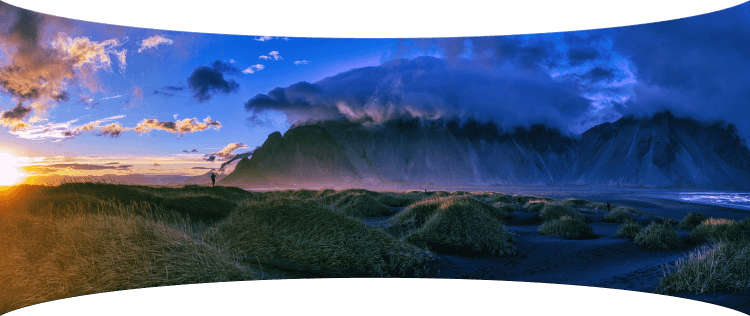
    Go for a classic landscape shot — the majestic Vestrahorn mountain of Iceland will look even more grandiose if you capture it all in one single pano shot.

Shooting aerial panoramas has fast become an obsession for me! Having all the panorama photo editing tools in one place with Luminar Neo is a game changer.

Stewart Carroll

Landscape and drone photographer, educator

Tips to get a high-quality panorama:

  • 1

    Since a panorama is just a 'big' photo at the end of the day, apply the same concepts as to other photos.

  • 2

    In terms of composition, look for balance in your image especially if your panorama has a very wide aspect ratio. Find a focal point — a person, a building or even the setting sun.

  • 3

    Just because you can fly high, doesn’t mean you have to every time. Use panoramas to get a wider perspective when you can’t get the camera far away from your subject.

  • 4

    Just because you can shoot huge panoramas, doesn’t mean you should. Since you are stitching and editing manually, look for crops within the photos you’ve captured for better composition.

  • 5

    Wait for ‘good’ light. If sunrise and sunsets are not an option, speckled cloud cover can create depth in an image, epscially in case the landscape is not uniformly illuminated by the sun.

Interesting locations for panoramas:

  • 1

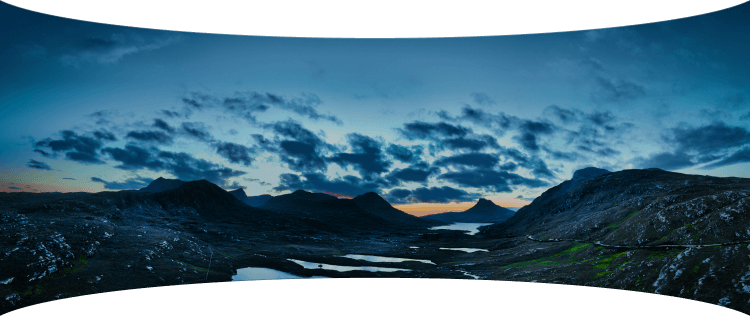
    It’s easy to capture vast expanses of land in the Scottish Highlands. Try the boggy moorland of Rannoch Moor with spectacular views of snowy mountain peaks.

  • 2

    Another gem is the Lasithi Plateau in Crete, Greece, a fertile plain full of ancient windmills surrounded by a series of semi-mountainous villages arranged in a circle.

  • 3

    Get inspired in Sagres, Portugal, a location known for its stunning cliffs, beautiful beaches, and historic fortresses. These are all great finds for capturing panoramic drone photos.

Panoramic photo stitcher: stitch images in one click | Skylum(6)

Advanced yet easy-to-use photo editor for everyone

Designed by Skylum for MacOS and Windows

Work also as plugins for Photoshop, Lightroom and Apple Photos®

icon

AI image enhancement

icon

Raw editing

icon

Layers support

icon

Non-destructive
editіng

icon

Lens correction

icon

Clone tool

icon

Dodge & burn

icon

Color enhancement

icon

Crop and resize

icon

Batch processing

Panoramic photo stitcher: stitch images in one click | Skylum(7)

GenSwap

Replace specific elements

Effortlessly swap elements in your photos with AI-generated visuals that seamlessly integrate with the rest of your image.

Luminar Neo features: Supercontrast - Experience the power of perfect color contrast

GenErase

Eliminate distractions

Remove unwanted elements from your images and seamlessly fill in the gaps with elements that match the surroundings.

Luminar Neo features: Supercontrast - Experience the power of perfect color contrast

GenExpand

Break the limits of the frame

Extend the boundaries of your photos, whether you're creating landscapes or portraits, by adding more space to them.

Luminar Neo features: Supercontrast - Experience the power of perfect color contrast

Supercontrast

Experience the power
of perfect color contrast

Precisely adjusts tonal contrast with six distinct controls spanning highlights, mid-tones, and shadows.

Luminar Neo features: Supercontrast - Experience the power of perfect color contrast

EnhanceAI

Achieve an instantly captivating photo with an all-in-one tool

Control up to a dozen adjustments including shadows, highlights, contrast, and tone with one AI-powered tool.

Luminar Neo features: Enhance AI - Achieve an instantly captivating photo with an all-in-one tool

SkyAI

Increase the vibrancy of your photos by replacing a dull sky

Seamlessly replace the sky, taking into account its reflection in water for maximum realism.

Luminar Neo features: Sky AI - Increase the vibrancy of your photos by replacing a dull sky

AtmosphereAI

Add a unique
mystical mood

Place fog, mist, or haze in your photo
with content-aware AI.

Luminar Neo features: Atmosphere - Add a unique mystical mood

Sunrays

Let the sun shine
in your photo

Add beautiful rays of sunshine and control
their glow intensity.

Luminar Neo features: Sunrays - Let the sun shine in your photo

Erase

Clean, mess-free
photos in one click

Remove unwanted objects or details for fast,
easy, and realistіc results.

Luminar Neo features: Erase - Clean, mess-free photos in one click

Remove Powerlines

Get rid of annoying
power lines

Clean up your cityscapes with the power of AI.
No masking needed.

Luminar Neo features: Remove powerlines - Get rid of annoying power lines

Portrait Background

Experiment with
fun portraits

Remove the background and transport
people to a different location.

Luminar Neo features: Portrait Background - Experiment with fun portraits

RelightAI

Fix backlit photos
in an instant

Light up dark photos in post-processing and get total control over the lighting in your photo.

Luminar Neo features: Relight AI - Fix backlit photos in an instant

FaceAI

Retouch facial
features naturally

Add face light, remove dark circles,
enhance lips, and do so much more.

Luminar Neo features: Face AI - Smooth skin in a heartbeat

BodyAI

Shape the body

Add volume to or remove volume from the torso
or abdomen to enhance natural beauty.

Luminar Neo features: Body AI - Shape the body

SkinAI

Smooth skin
in a heartbeat

Automatically retouch a person’s skin
and eliminate imperfections.

Luminar Neo features: Face AI

Portrait BokehAI

Create a dreamy
bokeh effect

Simulate an out-of-focus background effect
without the need for a special lens.

Luminar Neo features: Portrait Bokeh AI - Create a dreamy bokeh effect

Color Harmony

Get precise
color control

Fine-tune adjustments like brilliance, warmth,
and balance with advanced tech in simple sliders.

Luminar Neo features: Color Harmony - Get precise color control

StructureAI

Sharp details,
natural look

Reveal a great deal of detail while keeping
people’s faces and skin natural.

Luminar Neo features: Structure AI - Sharp details, natural look

Discover Luminar Neo features

Panoramic photo stitcher: stitch images in one click | Skylum(26)

GenSwap

GenErase

GenExpand

Supercontrast

EnhanceAI

SkyAI

AtmosphereAI

Sunrays

Erase

Remove Powerlines

Portrait Background

RelightAI

FaceAI

BodyAI

SkinAI

Portrait BokehAI

Color Harmony

StructureAI

Transform your photos
with Panorama Stitcher and other Luminar Neo tools

Luminar Neo is a powerhouse of tools that give you unimaginable results.

© Stewart Carroll

Mastеr the Auto-Stitch Panоrama
technique for your landscape photos

Add beautiful rays of sunshine and control
their glow intensity.

SunraysAI

Place fog, mist, or haze in your image using content-aware masking for maximum realism.

AtmosphereAI

Replace the sky realistically in a few clicks and make your photo stand out.

SkyAI

© Kseniia Kazak

Master the Auto-Stitch Panorama
technique for your cіtyscape photos

Get full control over contrast and details with six AI-powered sliders that cover highlights, midtones, and shadows.

Supercontrast

Unlock detail and clarity to make images that pop. Structure AI increases image contrast and brings out more details.

Structurе AI

Apply professional lookup tables (LUTs) to quickly change your photo’s appearance. Choose from film stocks and black and white looks — or create color grades to unlock a new style in seconds.

Mood AI

Landscape

Cityscape

Dożywotnia edycja na twoich zasadach! Wybierz plan Luminar Neo, który ci odpowiada

Twoja specjalna zniżka 10% wygasa za 15:00

Wieczysta
Licencja na komputer

Luminar Neo na komputerze stacjonarnym

$ 119 .00

Płatność jednorazowa

Kup teraz
30-dniowa gwarancja zwrotu pieniędzy

Komputer stacjonarny dla Windows/MacOS

Aplikacja mobilna na iOS/Android/ChromeOS

Dostęp do Biblioteki Kreatywnej

Kurs wideo Luminar Neo

Szybki przewodnik startowy Luminar Neo

Prezent

Popularne

Licencja wieczysta
na wiele urządzeń

Luminar Neo na komputerze stacjonarnym, aplikacja mobilna na iOS, Android, ChromeOS

$ 159 .00

Płatność jednorazowa

Kup teraz
30-dniowa gwarancja zwrotu pieniędzy

Komputer stacjonarny dla Windows/MacOS

Aplikacja mobilna na iOS/Android/ChromeOS

Dostęp do Biblioteki Kreatywnej

Kurs wideo Luminar Neo

Szybki przewodnik startowy Luminar Neo

Prezent

Wieczysta
Licencja Max

Luminar Neo na komputerze stacjonarnym, aplikacja mobilna na iOS, Android, ChromeOS oraz dostęp do Biblioteki Kreatywnej

$ 179 .00

Płatność jednorazowa

Kup teraz
30-dniowa gwarancja zwrotu pieniędzy

Komputer stacjonarny dla Windows/MacOS

Aplikacja mobilna na iOS/Android/ChromeOS

Dostęp do Biblioteki Kreatywnej

Roczny dostęp do ponad 1000 zasobów kreatywnych (presetów, nieb, LUT-ów, nakładek) oraz edukacyjnych kursów wideo dla Luminar Neo

Kurs wideo Luminar Neo

Szybki przewodnik startowy Luminar Neo

Prezent

Niezawodne wsparcie, zaufane przez naszych użytkowników

Chwila! Mamy niespodziankę 🎁

Twoja dodatkowa zniżka 10% czeka — skopiuj poniższy kod i użyj go przy kasie, ale pospiesz się, wygasa za zaledwie 15 minut!

15:00

Panoramic photo stitcher: stitch images in one click | Skylum(28) Panoramic photo stitcher: stitch images in one click | Skylum(29)

Podsumowanie zamówienia

Panoramic photo stitcher: stitch images in one click | Skylum(30)

Wieczysta
Licencja na komputer

$ 119 .00
$ 417 .00

Desktop na Windows/MacOS i pełny dostęp do wszystkich narzędzi generatywnych przez rok.

Kurs wideo Luminar Neo

Panoramic photo stitcher: stitch images in one click | Skylum(31)

Automatyczne aktualizacje

odnowienie za 1 rok $ 49 .00

$ 0 .00
$ 49 .00

Otrzymuj automatycznie wszystkie nowe płatne funkcje.

Ciesz się pełnym dostępem do wszystkich narzędzi generatywnych.

Bezpłatnie przez 1 rok. Potem naliczane są opłaty.

Całkowita kwota do zapłaty teraz:
$ 119 .00

Podsumowanie zamówienia

Panoramic photo stitcher: stitch images in one click | Skylum(30)

Licencja wieczysta
na wiele urządzeń

$ 159 .00
$ 477 .00

Desktop na Windows/MacOS i pełny dostęp do wszystkich narzędzi generatywnych przez rok.

Aplikacja mobilna na iOS/Android/ChromeOS

Kurs wideo Luminar Neo

Panoramic photo stitcher: stitch images in one click | Skylum(31)

Automatyczne aktualizacje

odnowienie za 1 rok $ 69 .00

$ 0 .00
$ 69 .00

Otrzymuj automatycznie wszystkie nowe płatne funkcje.

Ciesz się pełnym dostępem do wszystkich narzędzi generatywnych.

Bezpłatnie przez 1 rok. Potem naliczane są opłaty.

Całkowita kwota do zapłaty teraz:
$ 159 .00

Podsumowanie zamówienia

Panoramic photo stitcher: stitch images in one click | Skylum(30)

Wieczysta
Licencja Max

$ 179 .00
$ 546 .00

Desktop na Windows/MacOS i pełny dostęp do wszystkich narzędzi generatywnych przez rok.

Aplikacja mobilna na iOS/Android/ChromeOS

Kurs wideo Luminar Neo

Panoramic photo stitcher: stitch images in one click | Skylum(31)

Automatyczne aktualizacje

odnowienie za 1 rok $ 89 .00

$ 0 .00
$ 89 .00

Otrzymuj automatycznie wszystkie nowe płatne funkcje.

Ciesz się pełnym dostępem do wszystkich narzędzi generatywnych.

Bezpłatnie przez 1 rok. Potem naliczane są opłaty.

Całkowita kwota do zapłaty teraz:
$ 179 .00
Panoramic photo stitcher: stitch images in one click | Skylum(39)

Pryzmatyczne nakładki świetlne

Pakiet nakładek zespół Skylum
Panoramic photo stitcher: stitch images in one click | Skylum(40)

Eksperymentalne nakładki

Pakiet nakładek zespół Skylum
Panoramic photo stitcher: stitch images in one click | Skylum(41)

Kraina Wschodzącego Słońca

Pakiet ustawień wstępnych zespół Skylum
Panoramic photo stitcher: stitch images in one click | Skylum(42)

Wycieczka kempingowa

Pakiet ustawień wstępnych zespół Skylum
Panoramic photo stitcher: stitch images in one click | Skylum(43)

Czy to Ziemia

Pakiet ustawień wstępnych zespół Skylum
Panoramic photo stitcher: stitch images in one click | Skylum(44)

Odkryj Amerykę Łacińską

Pakiet ustawień wstępnych zespół Skylum
Panoramic photo stitcher: stitch images in one click | Skylum(45)

Odkryj Afrykę

Pakiet ustawień wstępnych zespół Skylum
Panoramic photo stitcher: stitch images in one click | Skylum(46)

Amerykański sen

Pakiet ustawień wstępnych zespół Skylum
Panoramic photo stitcher: stitch images in one click | Skylum(47)

Opowieści ludowe z Bliskiego Wschodu

Pakiet ustawień wstępnych zespół Skylum
Panoramic photo stitcher: stitch images in one click | Skylum(48)

Cudowna Skandynawia

Pakiet ustawień wstępnych zespół Skylum
Panoramic photo stitcher: stitch images in one click | Skylum(49)
Panoramic photo stitcher: stitch images in one click | Skylum(50)
Przed Po
Panoramic photo stitcher: stitch images in one click | Skylum(51)
Panoramic photo stitcher: stitch images in one click | Skylum(52)
Przed Po
Panoramic photo stitcher: stitch images in one click | Skylum(53)
Panoramic photo stitcher: stitch images in one click | Skylum(54)
Przed Po
Panoramic photo stitcher: stitch images in one click | Skylum(55)
Panoramic photo stitcher: stitch images in one click | Skylum(56)
Przed Po
Panoramic photo stitcher: stitch images in one click | Skylum(57)
Panoramic photo stitcher: stitch images in one click | Skylum(58)
Przed Po
Panoramic photo stitcher: stitch images in one click | Skylum(59)
Panoramic photo stitcher: stitch images in one click | Skylum(60)
Panoramic photo stitcher: stitch images in one click | Skylum(61)
Panoramic photo stitcher: stitch images in one click | Skylum(62)
Panoramic photo stitcher: stitch images in one click | Skylum(63)

Pryzmatyczne nakładki świetlne

Pakiet nakładek zespół Skylum

Twórz nastrojowe obrazy za pomocą tych 10 nakładek w formacie JPEG, które zawierają mieniące się światła i flary w różnych kolorach. Upewnij się, że używasz ich z Warstwami Luminar Neo i/lub narzędziem do usuwania tła portretowego i eksperymentuj ze swoimi zdjęciami w dowolnym gatunku. Możesz dodać interesujący efekt świetlny lub wyróżnić obiekt na nowe sposoby, a wszystko to za pomocą zaledwie kilku kliknięć. Czas to wypróbować!

Panoramic photo stitcher: stitch images in one click | Skylum(64)
Panoramic photo stitcher: stitch images in one click | Skylum(65)
Przed Po
Panoramic photo stitcher: stitch images in one click | Skylum(66)
Panoramic photo stitcher: stitch images in one click | Skylum(67)
Przed Po
Panoramic photo stitcher: stitch images in one click | Skylum(68)
Panoramic photo stitcher: stitch images in one click | Skylum(69)
Przed Po
Panoramic photo stitcher: stitch images in one click | Skylum(70)
Panoramic photo stitcher: stitch images in one click | Skylum(71)
Przed Po
Panoramic photo stitcher: stitch images in one click | Skylum(72)
Panoramic photo stitcher: stitch images in one click | Skylum(73)
Przed Po
Panoramic photo stitcher: stitch images in one click | Skylum(74)
Panoramic photo stitcher: stitch images in one click | Skylum(75)
Panoramic photo stitcher: stitch images in one click | Skylum(76)
Panoramic photo stitcher: stitch images in one click | Skylum(77)
Panoramic photo stitcher: stitch images in one click | Skylum(78)

Eksperymentalne nakładki

Pakiet nakładek zespół Skylum

Masz ochotę dodać odrobinę czegoś ekstra do swoich zdjęć? Odkryj te 10 eksperymentalnych nakładek w formacie JPEG, które można łatwo wykorzystać za pomocą funkcji Warstwy Luminar Neo, aby przekształcić dowolne zdjęcie w ujęcie, które przyciąga wzrok. Wybieraj spośród 10 hipnotyzujących efektów o różnych kolorach i kształtach i stwórz niepowtarzalny nastrój za pomocą kilku kliknięć. Od różowych odcieni po złote okręgi, z pewnością znajdziesz idealną nakładkę do swojego kolejnego arcydzieła.

Panoramic photo stitcher: stitch images in one click | Skylum(79)
Panoramic photo stitcher: stitch images in one click | Skylum(80)
Przed Po
Panoramic photo stitcher: stitch images in one click | Skylum(81)
Panoramic photo stitcher: stitch images in one click | Skylum(82)
Przed Po
Panoramic photo stitcher: stitch images in one click | Skylum(83)
Panoramic photo stitcher: stitch images in one click | Skylum(84)
Przed Po
Panoramic photo stitcher: stitch images in one click | Skylum(85)
Panoramic photo stitcher: stitch images in one click | Skylum(86)
Przed Po
Panoramic photo stitcher: stitch images in one click | Skylum(87)
Panoramic photo stitcher: stitch images in one click | Skylum(88)
Przed Po
Panoramic photo stitcher: stitch images in one click | Skylum(89)
Panoramic photo stitcher: stitch images in one click | Skylum(90)
Panoramic photo stitcher: stitch images in one click | Skylum(91)
Panoramic photo stitcher: stitch images in one click | Skylum(92)
Panoramic photo stitcher: stitch images in one click | Skylum(93)

Kraina Wschodzącego Słońca

Pakiet ustawień wstępnych zespół Skylum

Ulepsz zdjęcia zrobione podczas podróży do Japonii lub te, którym chcesz nadać klimat przypominający japoński styl. Od krajobrazów, przez kultowe zabytki, po zdjęcia jedzenia - ten pakiet jest niezwykle wszechstronny!


Panoramic photo stitcher: stitch images in one click | Skylum(94)
Panoramic photo stitcher: stitch images in one click | Skylum(95)
Przed Po
Panoramic photo stitcher: stitch images in one click | Skylum(96)
Panoramic photo stitcher: stitch images in one click | Skylum(97)
Przed Po
Panoramic photo stitcher: stitch images in one click | Skylum(98)
Panoramic photo stitcher: stitch images in one click | Skylum(99)
Przed Po
Panoramic photo stitcher: stitch images in one click | Skylum(100)
Panoramic photo stitcher: stitch images in one click | Skylum(101)
Przed Po
Panoramic photo stitcher: stitch images in one click | Skylum(102)
Panoramic photo stitcher: stitch images in one click | Skylum(103)
Przed Po
Panoramic photo stitcher: stitch images in one click | Skylum(104)
Panoramic photo stitcher: stitch images in one click | Skylum(105)
Panoramic photo stitcher: stitch images in one click | Skylum(106)
Panoramic photo stitcher: stitch images in one click | Skylum(107)
Panoramic photo stitcher: stitch images in one click | Skylum(108)

Wycieczka kempingowa

Pakiet ustawień wstępnych zespół Skylum

Zaprojektowane z myślą o nadaniu zdjęciom z wycieczek kempingowych i pieszych wędrówek jak najlepszego wyglądu, te 10 presetów nadaje zdjęciom plenerowym naturalny, żywy wygląd. Niezależnie od tego, czy fotografujesz majestatyczne góry, czy przytulne ogniska, jednym kliknięciem wydobędziesz ze swoich zdjęć to, co najlepsze.


Panoramic photo stitcher: stitch images in one click | Skylum(109)
Panoramic photo stitcher: stitch images in one click | Skylum(110)
Przed Po
Panoramic photo stitcher: stitch images in one click | Skylum(111)
Panoramic photo stitcher: stitch images in one click | Skylum(112)
Przed Po
Panoramic photo stitcher: stitch images in one click | Skylum(113)
Panoramic photo stitcher: stitch images in one click | Skylum(114)
Przed Po
Panoramic photo stitcher: stitch images in one click | Skylum(115)
Panoramic photo stitcher: stitch images in one click | Skylum(116)
Przed Po
Panoramic photo stitcher: stitch images in one click | Skylum(117)
Panoramic photo stitcher: stitch images in one click | Skylum(118)
Przed Po
Panoramic photo stitcher: stitch images in one click | Skylum(119)
Panoramic photo stitcher: stitch images in one click | Skylum(120)
Panoramic photo stitcher: stitch images in one click | Skylum(121)
Panoramic photo stitcher: stitch images in one click | Skylum(122)
Panoramic photo stitcher: stitch images in one click | Skylum(123)

Czy to Ziemia

Pakiet ustawień wstępnych zespół Skylum

Czy to wciąż Ziemia, czy jesteśmy na obcej planecie? Ta kolekcja 10 niezwykłych presetów została zaprojektowana, aby nadać zdjęciom krajobrazowym eteryczny, nieziemski charakter. Przekształć zwykłe krajobrazy w surrealistyczne sceny z żywymi kolorami, które natychmiast przyciągną wzrok widza.


Panoramic photo stitcher: stitch images in one click | Skylum(124)
Panoramic photo stitcher: stitch images in one click | Skylum(125)
Przed Po
Panoramic photo stitcher: stitch images in one click | Skylum(126)
Panoramic photo stitcher: stitch images in one click | Skylum(127)
Przed Po
Panoramic photo stitcher: stitch images in one click | Skylum(128)
Panoramic photo stitcher: stitch images in one click | Skylum(129)
Przed Po
Panoramic photo stitcher: stitch images in one click | Skylum(130)
Panoramic photo stitcher: stitch images in one click | Skylum(131)
Przed Po
Panoramic photo stitcher: stitch images in one click | Skylum(132)
Panoramic photo stitcher: stitch images in one click | Skylum(133)
Przed Po
Panoramic photo stitcher: stitch images in one click | Skylum(134)
Panoramic photo stitcher: stitch images in one click | Skylum(135)
Panoramic photo stitcher: stitch images in one click | Skylum(136)
Panoramic photo stitcher: stitch images in one click | Skylum(137)
Panoramic photo stitcher: stitch images in one click | Skylum(138)

Odkryj Amerykę Łacińską

Pakiet ustawień wstępnych zespół Skylum

Każdy z tych 10 Presetów dodaje filmowy klimat do Twoich zdjęć, podczas Twoich podróży po krajach Ameryki Łacińskiej. Uchwyć piękno i dodaj odrobinę uroku swoim ujęciom dzięki tej kolekcji przyjaznej w podróży, zaprojektowanej z myślą o krajobrazach.


Panoramic photo stitcher: stitch images in one click | Skylum(139)
Panoramic photo stitcher: stitch images in one click | Skylum(140)
Przed Po
Panoramic photo stitcher: stitch images in one click | Skylum(141)
Panoramic photo stitcher: stitch images in one click | Skylum(142)
Przed Po
Panoramic photo stitcher: stitch images in one click | Skylum(143)
Panoramic photo stitcher: stitch images in one click | Skylum(144)
Przed Po
Panoramic photo stitcher: stitch images in one click | Skylum(145)
Panoramic photo stitcher: stitch images in one click | Skylum(146)
Przed Po
Panoramic photo stitcher: stitch images in one click | Skylum(147)
Panoramic photo stitcher: stitch images in one click | Skylum(148)
Przed Po
Panoramic photo stitcher: stitch images in one click | Skylum(149)
Panoramic photo stitcher: stitch images in one click | Skylum(150)
Panoramic photo stitcher: stitch images in one click | Skylum(151)
Panoramic photo stitcher: stitch images in one click | Skylum(152)
Panoramic photo stitcher: stitch images in one click | Skylum(153)

Odkryj Afrykę

Pakiet ustawień wstępnych zespół Skylum

Ten zestaw, poświęcony wspaniałemu kontynentowi Afryki, łączy w sobie różnorodne presety, zarówno do zdjęć portretowych, jak i krajobrazowych. Ulepszaj punkty orientacyjne, zdjęcia z safari, zdjęcia architektury i portrety osób, które spotykasz podczas podróży po Afryce.


Panoramic photo stitcher: stitch images in one click | Skylum(154)
Panoramic photo stitcher: stitch images in one click | Skylum(155)
Przed Po
Panoramic photo stitcher: stitch images in one click | Skylum(156)
Panoramic photo stitcher: stitch images in one click | Skylum(157)
Przed Po
Panoramic photo stitcher: stitch images in one click | Skylum(158)
Panoramic photo stitcher: stitch images in one click | Skylum(159)
Przed Po
Panoramic photo stitcher: stitch images in one click | Skylum(160)
Panoramic photo stitcher: stitch images in one click | Skylum(161)
Przed Po
Panoramic photo stitcher: stitch images in one click | Skylum(162)
Panoramic photo stitcher: stitch images in one click | Skylum(163)
Przed Po
Panoramic photo stitcher: stitch images in one click | Skylum(164)
Panoramic photo stitcher: stitch images in one click | Skylum(165)
Panoramic photo stitcher: stitch images in one click | Skylum(166)
Panoramic photo stitcher: stitch images in one click | Skylum(167)
Panoramic photo stitcher: stitch images in one click | Skylum(168)

Amerykański sen

Pakiet ustawień wstępnych zespół Skylum

Twórz fantastyczne zdjęcia podczas podróży po USA. Ulepszaj zdjęcia punktów orientacyjnych, parków narodowych i ogólnych krajobrazów znanych miast. Osiągnij różne oszałamiające efekty za pomocą kilku kliknięć tych 10 wspaniałych ustawień wstępnych.


Panoramic photo stitcher: stitch images in one click | Skylum(169)
Panoramic photo stitcher: stitch images in one click | Skylum(170)
Przed Po
Panoramic photo stitcher: stitch images in one click | Skylum(171)
Panoramic photo stitcher: stitch images in one click | Skylum(172)
Przed Po
Panoramic photo stitcher: stitch images in one click | Skylum(173)
Panoramic photo stitcher: stitch images in one click | Skylum(174)
Przed Po
Panoramic photo stitcher: stitch images in one click | Skylum(175)
Panoramic photo stitcher: stitch images in one click | Skylum(176)
Przed Po
Panoramic photo stitcher: stitch images in one click | Skylum(177)
Panoramic photo stitcher: stitch images in one click | Skylum(178)
Przed Po
Panoramic photo stitcher: stitch images in one click | Skylum(179)
Panoramic photo stitcher: stitch images in one click | Skylum(180)
Panoramic photo stitcher: stitch images in one click | Skylum(181)
Panoramic photo stitcher: stitch images in one click | Skylum(182)
Panoramic photo stitcher: stitch images in one click | Skylum(183)

Opowieści ludowe z Bliskiego Wschodu

Pakiet ustawień wstępnych zespół Skylum

Ta fascynująca kolekcja 10 presetów została zaprojektowana, aby wydobyć tajemnicze piękno krajobrazów Bliskiego Wschodu, architektury, stylu ulicznego i natury. W ciepłych tonacjach, głębokich odcieniach żółci lub błękitu i złota - z pewnością znajdziesz preset idealny dla swojego zdjęcia.


Panoramic photo stitcher: stitch images in one click | Skylum(184)
Panoramic photo stitcher: stitch images in one click | Skylum(185)
Przed Po
Panoramic photo stitcher: stitch images in one click | Skylum(186)
Panoramic photo stitcher: stitch images in one click | Skylum(187)
Przed Po
Panoramic photo stitcher: stitch images in one click | Skylum(188)
Panoramic photo stitcher: stitch images in one click | Skylum(189)
Przed Po
Panoramic photo stitcher: stitch images in one click | Skylum(190)
Panoramic photo stitcher: stitch images in one click | Skylum(191)
Przed Po
Panoramic photo stitcher: stitch images in one click | Skylum(192)
Panoramic photo stitcher: stitch images in one click | Skylum(193)
Przed Po
Panoramic photo stitcher: stitch images in one click | Skylum(194)
Panoramic photo stitcher: stitch images in one click | Skylum(195)
Panoramic photo stitcher: stitch images in one click | Skylum(196)
Panoramic photo stitcher: stitch images in one click | Skylum(197)
Panoramic photo stitcher: stitch images in one click | Skylum(198)

Cudowna Skandynawia

Pakiet ustawień wstępnych zespół Skylum

Odkryj tę wspaniałą kolekcję 10 wszechstronnych presetów, które doskonale sprawdzą się w Twoich zdjęciach z podróży po krajach nordyckich. Uchwyć idylliczne krajobrazy, naturalne cuda i przytulne ujęcia architektury, które oddają skandynawski klimat. Czas spakować swoją podróżną torbę!

Kurs wideo Luminar Neo

Informacje o kursie
Czego możesz się nauczyć?
Zobacz proces
Twórz zdjęcia takie jak to
Twórca

Kreatywne techniki edycji zdjęć w Luminar Neo

od Alberta Drosa

10 samouczków wideo

W zestawie 12 starannie dobranych presetów

Kreatywny samouczek edycji w zestawie

Dołącz do holenderskiego fotografa krajobrazu, Alberta Drosa, w tym kursie, gdzie dzieli się swoją niezwykłą pasją do planowania i tworzenia wyjątkowych ujęć. W serii dziesięciu filmów uzyskasz wgląd w tajniki fotografii, dowiesz się, co sprawia, że zdjęcie jest udane, lub co może je zepsuć. Albert krok po kroku pokaże techniki edycji, które podniosą twoje umiejętności fotograficzne. Dodatkowo, jako specjalny bonus, otrzymasz bezpłatny zestaw 12 ręcznie dobranych presetów Alberta Drosa, które pomogą ci tworzyć hipnotyzujące obrazy. Odkryj sekrety zapierającej dech w piersiach fotografii krajobrazowej i przekształć swoje ujęcia w oszałamiające arcydzieła dzięki fachowym wskazówkom Alberta.
img

Wprowadzenie i opis kursu

Albert Dros przedstawia się i daje szybki przegląd tego, czego nauczysz się o fotografii i...

img

Wstęp do fotografii

Na czym należy się skupić podczas robienia zdjęć, aby uzyskać najlepsze rezultaty?

img

Podstawowa edycja

Albert przedstawia układ Luminar Neo oraz podstawowe narzędzia, dzięki którym można natychmiast osiągnąć doskonałe rezultaty.

img

Zaawansowana edycja

Zagłębiając się w szczegóły, Albert pokazuje bardziej zaawansowane narzędzia w Luminar Neo i jak z nich korzystać, aby udoskonalić swoje zdjęcia.

img

Dramatyczna edycja

Bądź kreatywny ze swoimi zdjęciami! Albert edytuje zdjęcie za pomocą bardziej kreatywnych narzędzi, aby podkreślić jego dramatyczne aspekty i tchnąć w nie nowe życie.

img

Focus Stacking

Luminar Neo posiada rozszerzenia, które pozwalają uzyskać jeszcze bardziej imponujące rezultaty. W tym filmie dowiesz się, jak połączyć ostrość zdjęć z rozszerzeniem Luminar Neo Łączenie ostrości.

img

Krajobraz miejski

Co decyduje o jakości zdjęcia krajobrazu miejskiego? Zobacz, jak przekształcić zdjęcie z Dubaju ze zwykłego w imponujące.

img

Lasy

Dowiedz się, jakich narzędzi Luminar Neo używa Albert do tworzenia swoich imponujących zdjęć lasu. Zwróć uwagę na Atmosferę AI, Promienie słońca i inne narzędzia!

img

Presety

Naucz się korzystać z presetów, aby szybko uzyskać ciekawe rozwiązania kolorystyczne na swoich zdjęciach. Albert poprowadzi Cię przez proces korzystania z presetów, aby uzyskać jeszcze piękniejsze ujęcia lasu.

img

Podsumowanie kursu

Uzyskaj szybkie podsumowanie wszystkiego, czego nauczyłeś się w tym kursie. Szczęśliwego tworzenia!

Przed Po
Przed Po
Przed Po
Przed Po
Przed Po

Albert Dros

FOTOGRAF, PISARZ I NAUCZYCIEL

Albert Dros jest holenderskim fotografem krajobrazu, który ma niezwykłą pasję do planowania i tworzenia unikalnych ujęć. Jego uwagę przyciągają wulkany, zaćmienia słońca i wyjątkowe aspekty natury. Nie poprzestaje na prostych ujęciach.

"Go big or go home" is his motto, always trying to add some unique element to his shots.

Jego praca została doceniona na całym świecie, a on sam był publikowany w największych mediach.

Albert dużo podróżuje jako edukator fotograficzny, ale także w ramach osobistych projektów. Ale nawet w Holandii nie może przestać fotografować. Jego inspiracja nigdy się nie kończy.

Frequently Asked Questions

How does the Panorama Stitching tool work?

Use the Panorama Stitching tool to create panoramas from multiple photos. Or you can import a video and create a panorama photo from it. You can also select a subject in your photo and create an interesting panoramic effect where it will appear multiple times on your panorama.

What is Auto-Stitch Panorama?

The Panorama Stitching tool does it all for you — seamlessly stitching images together without needing your manual input, it’s all automatic.

Can I create HDR panoramas automatically if my source photos have different exposures?

Yes. Luminar Neo's Panorama Stitching tool can automatically stitch photos taken at different exposures into a seamless panorama. The tool aligns frames, blends them smoothly, and balances light and tone across the image, allowing photographers to create wide-format panoramas with extended dynamic range and natural transitions.

Can I get a trial version of the Panoramic Photo Stitcher tool?

You can use the trial version of Luminar Neo and try panorama image stitching before you purchase.

Who can benefit from Luminar Neo Panorama Stitching tool?

Luminar Neo Panorama Stitching is especially valuable for:

  • Landscape photographers: create high-resolution wide scenes that capture scale, depth, and atmosphere.
  • Travel photographers: stitch expansive cityscapes and natural views into seamless panoramic images.
  • Architecture and real estate photographers: produce clean, distortion-controlled panoramas of interiors and exteriors.
  • Adventure and outdoor creators: combine multiple frames into immersive, ultra-wide compositions.
  • Commercial and fine art photographers: build detailed large-format images suitable for prints and professional use.

This tool helps anyone who needs wide, high-quality panoramas that look natural, detailed, and professional with minimal effort.

Why Luminar Neo is the best panorama stitching software?

Luminar Neo is the best panorama stitching software because it provides a built-in, automated way to stitch multiple photos into a seamless panorama inside a professional photo editor. The tool aligns images, blends overlaps smoothly, and balances tone across frames, allowing photographers to create wide, high-resolution panoramas without switching to separate stitching software.

Why Luminar Neo Panorama Stitching is trusted by photographers?

Photographers trust Luminar Neo Panorama Stitching because it delivers consistent, reliable results for real-world panorama workflows. The tool is trusted by professionals for its ability to accurately align frames, blend exposures smoothly, and integrate panoramas directly into a non-destructive editing environment. This makes Luminar Neo a dependable solution for landscape, travel, and architectural panorama creation.

App Requirements

macOS

Mac Model

MacBook, MacBook Air, MacBook Pro, iMac, iMac Pro, Mac Pro, Mac mini, early 2010 or newer

Processor

CPU Intel® Core™ i5 8 Gen or better

OS version

macOS 12.0 or higher.

RAM

Memory 8 GB RAM or more (16+ GB RAM is recommended)

Disk space

Hard disk 10 GB free space; SSD for best performance

Display

1280x768 size or better

Windows

Hardware

Windows-based hardware PC with mouse or similar input device

Processor

CPU Intel® Core™ i5 8 Gen or better, AMD Ryzen™ 5 or better

OS version

10 version 1909 or higher (only 64-bit OS)

RAM

Memory 8 GB RAM or more (16+ GB RAM is recommended)

Disk space

Hard disk 10 GB free space; SSD for best performance

Display

1280x768 size or better

Graphics

Open GL 3.3 or later compatible graphics card

Panoramic photo stitcher: stitch images in one click | Skylum(204)