© Serge Ramelli
© Stewart Carroll
© Ksenia Kazak

Expand your view with
Panorama Stitching

Create stunning panoramas from your photos and videos.

Upravujte fotky snadno v Luminar Neo

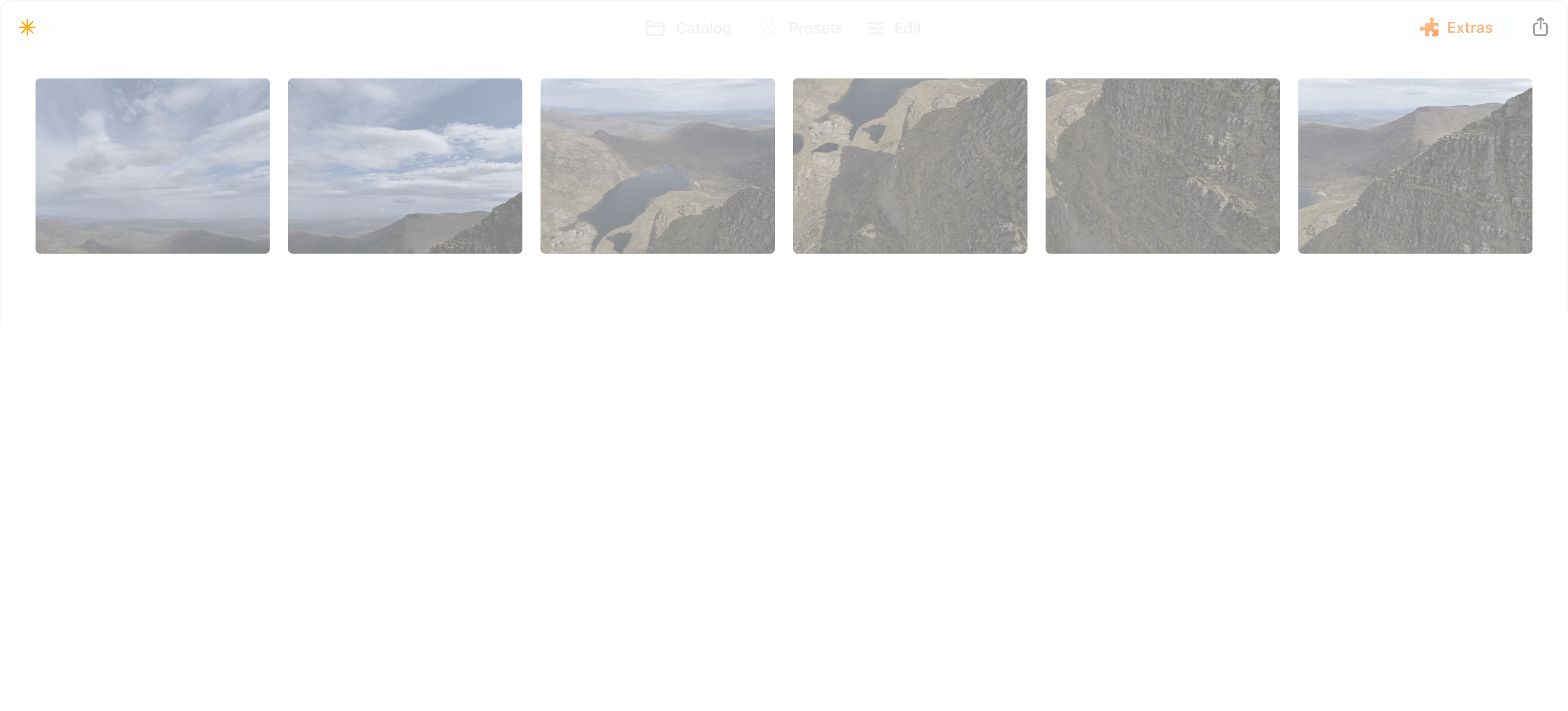
Explore panoramic photography stitching

Seamlessly stitch together multiple photos to create expansive panoramas
that immerse viewers in awe-inspiring landscapes and cityscapes.

Watch demo

Stitch multiple photos
together with ease

Watch demo

Create vibrant
and dynamic HDR panoramas

Watch demo

Transform a video into
a panoramic photo

Watch demo

Combine a moving object across multiple frames into a single action photo

Pro tips to get captivating panoramic photos

Luminar Neo is set to help millions of photographers envision bigger with the easy-to-make Panorama Stitching Extension.

Serge Ramelli

Landscape photographer and educator

© Serge Ramelli
© Serge Ramelli

Tips to get a high-quality panorama:

  • 1

    Avoid using an excessively wide angle lens, such as 35mm or wider, as this may result in a more artificial and less natural image. Instead, opt for a narrower-angle lens for better results.

  • 2

    Ensure that each photo overlaps with the adjacent one by at least 20%.

  • 3

    Shoot your photographs in manual mode to ensure that the camera settings remain consistent across all the photos in your series.

Interesting locations for panoramas:

  • 1

    Don’t be afraid to experiment with architecture panos! The iconic Rialto Bridge that crosses the Grand Canal in Venice is a perfect example of an unusual yet incredible panoramic shot.

  • 2

    Highlight the spectacular Eiffel Tower by capturing it as a part of a panoramic shot of Paris and see how the whole city comes to life in your photo.

  • 3

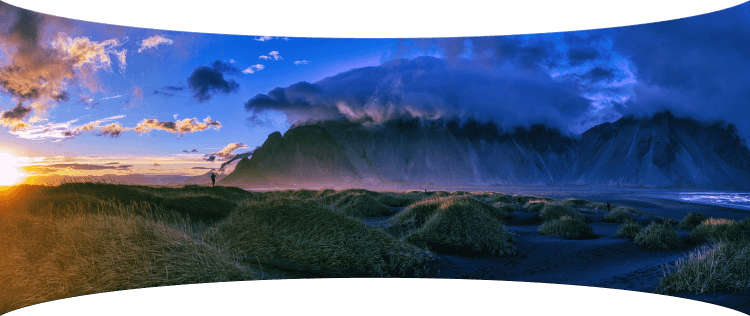
    Go for a classic landscape shot — the majestic Vestrahorn mountain of Iceland will look even more grandiose if you capture it all in one single pano shot.

Shooting aerial panoramas has fast become an obsession for me! Having all the panorama photo editing tools in one place with Luminar Neo is a game changer.

Stewart Carroll

Landscape and drone photographer, educator

Tips to get a high-quality panorama:

  • 1

    Since a panorama is just a 'big' photo at the end of the day, apply the same concepts as to other photos.

  • 2

    In terms of composition, look for balance in your image especially if your panorama has a very wide aspect ratio. Find a focal point — a person, a building or even the setting sun.

  • 3

    Just because you can fly high, doesn’t mean you have to every time. Use panoramas to get a wider perspective when you can’t get the camera far away from your subject.

  • 4

    Just because you can shoot huge panoramas, doesn’t mean you should. Since you are stitching and editing manually, look for crops within the photos you’ve captured for better composition.

  • 5

    Wait for ‘good’ light. If sunrise and sunsets are not an option, speckled cloud cover can create depth in an image, epscially in case the landscape is not uniformly illuminated by the sun.

Interesting locations for panoramas:

  • 1

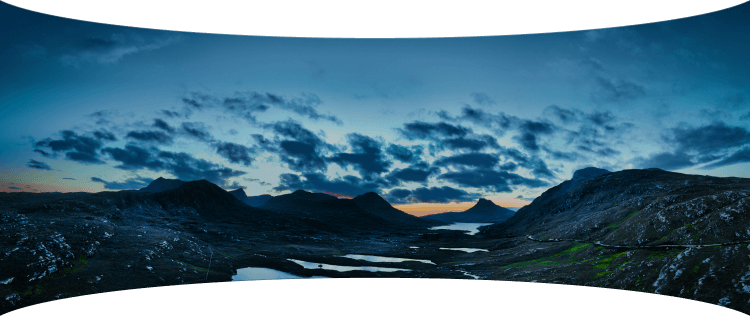
    It’s easy to capture vast expanses of land in the Scottish Highlands. Try the boggy moorland of Rannoch Moor with spectacular views of snowy mountain peaks.

  • 2

    Another gem is the Lasithi Plateau in Crete, Greece, a fertile plain full of ancient windmills surrounded by a series of semi-mountainous villages arranged in a circle.

  • 3

    Get inspired in Sagres, Portugal, a location known for its stunning cliffs, beautiful beaches, and historic fortresses. These are all great finds for capturing panoramic drone photos.

Panoramic photo stitcher: stitch images in one click | Skylum(6)

Advanced yet easy-to-use photo editor for everyone

Designed by Skylum for MacOS and Windows

Work also as plugins for Photoshop, Lightroom and Apple Photos®

icon

AI image enhancement

icon

Raw editing

icon

Layers support

icon

Non-destructive
editіng

icon

Lens correction

icon

Clone tool

icon

Dodge & burn

icon

Color enhancement

icon

Crop and resize

icon

Batch processing

Panoramic photo stitcher: stitch images in one click | Skylum(7)

GenSwap

Replace specific elements

Effortlessly swap elements in your photos with AI-generated visuals that seamlessly integrate with the rest of your image.

Luminar Neo features: Supercontrast - Experience the power of perfect color contrast

GenErase

Eliminate distractions

Remove unwanted elements from your images and seamlessly fill in the gaps with elements that match the surroundings.

Luminar Neo features: Supercontrast - Experience the power of perfect color contrast

GenExpand

Break the limits of the frame

Extend the boundaries of your photos, whether you're creating landscapes or portraits, by adding more space to them.

Luminar Neo features: Supercontrast - Experience the power of perfect color contrast

Supercontrast

Experience the power
of perfect color contrast

Precisely adjusts tonal contrast with six distinct controls spanning highlights, mid-tones, and shadows.

Luminar Neo features: Supercontrast - Experience the power of perfect color contrast

EnhanceAI

Achieve an instantly captivating photo with an all-in-one tool

Control up to a dozen adjustments including shadows, highlights, contrast, and tone with one AI-powered tool.

Luminar Neo features: Enhance AI - Achieve an instantly captivating photo with an all-in-one tool

SkyAI

Increase the vibrancy of your photos by replacing a dull sky

Seamlessly replace the sky, taking into account its reflection in water for maximum realism.

Luminar Neo features: Sky AI - Increase the vibrancy of your photos by replacing a dull sky

AtmosphereAI

Add a unique
mystical mood

Place fog, mist, or haze in your photo
with content-aware AI.

Luminar Neo features: Atmosphere - Add a unique mystical mood

Sunrays

Let the sun shine
in your photo

Add beautiful rays of sunshine and control
their glow intensity.

Luminar Neo features: Sunrays - Let the sun shine in your photo

Erase

Clean, mess-free
photos in one click

Remove unwanted objects or details for fast,
easy, and realistіc results.

Luminar Neo features: Erase - Clean, mess-free photos in one click

Remove Powerlines

Get rid of annoying
power lines

Clean up your cityscapes with the power of AI.
No masking needed.

Luminar Neo features: Remove powerlines - Get rid of annoying power lines

Portrait Background

Experiment with
fun portraits

Remove the background and transport
people to a different location.

Luminar Neo features: Portrait Background - Experiment with fun portraits

RelightAI

Fix backlit photos
in an instant

Light up dark photos in post-processing and get total control over the lighting in your photo.

Luminar Neo features: Relight AI - Fix backlit photos in an instant

FaceAI

Retouch facial
features naturally

Add face light, remove dark circles,
enhance lips, and do so much more.

Luminar Neo features: Face AI - Smooth skin in a heartbeat

BodyAI

Shape the body

Add volume to or remove volume from the torso
or abdomen to enhance natural beauty.

Luminar Neo features: Body AI - Shape the body

SkinAI

Smooth skin
in a heartbeat

Automatically retouch a person’s skin
and eliminate imperfections.

Luminar Neo features: Face AI

Portrait BokehAI

Create a dreamy
bokeh effect

Simulate an out-of-focus background effect
without the need for a special lens.

Luminar Neo features: Portrait Bokeh AI - Create a dreamy bokeh effect

Color Harmony

Get precise
color control

Fine-tune adjustments like brilliance, warmth,
and balance with advanced tech in simple sliders.

Luminar Neo features: Color Harmony - Get precise color control

StructureAI

Sharp details,
natural look

Reveal a great deal of detail while keeping
people’s faces and skin natural.

Luminar Neo features: Structure AI - Sharp details, natural look

Discover Luminar Neo features

Panoramic photo stitcher: stitch images in one click | Skylum(26)

GenSwap

GenErase

GenExpand

Supercontrast

EnhanceAI

SkyAI

AtmosphereAI

Sunrays

Erase

Remove Powerlines

Portrait Background

RelightAI

FaceAI

BodyAI

SkinAI

Portrait BokehAI

Color Harmony

StructureAI

Transform your photos
with Panorama Stitcher and other Luminar Neo tools

Luminar Neo is a powerhouse of tools that give you unimaginable results.

© Stewart Carroll

Mastеr the Auto-Stitch Panоrama
technique for your landscape photos

Add beautiful rays of sunshine and control
their glow intensity.

SunraysAI

Place fog, mist, or haze in your image using content-aware masking for maximum realism.

AtmosphereAI

Replace the sky realistically in a few clicks and make your photo stand out.

SkyAI

© Kseniia Kazak

Master the Auto-Stitch Panorama
technique for your cіtyscape photos

Get full control over contrast and details with six AI-powered sliders that cover highlights, midtones, and shadows.

Supercontrast

Unlock detail and clarity to make images that pop. Structure AI increases image contrast and brings out more details.

Structurе AI

Apply professional lookup tables (LUTs) to quickly change your photo’s appearance. Choose from film stocks and black and white looks — or create color grades to unlock a new style in seconds.

Mood AI

Landscape

Cityscape

Doživotní úpravy nyní flexibilně! Vyberte si plán Luminar Neo, který vám vyhovuje

Vaše speciální 10% sleva vyprší za 15:00

Perpetuální
Licence pro počítač

Luminar Neo na počítači

$ 119 .00

Jednorázová platba

Koupit nyní
30denní záruka vrácení peněz

Počítačová verze pro Windows/MacOS

Mobilní aplikace pro iOS/Android/ChromeOS

Přístup ke Creative Library

Videokurz Luminar Neo

Rychlý průvodce spuštěním Luminar Neo

Dárek

Nejoblíbenější

Trvalá licence
Pro více zařízení

Luminar Neo na počítači, mobilní aplikace pro iOS, Android, ChromeOS

$ 159 .00

Jednorázová platba

Koupit nyní
30denní záruka vrácení peněz

Počítačová verze pro Windows/MacOS

Mobilní aplikace pro iOS/Android/ChromeOS

Přístup ke Creative Library

Videokurz Luminar Neo

Rychlý průvodce spuštěním Luminar Neo

Dárek

Perpetuální
Max Licence

Luminar Neo na počítači, mobilní aplikace pro iOS, Android, ChromeOS a přístup ke Creative Library

$ 179 .00

Jednorázová platba

Koupit nyní
30denní záruka vrácení peněz

Počítačová verze pro Windows/MacOS

Mobilní aplikace pro iOS/Android/ChromeOS

Přístup ke Creative Library

1 rok přístupu k více než 1000 kreativním materiálům (přednastavení, oblohy, LUT, překryvy) a vzdělávacím video kurzům pro Luminar Neo

Videokurz Luminar Neo

Rychlý průvodce spuštěním Luminar Neo

Dárek

Spolehlivá podpora, které naši uživatelé důvěřují

Počkejte! Máme pro vás překvapení 🎁

Vaše extra sleva 10% čeká — zkopírujte kód níže a použijte ho při placení, ale pospěšte si, vyprší už za 15 minut!

15:00

Panoramic photo stitcher: stitch images in one click | Skylum(28) Panoramic photo stitcher: stitch images in one click | Skylum(29)

Shrnutí objednávky

Panoramic photo stitcher: stitch images in one click | Skylum(30)

Perpetuální
Licence pro počítač

$ 119 .00
$ 417 .00

Desktop pro Windows/MacOS a plný přístup ke všem generativním nástrojům na jeden rok.

Videokurz Luminar Neo

Panoramic photo stitcher: stitch images in one click | Skylum(31)

Automatické aktualizace

obnovení za 1 rok pro $ 49 .00

$ 0 .00
$ 49 .00

Získej automaticky všechny nové placené funkce.

Užívej si plný přístup ke všem generativním nástrojům.

Zdarma na 1 rok. Poté se účtují poplatky.

Celková částka splatná nyní:
$ 119 .00

Shrnutí objednávky

Panoramic photo stitcher: stitch images in one click | Skylum(30)

Trvalá licence
Pro více zařízení

$ 159 .00
$ 477 .00

Desktop pro Windows/MacOS a plný přístup ke všem generativním nástrojům na jeden rok.

Mobilní aplikace pro iOS/Android/ChromeOS

Videokurz Luminar Neo

Panoramic photo stitcher: stitch images in one click | Skylum(31)

Automatické aktualizace

obnovení za 1 rok pro $ 69 .00

$ 0 .00
$ 69 .00

Získej automaticky všechny nové placené funkce.

Užívej si plný přístup ke všem generativním nástrojům.

Zdarma na 1 rok. Poté se účtují poplatky.

Celková částka splatná nyní:
$ 159 .00

Shrnutí objednávky

Panoramic photo stitcher: stitch images in one click | Skylum(30)

Perpetuální
Max Licence

$ 179 .00
$ 546 .00

Desktop pro Windows/MacOS a plný přístup ke všem generativním nástrojům na jeden rok.

Mobilní aplikace pro iOS/Android/ChromeOS

Videokurz Luminar Neo

Panoramic photo stitcher: stitch images in one click | Skylum(31)

Automatické aktualizace

obnovení za 1 rok pro $ 89 .00

$ 0 .00
$ 89 .00

Získej automaticky všechny nové placené funkce.

Užívej si plný přístup ke všem generativním nástrojům.

Zdarma na 1 rok. Poté se účtují poplatky.

Celková částka splatná nyní:
$ 179 .00
Panoramic photo stitcher: stitch images in one click | Skylum(39)

Překryvy Světlé odlesky

Balíček překryvů od týmu Skylum
Panoramic photo stitcher: stitch images in one click | Skylum(40)

Experimentální překryvy

Balíček překryvů od týmu Skylum
Panoramic photo stitcher: stitch images in one click | Skylum(41)

Země vycházejícího slunce

Balíček přednastavení od týmu Skylum
Panoramic photo stitcher: stitch images in one click | Skylum(42)

Výlet pod stanem

Balíček přednastavení od týmu Skylum
Panoramic photo stitcher: stitch images in one click | Skylum(43)

Je to Země

Balíček přednastavení od týmu Skylum
Panoramic photo stitcher: stitch images in one click | Skylum(44)

Objevte Latinskou Ameriku

Balíček přednastavení od týmu Skylum
Panoramic photo stitcher: stitch images in one click | Skylum(45)

Objevte Afriku

Balíček přednastavení od týmu Skylum
Panoramic photo stitcher: stitch images in one click | Skylum(46)

Americký sen

Balíček přednastavení od týmu Skylum
Panoramic photo stitcher: stitch images in one click | Skylum(47)

Blízkovýchodní lidové pohádky

Balíček přednastavení od týmu Skylum
Panoramic photo stitcher: stitch images in one click | Skylum(48)

Nádherná Skandinávie

Balíček přednastavení od týmu Skylum
Panoramic photo stitcher: stitch images in one click | Skylum(49)
Panoramic photo stitcher: stitch images in one click | Skylum(50)
Předtím Potom
Panoramic photo stitcher: stitch images in one click | Skylum(51)
Panoramic photo stitcher: stitch images in one click | Skylum(52)
Předtím Potom
Panoramic photo stitcher: stitch images in one click | Skylum(53)
Panoramic photo stitcher: stitch images in one click | Skylum(54)
Předtím Potom
Panoramic photo stitcher: stitch images in one click | Skylum(55)
Panoramic photo stitcher: stitch images in one click | Skylum(56)
Předtím Potom
Panoramic photo stitcher: stitch images in one click | Skylum(57)
Panoramic photo stitcher: stitch images in one click | Skylum(58)
Předtím Potom
Panoramic photo stitcher: stitch images in one click | Skylum(59)
Panoramic photo stitcher: stitch images in one click | Skylum(60)
Panoramic photo stitcher: stitch images in one click | Skylum(61)
Panoramic photo stitcher: stitch images in one click | Skylum(62)
Panoramic photo stitcher: stitch images in one click | Skylum(63)

Překryvy Světlé odlesky

Balíček překryvů od týmu Skylum

Vytvořte atmosférické snímky pomocí těchto 10 překryvů ve formátu JPEG, které obsahují mihotavá světla a odlesky v různých barvách. Nezapomeňte je použít s nástrojem Vrstvy Luminar Neo a/nebo nástrojem Odstranění pozadí portrétu a experimentujte se svými fotografiemi jakéhokoli žánru. Můžete přidat zajímavý světelný efekt nebo nechat objekt vyniknout novým způsobem, a to vše jen několika kliknutími. Je čas to vyzkoušet!

Panoramic photo stitcher: stitch images in one click | Skylum(64)
Panoramic photo stitcher: stitch images in one click | Skylum(65)
Předtím Potom
Panoramic photo stitcher: stitch images in one click | Skylum(66)
Panoramic photo stitcher: stitch images in one click | Skylum(67)
Předtím Potom
Panoramic photo stitcher: stitch images in one click | Skylum(68)
Panoramic photo stitcher: stitch images in one click | Skylum(69)
Předtím Potom
Panoramic photo stitcher: stitch images in one click | Skylum(70)
Panoramic photo stitcher: stitch images in one click | Skylum(71)
Předtím Potom
Panoramic photo stitcher: stitch images in one click | Skylum(72)
Panoramic photo stitcher: stitch images in one click | Skylum(73)
Předtím Potom
Panoramic photo stitcher: stitch images in one click | Skylum(74)
Panoramic photo stitcher: stitch images in one click | Skylum(75)
Panoramic photo stitcher: stitch images in one click | Skylum(76)
Panoramic photo stitcher: stitch images in one click | Skylum(77)
Panoramic photo stitcher: stitch images in one click | Skylum(78)

Experimentální překryvy

Balíček překryvů od týmu Skylum

Máte chuť přidat do svých fotografií něco navíc? Objevte těchto 10 experimentálních překryvů ve formátu JPEG, které můžete snadno použít pomocí funkce Vrstvy aplikace Luminar Neo a proměnit tak jakoukoli fotografii v snímek, který upoutá pozornost. Vyberte si z 10 fascinujících efektů různých barev a tvarů a vytvořte jedinečnou náladu několika kliknutími. Od růžových odstínů až po zlaté kruhy - určitě najdete překrytí ideální pro své další mistrovské dílo.

Panoramic photo stitcher: stitch images in one click | Skylum(79)
Panoramic photo stitcher: stitch images in one click | Skylum(80)
Předtím Potom
Panoramic photo stitcher: stitch images in one click | Skylum(81)
Panoramic photo stitcher: stitch images in one click | Skylum(82)
Předtím Potom
Panoramic photo stitcher: stitch images in one click | Skylum(83)
Panoramic photo stitcher: stitch images in one click | Skylum(84)
Předtím Potom
Panoramic photo stitcher: stitch images in one click | Skylum(85)
Panoramic photo stitcher: stitch images in one click | Skylum(86)
Předtím Potom
Panoramic photo stitcher: stitch images in one click | Skylum(87)
Panoramic photo stitcher: stitch images in one click | Skylum(88)
Předtím Potom
Panoramic photo stitcher: stitch images in one click | Skylum(89)
Panoramic photo stitcher: stitch images in one click | Skylum(90)
Panoramic photo stitcher: stitch images in one click | Skylum(91)
Panoramic photo stitcher: stitch images in one click | Skylum(92)
Panoramic photo stitcher: stitch images in one click | Skylum(93)

Země vycházejícího slunce

Balíček přednastavení od týmu Skylum

Vylepšete fotografie, které jste pořídili během cesty do Japonska, nebo ty, které mají mít atmosféru připomínající japonský styl. Od krajin, přes ikonické památky až po fotografie jídla - tento balíček je neuvěřitelně univerzální!


Panoramic photo stitcher: stitch images in one click | Skylum(94)
Panoramic photo stitcher: stitch images in one click | Skylum(95)
Předtím Potom
Panoramic photo stitcher: stitch images in one click | Skylum(96)
Panoramic photo stitcher: stitch images in one click | Skylum(97)
Předtím Potom
Panoramic photo stitcher: stitch images in one click | Skylum(98)
Panoramic photo stitcher: stitch images in one click | Skylum(99)
Předtím Potom
Panoramic photo stitcher: stitch images in one click | Skylum(100)
Panoramic photo stitcher: stitch images in one click | Skylum(101)
Předtím Potom
Panoramic photo stitcher: stitch images in one click | Skylum(102)
Panoramic photo stitcher: stitch images in one click | Skylum(103)
Předtím Potom
Panoramic photo stitcher: stitch images in one click | Skylum(104)
Panoramic photo stitcher: stitch images in one click | Skylum(105)
Panoramic photo stitcher: stitch images in one click | Skylum(106)
Panoramic photo stitcher: stitch images in one click | Skylum(107)
Panoramic photo stitcher: stitch images in one click | Skylum(108)

Výlet pod stanem

Balíček přednastavení od týmu Skylum

Těchto 10 přednastavení je navrženo tak, aby dodala vašim fotografiím z kempování a turistiky ten nejlepší vzhled a dodaly vašim venkovním fotografiím přirozený a živý vzhled. Ať už pořizujete snímky majestátních hor nebo útulných táborových ohňů, jedním kliknutím zvýrazníte to nejlepší z vašich snímků.


Panoramic photo stitcher: stitch images in one click | Skylum(109)
Panoramic photo stitcher: stitch images in one click | Skylum(110)
Předtím Potom
Panoramic photo stitcher: stitch images in one click | Skylum(111)
Panoramic photo stitcher: stitch images in one click | Skylum(112)
Předtím Potom
Panoramic photo stitcher: stitch images in one click | Skylum(113)
Panoramic photo stitcher: stitch images in one click | Skylum(114)
Předtím Potom
Panoramic photo stitcher: stitch images in one click | Skylum(115)
Panoramic photo stitcher: stitch images in one click | Skylum(116)
Předtím Potom
Panoramic photo stitcher: stitch images in one click | Skylum(117)
Panoramic photo stitcher: stitch images in one click | Skylum(118)
Předtím Potom
Panoramic photo stitcher: stitch images in one click | Skylum(119)
Panoramic photo stitcher: stitch images in one click | Skylum(120)
Panoramic photo stitcher: stitch images in one click | Skylum(121)
Panoramic photo stitcher: stitch images in one click | Skylum(122)
Panoramic photo stitcher: stitch images in one click | Skylum(123)

Je to Země

Balíček přednastavení od týmu Skylum

Je to stále Země, nebo jsme na cizí planetě? Tato kolekce 10 výjimečných předvoleb je navržena tak, aby vašim fotografiím krajiny dodala éterický, nadpozemský nádech. Proměňte obyčejné krajiny v surrealistické výjevy s živými barvami, které okamžitě upoutají pozornost diváka.


Panoramic photo stitcher: stitch images in one click | Skylum(124)
Panoramic photo stitcher: stitch images in one click | Skylum(125)
Předtím Potom
Panoramic photo stitcher: stitch images in one click | Skylum(126)
Panoramic photo stitcher: stitch images in one click | Skylum(127)
Předtím Potom
Panoramic photo stitcher: stitch images in one click | Skylum(128)
Panoramic photo stitcher: stitch images in one click | Skylum(129)
Předtím Potom
Panoramic photo stitcher: stitch images in one click | Skylum(130)
Panoramic photo stitcher: stitch images in one click | Skylum(131)
Předtím Potom
Panoramic photo stitcher: stitch images in one click | Skylum(132)
Panoramic photo stitcher: stitch images in one click | Skylum(133)
Předtím Potom
Panoramic photo stitcher: stitch images in one click | Skylum(134)
Panoramic photo stitcher: stitch images in one click | Skylum(135)
Panoramic photo stitcher: stitch images in one click | Skylum(136)
Panoramic photo stitcher: stitch images in one click | Skylum(137)
Panoramic photo stitcher: stitch images in one click | Skylum(138)

Objevte Latinskou Ameriku

Balíček přednastavení od týmu Skylum

Vyzkoušejte si filmovou atmosféru, kterou každé z těchto 10 přednastavení dodá vašim fotografiím při cestě po zemích Latinské Ameriky. Objevte krásu a dodejte svým snímkům šmrnc díky této kolekci určené pro cestování po krajině.


Panoramic photo stitcher: stitch images in one click | Skylum(139)
Panoramic photo stitcher: stitch images in one click | Skylum(140)
Předtím Potom
Panoramic photo stitcher: stitch images in one click | Skylum(141)
Panoramic photo stitcher: stitch images in one click | Skylum(142)
Předtím Potom
Panoramic photo stitcher: stitch images in one click | Skylum(143)
Panoramic photo stitcher: stitch images in one click | Skylum(144)
Předtím Potom
Panoramic photo stitcher: stitch images in one click | Skylum(145)
Panoramic photo stitcher: stitch images in one click | Skylum(146)
Předtím Potom
Panoramic photo stitcher: stitch images in one click | Skylum(147)
Panoramic photo stitcher: stitch images in one click | Skylum(148)
Předtím Potom
Panoramic photo stitcher: stitch images in one click | Skylum(149)
Panoramic photo stitcher: stitch images in one click | Skylum(150)
Panoramic photo stitcher: stitch images in one click | Skylum(151)
Panoramic photo stitcher: stitch images in one click | Skylum(152)
Panoramic photo stitcher: stitch images in one click | Skylum(153)

Objevte Afriku

Balíček přednastavení od týmu Skylum

Tento balíček je věnován nádhernému africkému kontinentu a obsahuje řadu přednastavení pro portrétní snímky i snímky krajiny. Vylepšete památky, snímky ze safari, fotografie architektury a portréty lidí, které potkáte na svých cestách po Africe.


Panoramic photo stitcher: stitch images in one click | Skylum(154)
Panoramic photo stitcher: stitch images in one click | Skylum(155)
Předtím Potom
Panoramic photo stitcher: stitch images in one click | Skylum(156)
Panoramic photo stitcher: stitch images in one click | Skylum(157)
Předtím Potom
Panoramic photo stitcher: stitch images in one click | Skylum(158)
Panoramic photo stitcher: stitch images in one click | Skylum(159)
Předtím Potom
Panoramic photo stitcher: stitch images in one click | Skylum(160)
Panoramic photo stitcher: stitch images in one click | Skylum(161)
Předtím Potom
Panoramic photo stitcher: stitch images in one click | Skylum(162)
Panoramic photo stitcher: stitch images in one click | Skylum(163)
Předtím Potom
Panoramic photo stitcher: stitch images in one click | Skylum(164)
Panoramic photo stitcher: stitch images in one click | Skylum(165)
Panoramic photo stitcher: stitch images in one click | Skylum(166)
Panoramic photo stitcher: stitch images in one click | Skylum(167)
Panoramic photo stitcher: stitch images in one click | Skylum(168)

Americký sen

Balíček přednastavení od týmu Skylum

Vytvářejte fantastické fotografie během svých cest po USA. Vylepšete snímky pamětihodností, národních parků a obecných panoramat známých měst. Dosáhněte různých ohromujících efektů pomocí několika kliknutí těchto 10 nádherných přednastavení.


Panoramic photo stitcher: stitch images in one click | Skylum(169)
Panoramic photo stitcher: stitch images in one click | Skylum(170)
Předtím Potom
Panoramic photo stitcher: stitch images in one click | Skylum(171)
Panoramic photo stitcher: stitch images in one click | Skylum(172)
Předtím Potom
Panoramic photo stitcher: stitch images in one click | Skylum(173)
Panoramic photo stitcher: stitch images in one click | Skylum(174)
Předtím Potom
Panoramic photo stitcher: stitch images in one click | Skylum(175)
Panoramic photo stitcher: stitch images in one click | Skylum(176)
Předtím Potom
Panoramic photo stitcher: stitch images in one click | Skylum(177)
Panoramic photo stitcher: stitch images in one click | Skylum(178)
Předtím Potom
Panoramic photo stitcher: stitch images in one click | Skylum(179)
Panoramic photo stitcher: stitch images in one click | Skylum(180)
Panoramic photo stitcher: stitch images in one click | Skylum(181)
Panoramic photo stitcher: stitch images in one click | Skylum(182)
Panoramic photo stitcher: stitch images in one click | Skylum(183)

Blízkovýchodní lidové pohádky

Balíček přednastavení od týmu Skylum

Tato okouzlující kolekce 10 přednastavení je navržena tak, aby vyzdvihla tajemnou krásu blízkovýchodních scenérií, architektury, pouličního stylu a přírody. Teplé tóny, sytě žlutá nebo modrá a zlatá - určitě najdete předvolbu ideální pro svou fotografii.


Panoramic photo stitcher: stitch images in one click | Skylum(184)
Panoramic photo stitcher: stitch images in one click | Skylum(185)
Předtím Potom
Panoramic photo stitcher: stitch images in one click | Skylum(186)
Panoramic photo stitcher: stitch images in one click | Skylum(187)
Předtím Potom
Panoramic photo stitcher: stitch images in one click | Skylum(188)
Panoramic photo stitcher: stitch images in one click | Skylum(189)
Předtím Potom
Panoramic photo stitcher: stitch images in one click | Skylum(190)
Panoramic photo stitcher: stitch images in one click | Skylum(191)
Předtím Potom
Panoramic photo stitcher: stitch images in one click | Skylum(192)
Panoramic photo stitcher: stitch images in one click | Skylum(193)
Předtím Potom
Panoramic photo stitcher: stitch images in one click | Skylum(194)
Panoramic photo stitcher: stitch images in one click | Skylum(195)
Panoramic photo stitcher: stitch images in one click | Skylum(196)
Panoramic photo stitcher: stitch images in one click | Skylum(197)
Panoramic photo stitcher: stitch images in one click | Skylum(198)

Nádherná Skandinávie

Balíček přednastavení od týmu Skylum

Objevte tuto nádhernou kolekci 10 univerzálních přednastavení, která jsou ideální pro vaše fotografie z cest po severských zemích. Zachyťte idylické krajiny, přírodní zázraky a útulné architektonické snímky, které dýchají skandinávskou náladou. Je čas sbalit si cestovní zavazadlo!

Videokurz Luminar Neo

O kurzu
Co se naučíte?
Sledujte proces
Pořiďte si fotografie, jako jsou tyto
Tvůrce

Kreativní techniky úprav fotografií v aplikaci Luminar Neo

Albert Dros

10 výukových videí

Obsahuje 12 ručně vybraných přednastavení

Kreativní výukový program pro úpravy

Připojte se k nizozemskému krajinářskému fotografovi Albertu Drosovi, který se v tomto kurzu podělí o svou mimořádnou vášeň pro plánování a vytváření jedinečných záběrů. V těchto deseti videích získáte přehled o tom, co dělá nebo ničí fotografie. Albert vám krok za krokem poradí s technikami úprav, které pozvednou vaše fotografické dovednosti. Navíc jako speciální bonus získáte zdarma balíček 12 ručně vybraných předvoleb od Alberta Drosa, které vám pomohou vytvářet fascinující snímky. Odhalte tajemství úchvatné krajinářské fotografie a proměňte své snímky v ohromující mistrovská díla díky Albertovým odborným instrukcím.
img

Úvod a osnova kurzu

Albert Dros se představuje a podává stručný přehled toho, co se v této knize o fotografování a...

img

Úvod do fotografování

Na co byste se měli při fotografování zaměřit, abyste dosáhli co nejlepších výsledků?

img

Základní úpravy

Albert vás seznámí s uspořádáním Luminar Neo a základními nástroji, které můžete použít k okamžitému dosažení skvělých výsledků.

img

Pokročilé úpravy

Albert vám do hloubky ukáže pokročilejší nástroje v aplikaci Luminar Neo a ukáže vám, jak je použít, aby vaše fotografie vynikly.

img

Dramatické úpravy

Buďte kreativní při pořizování fotografií! Albert upraví fotografii pomocí kreativnějších nástrojů, aby zvýraznil její dramatické aspekty a vdechl jí nový život.

img

Stupňování zaostření

Luminar Neo obsahuje rozšíření, která vám umožní dosáhnout ještě působivějších výsledků. V tomto videu se dozvíte, jak provést stohování zaostření pomocí rozšíření Focus Stacking aplikace Luminar Neo.

img

Městské krajiny

Co rozhoduje o tom, zda bude záběr městské krajiny dobrý nebo špatný? Podívejte se, jak proměnit fotografii z Dubaje z obyčejné na působivou.

img

Lesy

Zjistěte, jaké nástroje Luminar Neo Albert používá k vytváření svých působivých fotografií lesa. Podívejte se na Atmosféru AI, Sluneční paprsky a další nástroje!

img

Dárky

Naučte se používat přednastavení, abyste rychle získali zajímavá barevná řešení na fotografiích. Albert vás provede používáním přednastavení, abyste získali ještě krásnější snímky lesa.

img

Shrnutí kurzu

Získejte rychlý přehled o všem, co jste se v tomto kurzu naučili. Šťastnou tvorbu!

Předtím Potom
Předtím Potom
Předtím Potom
Předtím Potom
Předtím Potom

Albert Dros

FOTOGRAF, SPISOVATEL A PEDAGOG

Albert Dros je nizozemský krajinářský fotograf, který s mimořádnou vášní plánuje a vytváří jedinečné záběry. Jeho pozornost přitahují sopky, zatmění Slunce a jedinečné aspekty přírody. Nejde mu jen o jednoduchý záběr.

"Go big or go home" is his motto, always trying to add some unique element to his shots.

Jeho práce byla oceněna v celosvětovém měřítku a publikoval v největších světových médiích.

Albert hodně cestuje jako fotografický pedagog, ale také kvůli osobním projektům. Ale ani v Nizozemsku nedokáže přestat fotografovat. Jeho inspirace nikdy nekončí.

Frequently Asked Questions

How does the Panorama Stitching tool work?

Use the Panorama Stitching tool to create panoramas from multiple photos. Or you can import a video and create a panorama photo from it. You can also select a subject in your photo and create an interesting panoramic effect where it will appear multiple times on your panorama.

What is Auto-Stitch Panorama?

The Panorama Stitching tool does it all for you — seamlessly stitching images together without needing your manual input, it’s all automatic.

Can I create HDR panoramas automatically if my source photos have different exposures?

Yes. Luminar Neo's Panorama Stitching tool can automatically stitch photos taken at different exposures into a seamless panorama. The tool aligns frames, blends them smoothly, and balances light and tone across the image, allowing photographers to create wide-format panoramas with extended dynamic range and natural transitions.

Can I get a trial version of the Panoramic Photo Stitcher tool?

You can use the trial version of Luminar Neo and try panorama image stitching before you purchase.

Who can benefit from Luminar Neo Panorama Stitching tool?

Luminar Neo Panorama Stitching is especially valuable for:

  • Landscape photographers: create high-resolution wide scenes that capture scale, depth, and atmosphere.
  • Travel photographers: stitch expansive cityscapes and natural views into seamless panoramic images.
  • Architecture and real estate photographers: produce clean, distortion-controlled panoramas of interiors and exteriors.
  • Adventure and outdoor creators: combine multiple frames into immersive, ultra-wide compositions.
  • Commercial and fine art photographers: build detailed large-format images suitable for prints and professional use.

This tool helps anyone who needs wide, high-quality panoramas that look natural, detailed, and professional with minimal effort.

Why Luminar Neo is the best panorama stitching software?

Luminar Neo is the best panorama stitching software because it provides a built-in, automated way to stitch multiple photos into a seamless panorama inside a professional photo editor. The tool aligns images, blends overlaps smoothly, and balances tone across frames, allowing photographers to create wide, high-resolution panoramas without switching to separate stitching software.

Why Luminar Neo Panorama Stitching is trusted by photographers?

Photographers trust Luminar Neo Panorama Stitching because it delivers consistent, reliable results for real-world panorama workflows. The tool is trusted by professionals for its ability to accurately align frames, blend exposures smoothly, and integrate panoramas directly into a non-destructive editing environment. This makes Luminar Neo a dependable solution for landscape, travel, and architectural panorama creation.

App Requirements

macOS

Mac Model

MacBook, MacBook Air, MacBook Pro, iMac, iMac Pro, Mac Pro, Mac mini, early 2010 or newer

Processor

CPU Intel® Core™ i5 8 Gen or better

OS version

macOS 12.0 or higher.

RAM

Memory 8 GB RAM or more (16+ GB RAM is recommended)

Disk space

Hard disk 10 GB free space; SSD for best performance

Display

1280x768 size or better

Windows

Hardware

Windows-based hardware PC with mouse or similar input device

Processor

CPU Intel® Core™ i5 8 Gen or better, AMD Ryzen™ 5 or better

OS version

10 version 1909 or higher (only 64-bit OS)

RAM

Memory 8 GB RAM or more (16+ GB RAM is recommended)

Disk space

Hard disk 10 GB free space; SSD for best performance

Display

1280x768 size or better

Graphics

Open GL 3.3 or later compatible graphics card

Panoramic photo stitcher: stitch images in one click | Skylum(204)