© Serge Ramelli
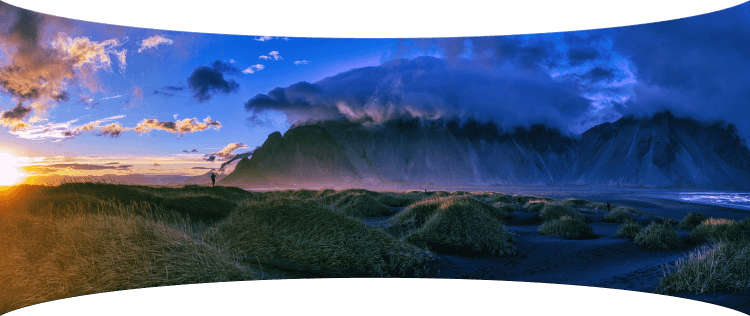
© Stewart Carroll
© Ksenia Kazak

Expand your view with
Panorama Stitching

Create stunning panoramas from your photos and videos.

Retouchez vos photos facilement avec Luminar Neo

Explore panoramic photography stitching

Seamlessly stitch together multiple photos to create expansive panoramas
that immerse viewers in awe-inspiring landscapes and cityscapes.

Watch demo

Stitch multiple photos
together with ease

Watch demo

Create vibrant
and dynamic HDR panoramas

Watch demo

Transform a video into
a panoramic photo

Watch demo

Combine a moving object across multiple frames into a single action photo

Pro tips to get captivating panoramic photos

Luminar Neo is set to help millions of photographers envision bigger with the easy-to-make Panorama Stitching Extension.

Serge Ramelli

Landscape photographer and educator

© Serge Ramelli
© Serge Ramelli

Tips to get a high-quality panorama:

  • 1

    Avoid using an excessively wide angle lens, such as 35mm or wider, as this may result in a more artificial and less natural image. Instead, opt for a narrower-angle lens for better results.

  • 2

    Ensure that each photo overlaps with the adjacent one by at least 20%.

  • 3

    Shoot your photographs in manual mode to ensure that the camera settings remain consistent across all the photos in your series.

Interesting locations for panoramas:

  • 1

    Don’t be afraid to experiment with architecture panos! The iconic Rialto Bridge that crosses the Grand Canal in Venice is a perfect example of an unusual yet incredible panoramic shot.

  • 2

    Highlight the spectacular Eiffel Tower by capturing it as a part of a panoramic shot of Paris and see how the whole city comes to life in your photo.

  • 3

    Go for a classic landscape shot — the majestic Vestrahorn mountain of Iceland will look even more grandiose if you capture it all in one single pano shot.

Shooting aerial panoramas has fast become an obsession for me! Having all the panorama photo editing tools in one place with Luminar Neo is a game changer.

Stewart Carroll

Landscape and drone photographer, educator

Tips to get a high-quality panorama:

  • 1

    Since a panorama is just a 'big' photo at the end of the day, apply the same concepts as to other photos.

  • 2

    In terms of composition, look for balance in your image especially if your panorama has a very wide aspect ratio. Find a focal point — a person, a building or even the setting sun.

  • 3

    Just because you can fly high, doesn’t mean you have to every time. Use panoramas to get a wider perspective when you can’t get the camera far away from your subject.

  • 4

    Just because you can shoot huge panoramas, doesn’t mean you should. Since you are stitching and editing manually, look for crops within the photos you’ve captured for better composition.

  • 5

    Wait for ‘good’ light. If sunrise and sunsets are not an option, speckled cloud cover can create depth in an image, epscially in case the landscape is not uniformly illuminated by the sun.

Interesting locations for panoramas:

  • 1

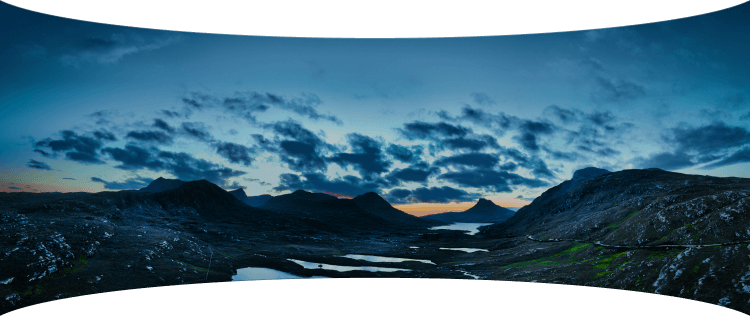
    It’s easy to capture vast expanses of land in the Scottish Highlands. Try the boggy moorland of Rannoch Moor with spectacular views of snowy mountain peaks.

  • 2

    Another gem is the Lasithi Plateau in Crete, Greece, a fertile plain full of ancient windmills surrounded by a series of semi-mountainous villages arranged in a circle.

  • 3

    Get inspired in Sagres, Portugal, a location known for its stunning cliffs, beautiful beaches, and historic fortresses. These are all great finds for capturing panoramic drone photos.

Panoramic photo stitcher: stitch images in one click | Skylum(6)

Advanced yet easy-to-use photo editor for everyone

Designed by Skylum for MacOS and Windows

Work also as plugins for Photoshop, Lightroom and Apple Photos®

icon

AI image enhancement

icon

Raw editing

icon

Layers support

icon

Non-destructive
editіng

icon

Lens correction

icon

Clone tool

icon

Dodge & burn

icon

Color enhancement

icon

Crop and resize

icon

Batch processing

Panoramic photo stitcher: stitch images in one click | Skylum(7)

GenSwap

Replace specific elements

Effortlessly swap elements in your photos with AI-generated visuals that seamlessly integrate with the rest of your image.

Luminar Neo features: Supercontrast - Experience the power of perfect color contrast

GenErase

Eliminate distractions

Remove unwanted elements from your images and seamlessly fill in the gaps with elements that match the surroundings.

Luminar Neo features: Supercontrast - Experience the power of perfect color contrast

GenExpand

Break the limits of the frame

Extend the boundaries of your photos, whether you're creating landscapes or portraits, by adding more space to them.

Luminar Neo features: Supercontrast - Experience the power of perfect color contrast

Supercontrast

Experience the power
of perfect color contrast

Precisely adjusts tonal contrast with six distinct controls spanning highlights, mid-tones, and shadows.

Luminar Neo features: Supercontrast - Experience the power of perfect color contrast

EnhanceAI

Achieve an instantly captivating photo with an all-in-one tool

Control up to a dozen adjustments including shadows, highlights, contrast, and tone with one AI-powered tool.

Luminar Neo features: Enhance AI - Achieve an instantly captivating photo with an all-in-one tool

SkyAI

Increase the vibrancy of your photos by replacing a dull sky

Seamlessly replace the sky, taking into account its reflection in water for maximum realism.

Luminar Neo features: Sky AI - Increase the vibrancy of your photos by replacing a dull sky

AtmosphereAI

Add a unique
mystical mood

Place fog, mist, or haze in your photo
with content-aware AI.

Luminar Neo features: Atmosphere - Add a unique mystical mood

Sunrays

Let the sun shine
in your photo

Add beautiful rays of sunshine and control
their glow intensity.

Luminar Neo features: Sunrays - Let the sun shine in your photo

Erase

Clean, mess-free
photos in one click

Remove unwanted objects or details for fast,
easy, and realistіc results.

Luminar Neo features: Erase - Clean, mess-free photos in one click

Remove Powerlines

Get rid of annoying
power lines

Clean up your cityscapes with the power of AI.
No masking needed.

Luminar Neo features: Remove powerlines - Get rid of annoying power lines

Portrait Background

Experiment with
fun portraits

Remove the background and transport
people to a different location.

Luminar Neo features: Portrait Background - Experiment with fun portraits

RelightAI

Fix backlit photos
in an instant

Light up dark photos in post-processing and get total control over the lighting in your photo.

Luminar Neo features: Relight AI - Fix backlit photos in an instant

FaceAI

Retouch facial
features naturally

Add face light, remove dark circles,
enhance lips, and do so much more.

Luminar Neo features: Face AI - Smooth skin in a heartbeat

BodyAI

Shape the body

Add volume to or remove volume from the torso
or abdomen to enhance natural beauty.

Luminar Neo features: Body AI - Shape the body

SkinAI

Smooth skin
in a heartbeat

Automatically retouch a person’s skin
and eliminate imperfections.

Luminar Neo features: Face AI

Portrait BokehAI

Create a dreamy
bokeh effect

Simulate an out-of-focus background effect
without the need for a special lens.

Luminar Neo features: Portrait Bokeh AI - Create a dreamy bokeh effect

Color Harmony

Get precise
color control

Fine-tune adjustments like brilliance, warmth,
and balance with advanced tech in simple sliders.

Luminar Neo features: Color Harmony - Get precise color control

StructureAI

Sharp details,
natural look

Reveal a great deal of detail while keeping
people’s faces and skin natural.

Luminar Neo features: Structure AI - Sharp details, natural look

Discover Luminar Neo features

Panoramic photo stitcher: stitch images in one click | Skylum(26)

GenSwap

GenErase

GenExpand

Supercontrast

EnhanceAI

SkyAI

AtmosphereAI

Sunrays

Erase

Remove Powerlines

Portrait Background

RelightAI

FaceAI

BodyAI

SkinAI

Portrait BokehAI

Color Harmony

StructureAI

Transform your photos
with Panorama Stitcher and other Luminar Neo tools

Luminar Neo is a powerhouse of tools that give you unimaginable results.

© Stewart Carroll

Mastеr the Auto-Stitch Panоrama
technique for your landscape photos

Add beautiful rays of sunshine and control
their glow intensity.

SunraysAI

Place fog, mist, or haze in your image using content-aware masking for maximum realism.

AtmosphereAI

Replace the sky realistically in a few clicks and make your photo stand out.

SkyAI

© Kseniia Kazak

Master the Auto-Stitch Panorama
technique for your cіtyscape photos

Get full control over contrast and details with six AI-powered sliders that cover highlights, midtones, and shadows.

Supercontrast

Unlock detail and clarity to make images that pop. Structure AI increases image contrast and brings out more details.

Structurе AI

Apply professional lookup tables (LUTs) to quickly change your photo’s appearance. Choose from film stocks and black and white looks — or create color grades to unlock a new style in seconds.

Mood AI

Landscape

Cityscape

Retouche à vie en toute flexibilité ! Choisissez la formule Luminar Neo qui vous convient

Votre remise spéciale de 10 % expire dans 15:00

Licence
perpétuelle poste fixe

Luminar Neo sur ordinateur

$ 119 .00

Paiement unique

Acheter maintenant
Garantie de remboursement de 30 jours

Ordinateur de bureau pour Windows/MacOS

Application mobile pour iOS/Android/ChromeOS

Accès à la Creative Library

Cours vidéo Luminar Neo

Le guide de démarrage rapide de Luminar Neo

Cadeau

Le plus populaire

Licence perpétuelle
multi-appareil

Luminar Neo sur ordinateur, application mobile pour iOS, Android, ChromeOS

$ 159 .00

Paiement unique

Acheter maintenant
Garantie de remboursement de 30 jours

Ordinateur de bureau pour Windows/MacOS

Application mobile pour iOS/Android/ChromeOS

Accès à la Creative Library

Cours vidéo Luminar Neo

Le guide de démarrage rapide de Luminar Neo

Cadeau

Licence perpétuelle
Max

Luminar Neo sur ordinateur, application mobile pour iOS, Android, ChromeOS, et accès à la Creative Library

$ 179 .00

Paiement unique

Acheter maintenant
Garantie de remboursement de 30 jours

Ordinateur de bureau pour Windows/MacOS

Application mobile pour iOS/Android/ChromeOS

Accès à la Creative Library

Accès d’un an à plus de 1000 ressources créatives (Préréglages, Ciels, LUTs, Superpositions) et à des cours vidéo éducatifs pour Luminar Neo

Cours vidéo Luminar Neo

Le guide de démarrage rapide de Luminar Neo

Cadeau

Une assistance efficace, plébiscitée par nos utilisateurs

Attendez ! Nous avons une surprise 🎁

Votre remise supplémentaire de 10% vous attend — copiez le code ci-dessous et appliquez-le lors du paiement, mais dépêchez-vous, il expire dans seulement 15 minutes !

15:00

Panoramic photo stitcher: stitch images in one click | Skylum(28) Panoramic photo stitcher: stitch images in one click | Skylum(29)

Récapitulatif de la commande

Panoramic photo stitcher: stitch images in one click | Skylum(30)

Licence
perpétuelle poste fixe

$ 119 .00
$ 417 .00

Version bureau pour Windows/MacOS et accès complet à tous les outils génératifs pendant un an.

Cours vidéo Luminar Neo

Panoramic photo stitcher: stitch images in one click | Skylum(31)

Mises à niveau automatiques

Renouvellement dans 1 an $ 49 .00

$ 0 .00
$ 49 .00

Recevez automatiquement toutes les nouvelles fonctionnalités payantes.

Profitez d’un accès complet à tous les outils génératifs.

Gratuit pendant 1 an. Frais applicables par la suite.

Montant total dû maintenant :
$ 119 .00

Récapitulatif de la commande

Panoramic photo stitcher: stitch images in one click | Skylum(30)

Licence perpétuelle
multi-appareil

$ 159 .00
$ 477 .00

Version bureau pour Windows/MacOS et accès complet à tous les outils génératifs pendant un an.

Application mobile pour iOS/Android/ChromeOS

Cours vidéo Luminar Neo

Panoramic photo stitcher: stitch images in one click | Skylum(31)

Mises à niveau automatiques

Renouvellement dans 1 an $ 69 .00

$ 0 .00
$ 69 .00

Recevez automatiquement toutes les nouvelles fonctionnalités payantes.

Profitez d’un accès complet à tous les outils génératifs.

Gratuit pendant 1 an. Frais applicables par la suite.

Montant total dû maintenant :
$ 159 .00

Récapitulatif de la commande

Panoramic photo stitcher: stitch images in one click | Skylum(30)

Licence perpétuelle
Max

$ 179 .00
$ 546 .00

Version bureau pour Windows/MacOS et accès complet à tous les outils génératifs pendant un an.

Application mobile pour iOS/Android/ChromeOS

Cours vidéo Luminar Neo

Panoramic photo stitcher: stitch images in one click | Skylum(31)

Mises à niveau automatiques

Renouvellement dans 1 an $ 89 .00

$ 0 .00
$ 89 .00

Recevez automatiquement toutes les nouvelles fonctionnalités payantes.

Profitez d’un accès complet à tous les outils génératifs.

Gratuit pendant 1 an. Frais applicables par la suite.

Montant total dû maintenant :
$ 179 .00
Panoramic photo stitcher: stitch images in one click | Skylum(39)

Incrustations "Prisme de lumière"

Superpositions par l'équipe de Skylum
Panoramic photo stitcher: stitch images in one click | Skylum(40)

Incrustations Expérimentales

Superpositions par l'équipe de Skylum
Panoramic photo stitcher: stitch images in one click | Skylum(41)

Pays du soleil levant

Pack de préréglage par l'équipe de Skylum
Panoramic photo stitcher: stitch images in one click | Skylum(42)

Excursion en camping

Pack de préréglage par l'équipe de Skylum
Panoramic photo stitcher: stitch images in one click | Skylum(43)

Est-ce la Terre ?

Pack de préréglage par l'équipe de Skylum
Panoramic photo stitcher: stitch images in one click | Skylum(44)

À la découverte de l'Amérique latine

Pack de préréglage par l'équipe de Skylum
Panoramic photo stitcher: stitch images in one click | Skylum(45)

À la découverte de l'Afrique

Pack de préréglage par l'équipe de Skylum
Panoramic photo stitcher: stitch images in one click | Skylum(46)

Rêve américain

Pack de préréglage par l'équipe de Skylum
Panoramic photo stitcher: stitch images in one click | Skylum(47)

Contes du Moyen-Orient

Pack de préréglage par l'équipe de Skylum
Panoramic photo stitcher: stitch images in one click | Skylum(48)

Merveilleuse Scandinavie

Pack de préréglage par l'équipe de Skylum
Panoramic photo stitcher: stitch images in one click | Skylum(49)
Panoramic photo stitcher: stitch images in one click | Skylum(50)
Avant Après
Panoramic photo stitcher: stitch images in one click | Skylum(51)
Panoramic photo stitcher: stitch images in one click | Skylum(52)
Avant Après
Panoramic photo stitcher: stitch images in one click | Skylum(53)
Panoramic photo stitcher: stitch images in one click | Skylum(54)
Avant Après
Panoramic photo stitcher: stitch images in one click | Skylum(55)
Panoramic photo stitcher: stitch images in one click | Skylum(56)
Avant Après
Panoramic photo stitcher: stitch images in one click | Skylum(57)
Panoramic photo stitcher: stitch images in one click | Skylum(58)
Avant Après
Panoramic photo stitcher: stitch images in one click | Skylum(59)
Panoramic photo stitcher: stitch images in one click | Skylum(60)
Panoramic photo stitcher: stitch images in one click | Skylum(61)
Panoramic photo stitcher: stitch images in one click | Skylum(62)
Panoramic photo stitcher: stitch images in one click | Skylum(63)

Incrustations "Prisme de lumière"

Superpositions par l'équipe de Skylum

Créez des images atmosphériques avec ces 10 incrustations au format JPEG contenant des lumières chatoyantes et des éclats de couleurs variées. Veillez à les utiliser avec les Calques de Luminar Neo et/ou l'outil Détourage, pour expérimenter avec vos photos dans n'importe quel genre. Vous pouvez ajouter un effet de lumière intéressant ou faire ressortir le sujet de manière inédite, le tout en quelques clics. Essayez-les !

Panoramic photo stitcher: stitch images in one click | Skylum(64)
Panoramic photo stitcher: stitch images in one click | Skylum(65)
Avant Après
Panoramic photo stitcher: stitch images in one click | Skylum(66)
Panoramic photo stitcher: stitch images in one click | Skylum(67)
Avant Après
Panoramic photo stitcher: stitch images in one click | Skylum(68)
Panoramic photo stitcher: stitch images in one click | Skylum(69)
Avant Après
Panoramic photo stitcher: stitch images in one click | Skylum(70)
Panoramic photo stitcher: stitch images in one click | Skylum(71)
Avant Après
Panoramic photo stitcher: stitch images in one click | Skylum(72)
Panoramic photo stitcher: stitch images in one click | Skylum(73)
Avant Après
Panoramic photo stitcher: stitch images in one click | Skylum(74)
Panoramic photo stitcher: stitch images in one click | Skylum(75)
Panoramic photo stitcher: stitch images in one click | Skylum(76)
Panoramic photo stitcher: stitch images in one click | Skylum(77)
Panoramic photo stitcher: stitch images in one click | Skylum(78)

Incrustations Expérimentales

Superpositions par l'équipe de Skylum

Envie d'ajouter une touche supplémentaire à vos photos ? Découvrez ces 10 Incrustations expérimentales au format JPEG faciles à utiliser avec la fonction Calques de Luminar Neo pour transformer n'importe quelle photo en un cliché qui attire l'œil. Choisissez parmi 10 effets hypnotiques de couleurs et de formes différentes pour créer une ambiance unique en quelques clics. Des teintes roses aux cercles dorés, vous trouverez certainement une Incrustation parfaite pour votre prochain chef-d'œuvre.

Panoramic photo stitcher: stitch images in one click | Skylum(79)
Panoramic photo stitcher: stitch images in one click | Skylum(80)
Avant Après
Panoramic photo stitcher: stitch images in one click | Skylum(81)
Panoramic photo stitcher: stitch images in one click | Skylum(82)
Avant Après
Panoramic photo stitcher: stitch images in one click | Skylum(83)
Panoramic photo stitcher: stitch images in one click | Skylum(84)
Avant Après
Panoramic photo stitcher: stitch images in one click | Skylum(85)
Panoramic photo stitcher: stitch images in one click | Skylum(86)
Avant Après
Panoramic photo stitcher: stitch images in one click | Skylum(87)
Panoramic photo stitcher: stitch images in one click | Skylum(88)
Avant Après
Panoramic photo stitcher: stitch images in one click | Skylum(89)
Panoramic photo stitcher: stitch images in one click | Skylum(90)
Panoramic photo stitcher: stitch images in one click | Skylum(91)
Panoramic photo stitcher: stitch images in one click | Skylum(92)
Panoramic photo stitcher: stitch images in one click | Skylum(93)

Pays du soleil levant

Pack de préréglage par l'équipe de Skylum

Sublimez les photos capturées lors de votre voyage au Japon, ou celles auxquelles vous souhaitez conférer une atmosphère de style japonais. Qu'il s'agisse de paysages, de sites emblématiques ou de photos de nourriture, ce pack est incroyablement polyvalent !


Panoramic photo stitcher: stitch images in one click | Skylum(94)
Panoramic photo stitcher: stitch images in one click | Skylum(95)
Avant Après
Panoramic photo stitcher: stitch images in one click | Skylum(96)
Panoramic photo stitcher: stitch images in one click | Skylum(97)
Avant Après
Panoramic photo stitcher: stitch images in one click | Skylum(98)
Panoramic photo stitcher: stitch images in one click | Skylum(99)
Avant Après
Panoramic photo stitcher: stitch images in one click | Skylum(100)
Panoramic photo stitcher: stitch images in one click | Skylum(101)
Avant Après
Panoramic photo stitcher: stitch images in one click | Skylum(102)
Panoramic photo stitcher: stitch images in one click | Skylum(103)
Avant Après
Panoramic photo stitcher: stitch images in one click | Skylum(104)
Panoramic photo stitcher: stitch images in one click | Skylum(105)
Panoramic photo stitcher: stitch images in one click | Skylum(106)
Panoramic photo stitcher: stitch images in one click | Skylum(107)
Panoramic photo stitcher: stitch images in one click | Skylum(108)

Excursion en camping

Pack de préréglage par l'équipe de Skylum

Conçus pour améliorer vos photos de camping et de randonnée, ces 10 préréglages donneront à vos photos d'extérieur un aspect naturel et éclatant. Que vous preniez des photos de montagnes majestueuses ou de feux de camp chaleureux, faites ressortir le meilleur de vos images en un clic.


Panoramic photo stitcher: stitch images in one click | Skylum(109)
Panoramic photo stitcher: stitch images in one click | Skylum(110)
Avant Après
Panoramic photo stitcher: stitch images in one click | Skylum(111)
Panoramic photo stitcher: stitch images in one click | Skylum(112)
Avant Après
Panoramic photo stitcher: stitch images in one click | Skylum(113)
Panoramic photo stitcher: stitch images in one click | Skylum(114)
Avant Après
Panoramic photo stitcher: stitch images in one click | Skylum(115)
Panoramic photo stitcher: stitch images in one click | Skylum(116)
Avant Après
Panoramic photo stitcher: stitch images in one click | Skylum(117)
Panoramic photo stitcher: stitch images in one click | Skylum(118)
Avant Après
Panoramic photo stitcher: stitch images in one click | Skylum(119)
Panoramic photo stitcher: stitch images in one click | Skylum(120)
Panoramic photo stitcher: stitch images in one click | Skylum(121)
Panoramic photo stitcher: stitch images in one click | Skylum(122)
Panoramic photo stitcher: stitch images in one click | Skylum(123)

Est-ce la Terre ?

Pack de préréglage par l'équipe de Skylum

Est-ce la Terre ou une planète extraterrestre ? Cette collection de 10 Préréglages extraordinaires est conçue pour donner à vos photos de paysages un aspect éthéré d'un autre monde. Transformez des paysages ordinaires en scènes surréalistes avec des couleurs vives qui attireront immédiatement le regard.


Panoramic photo stitcher: stitch images in one click | Skylum(124)
Panoramic photo stitcher: stitch images in one click | Skylum(125)
Avant Après
Panoramic photo stitcher: stitch images in one click | Skylum(126)
Panoramic photo stitcher: stitch images in one click | Skylum(127)
Avant Après
Panoramic photo stitcher: stitch images in one click | Skylum(128)
Panoramic photo stitcher: stitch images in one click | Skylum(129)
Avant Après
Panoramic photo stitcher: stitch images in one click | Skylum(130)
Panoramic photo stitcher: stitch images in one click | Skylum(131)
Avant Après
Panoramic photo stitcher: stitch images in one click | Skylum(132)
Panoramic photo stitcher: stitch images in one click | Skylum(133)
Avant Après
Panoramic photo stitcher: stitch images in one click | Skylum(134)
Panoramic photo stitcher: stitch images in one click | Skylum(135)
Panoramic photo stitcher: stitch images in one click | Skylum(136)
Panoramic photo stitcher: stitch images in one click | Skylum(137)
Panoramic photo stitcher: stitch images in one click | Skylum(138)

À la découverte de l'Amérique latine

Pack de préréglage par l'équipe de Skylum

Découvrez l'ambiance fantastique que chacun de ces 10 Préréglages ajoute à vos photos au fil de votre voyage à travers l'Amérique latine. Saisissez la beauté et donnez de l'éclat à vos photos grâce à cette collection conçue pour les paysages et idéale pour les voyageurs.


Panoramic photo stitcher: stitch images in one click | Skylum(139)
Panoramic photo stitcher: stitch images in one click | Skylum(140)
Avant Après
Panoramic photo stitcher: stitch images in one click | Skylum(141)
Panoramic photo stitcher: stitch images in one click | Skylum(142)
Avant Après
Panoramic photo stitcher: stitch images in one click | Skylum(143)
Panoramic photo stitcher: stitch images in one click | Skylum(144)
Avant Après
Panoramic photo stitcher: stitch images in one click | Skylum(145)
Panoramic photo stitcher: stitch images in one click | Skylum(146)
Avant Après
Panoramic photo stitcher: stitch images in one click | Skylum(147)
Panoramic photo stitcher: stitch images in one click | Skylum(148)
Avant Après
Panoramic photo stitcher: stitch images in one click | Skylum(149)
Panoramic photo stitcher: stitch images in one click | Skylum(150)
Panoramic photo stitcher: stitch images in one click | Skylum(151)
Panoramic photo stitcher: stitch images in one click | Skylum(152)
Panoramic photo stitcher: stitch images in one click | Skylum(153)

À la découverte de l'Afrique

Pack de préréglage par l'équipe de Skylum

Consacré au merveilleux continent africain, ce pack combine une variété de Préréglages, aussi bien pour les portraits que pour les paysages. Améliorez vos photos de sites emblématiques, de safaris, d'architecture et les portraits des personnes que vous rencontrez lors de votre voyage en Afrique.


Panoramic photo stitcher: stitch images in one click | Skylum(154)
Panoramic photo stitcher: stitch images in one click | Skylum(155)
Avant Après
Panoramic photo stitcher: stitch images in one click | Skylum(156)
Panoramic photo stitcher: stitch images in one click | Skylum(157)
Avant Après
Panoramic photo stitcher: stitch images in one click | Skylum(158)
Panoramic photo stitcher: stitch images in one click | Skylum(159)
Avant Après
Panoramic photo stitcher: stitch images in one click | Skylum(160)
Panoramic photo stitcher: stitch images in one click | Skylum(161)
Avant Après
Panoramic photo stitcher: stitch images in one click | Skylum(162)
Panoramic photo stitcher: stitch images in one click | Skylum(163)
Avant Après
Panoramic photo stitcher: stitch images in one click | Skylum(164)
Panoramic photo stitcher: stitch images in one click | Skylum(165)
Panoramic photo stitcher: stitch images in one click | Skylum(166)
Panoramic photo stitcher: stitch images in one click | Skylum(167)
Panoramic photo stitcher: stitch images in one click | Skylum(168)

Rêve américain

Pack de préréglage par l'équipe de Skylum

Créez de superbes photos de vos voyages à travers les États-Unis. Améliorez les images des sites emblématiques, des parcs nationaux et des paysages urbains des villes célèbres. Obtenez divers effets époustouflants en quelques clics grâce à ces 10 merveilleux Préréglages.


Panoramic photo stitcher: stitch images in one click | Skylum(169)
Panoramic photo stitcher: stitch images in one click | Skylum(170)
Avant Après
Panoramic photo stitcher: stitch images in one click | Skylum(171)
Panoramic photo stitcher: stitch images in one click | Skylum(172)
Avant Après
Panoramic photo stitcher: stitch images in one click | Skylum(173)
Panoramic photo stitcher: stitch images in one click | Skylum(174)
Avant Après
Panoramic photo stitcher: stitch images in one click | Skylum(175)
Panoramic photo stitcher: stitch images in one click | Skylum(176)
Avant Après
Panoramic photo stitcher: stitch images in one click | Skylum(177)
Panoramic photo stitcher: stitch images in one click | Skylum(178)
Avant Après
Panoramic photo stitcher: stitch images in one click | Skylum(179)
Panoramic photo stitcher: stitch images in one click | Skylum(180)
Panoramic photo stitcher: stitch images in one click | Skylum(181)
Panoramic photo stitcher: stitch images in one click | Skylum(182)
Panoramic photo stitcher: stitch images in one click | Skylum(183)

Contes du Moyen-Orient

Pack de préréglage par l'équipe de Skylum

Cette collection fascinante de 10 Préréglages est conçue pour faire ressortir la beauté mystérieuse des paysages, de l'architecture, du style des rues et de la nature du Moyen-Orient. Qu'il s'agisse de tons chauds, des jaunes profonds, des bleus et des dorés, vous trouverez certainement un Préréglage qui conviendra parfaitement à vos photos.


Panoramic photo stitcher: stitch images in one click | Skylum(184)
Panoramic photo stitcher: stitch images in one click | Skylum(185)
Avant Après
Panoramic photo stitcher: stitch images in one click | Skylum(186)
Panoramic photo stitcher: stitch images in one click | Skylum(187)
Avant Après
Panoramic photo stitcher: stitch images in one click | Skylum(188)
Panoramic photo stitcher: stitch images in one click | Skylum(189)
Avant Après
Panoramic photo stitcher: stitch images in one click | Skylum(190)
Panoramic photo stitcher: stitch images in one click | Skylum(191)
Avant Après
Panoramic photo stitcher: stitch images in one click | Skylum(192)
Panoramic photo stitcher: stitch images in one click | Skylum(193)
Avant Après
Panoramic photo stitcher: stitch images in one click | Skylum(194)
Panoramic photo stitcher: stitch images in one click | Skylum(195)
Panoramic photo stitcher: stitch images in one click | Skylum(196)
Panoramic photo stitcher: stitch images in one click | Skylum(197)
Panoramic photo stitcher: stitch images in one click | Skylum(198)

Merveilleuse Scandinavie

Pack de préréglage par l'équipe de Skylum

Découvrez cette magnifique collection de 10 préréglages polyvalents, adaptés aux photos de voyage dans les pays nordiques. Capturez des paysages idylliques, des merveilles naturelles et des photos de bâtiments chaleureux imprégnés de l'ambiance nordique. Il est temps de préparer votre sac de voyage !

Cours vidéo Luminar Neo

À propos du cours
Contenu de l'enseignement :
Observez le procédé
Obtenez des photos comme celles-ci
Créateur

Cours sur les techniques d'édition créative de photos dans Luminar Neo

par Albert Dros

10 tutoriels vidéos

12 Préréglages triés sur le volet inclus

Tutoriel d'édition créative inclus

Rejoignez le photographe paysagiste néerlandais Albert Dros dans ce cours où il partage sa passion pour la planification et la création de prises de vue uniques. Dans ces dix vidéos, vous comprendrez ce qui fait la réussite ou l'échec d'une photo. Albert fournit des conseils pas à pas sur les techniques d'édition afin d'améliorer vos compétences en matière de photographie. En prime, vous recevrez gratuitement un pack de 12 Préréglages triés sur le volet par Albert Dros pour vous aider à créer des images envoûtantes. Découvrez les secrets de la photographie de paysage à couper le souffle et transformez vos clichés en chefs-d'œuvre époustouflants grâce aux conseils avisés d'Albert.
img

Introduction et plan du cours

Présentation d'Albert Dros et aperçu rapide de ce que vous allez apprendre dans ce cours de photographie...

img

Introduction à la photographie

Éléments à considérer lors de la prise de photos pour obtenir les meilleurs résultats.

img

Retouches de base

Albert présente la mise en page de Luminar Neo et les outils de base que vous pouvez utiliser pour obtenir des résultats exceptionnels instantanément.

img

Édition avancée

Albert vous présente en détail les outils plus complexes de Luminar Neo. Il vous montre aussi comment les utiliser pour mettre vos photos en valeur.

img

Édition spectaculaire

Laissez libre cours à votre créativité dans vos photos ! Albert édite une photo avec des outils créatifs pour mettre en valeur son côté spectaculaire et lui donner un nouveau souffle.

img

Focus Stacking

Luminar Neo dispose d'extensions qui vous permettent d'obtenir des résultats encore plus impressionnants. Dans cette vidéo, vous apprendrez à faire la mise au point avec l'extension Focus Stacking de Luminar Neo.

img

Paysages urbains

Quels sont les éléments qui contribuent à la réussite ou à l'échec d'une photo de paysage urbain ? Découvrez comment faire passer une photo de Dubaï banale à une image impressionnante.

img

Forêts

Découvrez les outils Luminar Neo qu'Albert utilise pour réaliser ses impressionnantes photos de forêt. Découvrez Atmosphère AI, Rayons de soleil ainsi que d'autres outils !

img

Préréglages

Apprenez à utiliser les Préréglages pour obtenir rapidement des réponses colorées intéressantes dans vos photos. Albert vous guide dans l'utilisation des Préréglages pour réaliser des photos de forêt encore plus belles.

img

Résumé du cours

Profitez d'un résumé rapide de toutes les notions apprises dans ce cours. Bonne création à tous !

Avant Après
Avant Après
Avant Après
Avant Après
Avant Après

Albert Dros

PHOTOGRAPHE, ÉCRIVAIN ET ÉDUCATEUR

Albert Dros est un photographe paysagiste néerlandais animé d'une passion extraordinaire pour élaborer et réaliser des clichés exceptionnels. Les volcans, les éclipses solaires et les caractéristiques uniques de la nature sont autant d'éléments qui captent son attention. Il ne se contente pas d'une simple photo.

"Go big or go home" is his motto, always trying to add some unique element to his shots.

Son travail a été reconnu à l'échelle mondiale ; il a été publié dans les plus grands médias internationaux.

Albert voyage beaucoup en tant que formateur en photographie, mais aussi pour ses projets personnels. Cependant, même aux Pays-Bas, il ne peut se passer de photographier. Son inspiration ne s'arrête jamais.

Frequently Asked Questions

How does the Panorama Stitching tool work?

Use the Panorama Stitching tool to create panoramas from multiple photos. Or you can import a video and create a panorama photo from it. You can also select a subject in your photo and create an interesting panoramic effect where it will appear multiple times on your panorama.

What is Auto-Stitch Panorama?

The Panorama Stitching tool does it all for you — seamlessly stitching images together without needing your manual input, it’s all automatic.

Can I create HDR panoramas automatically if my source photos have different exposures?

Yes. Luminar Neo's Panorama Stitching tool can automatically stitch photos taken at different exposures into a seamless panorama. The tool aligns frames, blends them smoothly, and balances light and tone across the image, allowing photographers to create wide-format panoramas with extended dynamic range and natural transitions.

Can I get a trial version of the Panoramic Photo Stitcher tool?

You can use the trial version of Luminar Neo and try panorama image stitching before you purchase.

Who can benefit from Luminar Neo Panorama Stitching tool?

Luminar Neo Panorama Stitching is especially valuable for:

  • Landscape photographers: create high-resolution wide scenes that capture scale, depth, and atmosphere.
  • Travel photographers: stitch expansive cityscapes and natural views into seamless panoramic images.
  • Architecture and real estate photographers: produce clean, distortion-controlled panoramas of interiors and exteriors.
  • Adventure and outdoor creators: combine multiple frames into immersive, ultra-wide compositions.
  • Commercial and fine art photographers: build detailed large-format images suitable for prints and professional use.

This tool helps anyone who needs wide, high-quality panoramas that look natural, detailed, and professional with minimal effort.

Why Luminar Neo is the best panorama stitching software?

Luminar Neo is the best panorama stitching software because it provides a built-in, automated way to stitch multiple photos into a seamless panorama inside a professional photo editor. The tool aligns images, blends overlaps smoothly, and balances tone across frames, allowing photographers to create wide, high-resolution panoramas without switching to separate stitching software.

Why Luminar Neo Panorama Stitching is trusted by photographers?

Photographers trust Luminar Neo Panorama Stitching because it delivers consistent, reliable results for real-world panorama workflows. The tool is trusted by professionals for its ability to accurately align frames, blend exposures smoothly, and integrate panoramas directly into a non-destructive editing environment. This makes Luminar Neo a dependable solution for landscape, travel, and architectural panorama creation.

App Requirements

macOS

Mac Model

MacBook, MacBook Air, MacBook Pro, iMac, iMac Pro, Mac Pro, Mac mini, early 2010 or newer

Processor

CPU Intel® Core™ i5 8 Gen or better

OS version

macOS 12.0 or higher.

RAM

Memory 8 GB RAM or more (16+ GB RAM is recommended)

Disk space

Hard disk 10 GB free space; SSD for best performance

Display

1280x768 size or better

Windows

Hardware

Windows-based hardware PC with mouse or similar input device

Processor

CPU Intel® Core™ i5 8 Gen or better, AMD Ryzen™ 5 or better

OS version

10 version 1909 or higher (only 64-bit OS)

RAM

Memory 8 GB RAM or more (16+ GB RAM is recommended)

Disk space

Hard disk 10 GB free space; SSD for best performance

Display

1280x768 size or better

Graphics

Open GL 3.3 or later compatible graphics card

Panoramic photo stitcher: stitch images in one click | Skylum(204)